• This forum is the machine-generated translation of www.cad3d.it/forum1 - the Italian design community. Several terms are not translated correctly.

reproduce the surface of a aircraft.

  • Thread starter Thread starter panormus
  • Start date Start date

panormus

Guest
Hey, guys.

I'm practicing playing a plane in scale and found some difficulties.
I wanted to ask the superstores how they would move to make this su26-mx (by hindering the possibility that the general lines may differ from the original model). .

I'll get you a file.

greetings
 

Attachments

waiting for a general advice on how to operate I ask you a more specific question.
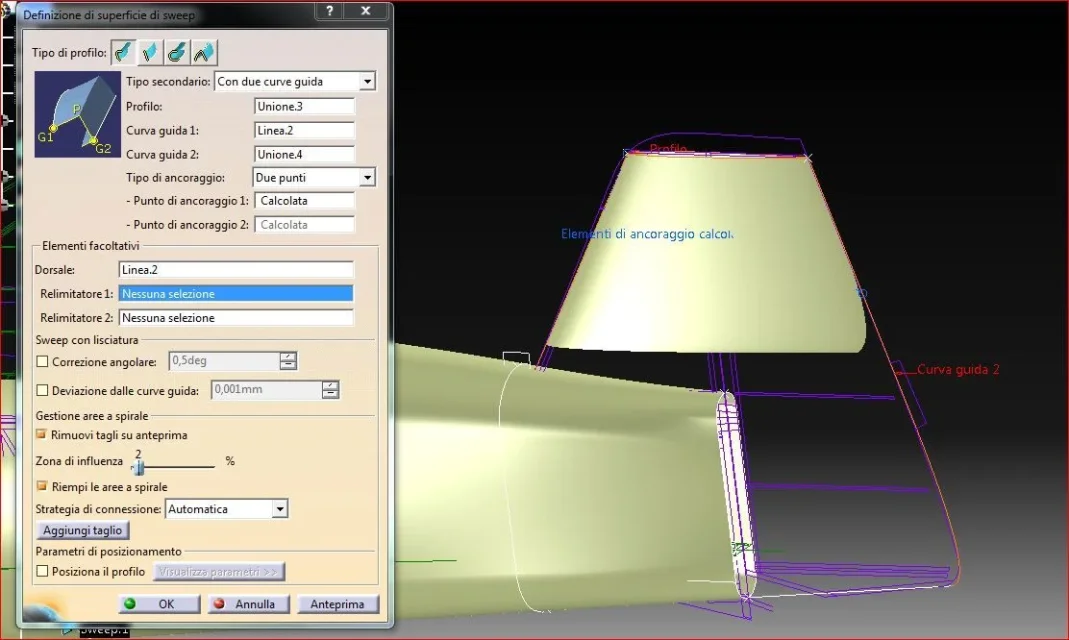
is doing a sweep of the directional profile (naca009) with 2 guidelines, but I cannot understand why it does not generate the surface throughout the extension of the guidelines and specifies me 2 anchor points that I do not know what they are and how to work on it.
if you notice the directional was created, but how it was smaller than what I need.
Can you tell me what parameters I have to set?
greetingssweep direzionale.webp
 
and same problem with the semiala.
essentially if I choose two straight guides the sweep goes to good end, but if one of them ends with a curvature happens what is seen in the annex.
I'll wait for you.
sweep semiala.webp
 
waiting for a general advice on how to operate I ask you a more specific question.
is doing a sweep of the directional profile (naca009) with 2 guidelines, but I cannot understand why it does not generate the surface throughout the extension of the guidelines and specifies me 2 anchor points that I do not know what they are and how to work on it.
if you notice the directional was created, but how it was smaller than what I need.
Can you tell me what parameters I have to set?
greetingsView attachment 33076
you must define correctmete the thorns and anchor points
as you see from the photo the system has computed all the surface but the curves guda have been recalculated for isomorphism.
In the case of the wing that in the case of the tail you must always exclude the areas where the surfaces are gathered but first you have to create surfaces that are limited even beyond the connecting zones, after which you are going to connect the various zones.

You can hardly build a surface with a single command.

Hi.
 

Attachments

  • sweep%20direzionale.webp
    sweep%20direzionale.webp
    71.7 KB · Views: 7
I'm sorry.
you must define correctmete the thorns and anchor points
How do you define anchoring points?

as you see from the photo the system has computed all the surface
what does it mean to compute the whole surface?
but the curves guda were recalculated for isomorphism.
which means calculated by isomorphism?
... you must always exclude areas where the surfaces collect
always for the principle that the fittings take care of at the end?
I remember, but in the tail there is a problem: if I follow the sweep using two straight lines as guides and then cut/smusse the most extreme tip in the tail, the rudder to understand us, turns out eventually to have a thicker surface below, than the upper part.
basically looking at the rudder from behind, it seems like a pear, when instead it should end sharply, as if the naca profile repeated in every point long the guide2; I don't know if I made myself understand.. for clarification.
but first you have to create surfaces that limit even beyond the connecting zones, after which you are talking about connecting the various areas.
see above. of this I remembered, it is a lesson you gave me several times, I learned from you this concept.
You can hardly build a surface with a single command. Hi.
Thank you, always precious. Please be patient if I ask so many questions, thank you to all of you who are teaching me a lot.
 
from what I can see from the pictures you posted
the best way to build the tail is to me
the use of multisection;
closed sections and spline profiles for guide curves... .

in any case for use of the sweept command
You must:

1- create profile anchoring points on guide curves,
that give constraints on dragging the long profile
the guides, you can use the context command inside
of the flyout sweept (as I could see from the attached file
depending on the positioning of the points varies the surface)

2- create a thorn, that is a reference curve that
will position your orthogonal profile to it, even in this
If the context command allows you to select
as input sections and guides:
to cover all the slides you need
create a thorn by inputting both as input
for thorns

3- in the last part of the comado there is a special section
to vary the direction and location of the positioned profile

4- more words exercise.......

5- sweept can also be found in the free style module
e shape icem design... with more controls for
surface formation
to the
 

Attachments

  • Sweept-.webp
    Sweept-.webp
    151.2 KB · Views: 10
  • Sweept-Ancor point-1.webp
    Sweept-Ancor point-1.webp
    140 KB · Views: 7
  • Sweept-Ancor point-2.webp
    Sweept-Ancor point-2.webp
    141.8 KB · Views: 6
  • Sweept-Ancor point-2-Variation.webp
    Sweept-Ancor point-2-Variation.webp
    161.1 KB · Views: 7
  • Sweept-Spine.webp
    Sweept-Spine.webp
    151.5 KB · Views: 7

Forum statistics

Threads
44,997
Messages
339,767
Members
4
Latest member
ibt

Members online

No members online now.
Back
Top