
• This forum is the machine-generated translation of www.cad3d.it/forum1 - the Italian design community. Several terms are not translated correctly.

request advice

  • Thread starter Thread starter cipolo72
  • Start date Start date

cipolo72

Guest
Hello everyone, I'm a new user and I don't know if this is the right forum or not, so excuse me in advance.
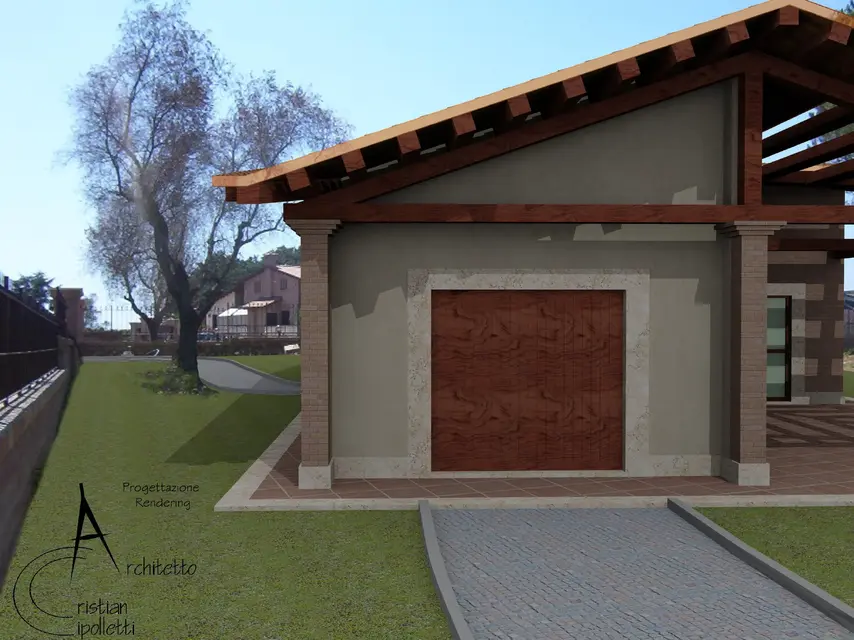
provided that I am self-taught both in the use of autocad (used for the construction of model 3d) and 3ds max (used only for rendering), I wanted some advice to improve my last work.
in the specific I am making final renderings for a villino with 3ds max 2011 using two light sources a directional light target with ray traced shadow shadow and a skylight, for rendering use the default scanline maker with the light tracer activated.

How can I improve the realism of rendering?
comments and advice.

Thank you.
 

Attachments

  • 2° rendering finito.webp
    2° rendering finito.webp
    585.3 KB · Views: 25
  • 1° rendering finito.webp
    1° rendering finito.webp
    796.7 KB · Views: 23
  • 5° rendering finito.webp
    5° rendering finito.webp
    704.8 KB · Views: 15
Hello and welcome.
the central image is not bad at all, removed perhaps the mapping of the door and the beams I would say that it is good, it is pleasant. I don't like the first one, it'll be the frame that doesn't tell me anything, then it's a bit dark and there are strange reflections on the ropes of the driveway.
the third is not bad apart from the unspecified shadows, but I really like insertion and perspective.

I suggest you use the sunligth combined with the skylight, perhaps increasing a bit of intensity, I would put some ornaments (draio, umbrellas, barbecue, bushes) and a couple of human figures.

a last note: what material did you use for the glass door? It doesn't seem very realistic.
 
I use the default scanline maker with the light tracer activated.
How can I improve the realism of rendering?
Well, first of all using a more indicated rendering engine?! I don't understand, why use 3ds max 2011 with scanline?? is like turning in porsche with rapeseed oil as fuel (and in fact the results are seen)... what materials did you use? I don't want to seem too strict but similar renderings (or probably better) are done with autocad without uncomfortable 3ds max
 
thank you, first of all for the advice, sincerely I did not expect them to see the beautiful works I saw in the forum.
in response to lattu:

the materials of the wood unfortunately are those of an old library of 3ds max 2008 and unfortunately having imported the file from autocad, in which I had separated the materials from layers, all that is wood has the same mapping and material, I do not know how to separate them in 3ds max. regarding the glass, even there for speed, not having created the interior, I made the material not transparent.
Where do I find sunlight?

for asalalp:
I'm trying to make a new render utlizzando the mental motor ray daylighting high but unless setting errors I find great difference, apart from the best definition of the tiles.


where do I find mental materials ray?

for tristan:
You're not too strict, but as I said in the presentation I'm completely self-taught, and if I thought I'd do my job well, I wouldn't be here asking for advice.
However surely, working with autocad 2005, renderings are better with 3ds max, regarding the materials are those architectural materials of 3ds max 2008.

thanks to all for advice
 

Attachments

  • 6° rendering finito.webp
    6° rendering finito.webp
    825.4 KB · Views: 9
  • 6° rendering mental ray.webp
    6° rendering mental ray.webp
    552.5 KB · Views: 8
Hello everyone, I'm a new user and I don't know if this is the right forum or not, so excuse me in advance.
provided that I am self-taught both in the use of autocad (used for the construction of model 3d) and 3ds max (used only for rendering), I wanted some advice to improve my last work.
in the specific I am making final renderings for a villino with 3ds max 2011 using two light sources a directional light target with ray traced shadow shadow and a skylight, for rendering use the default scanline maker with the light tracer activated.

How can I improve the realism of rendering?
comments and advice.

Thank you.
to mileage your rendering look at this tutorial I made for mental ray... find it on my site www.studiograficorotatori.it section video tutorials...however active mr, use as only\cielo the daylight imposed mr sun\mr sky....attime mental ray from the common dei render, then activate the g.i in mental ray and activate the final ghater....rendering done... on my tutorial you find everything...if something is not called you ask me too...
 

Forum statistics

Threads
44,997
Messages
339,767
Members
4
Latest member
ibt

Members online

No members online now.
Back
Top