gbarattin
Guest
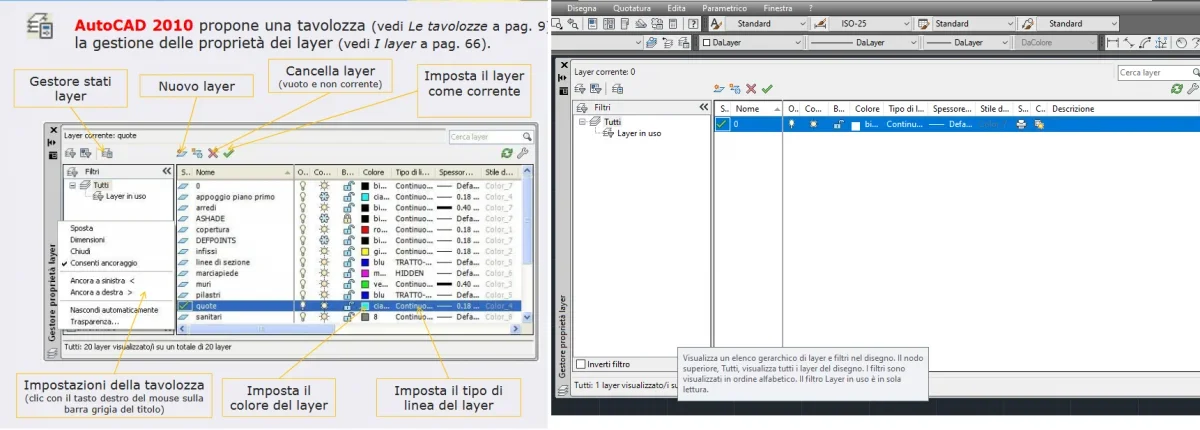
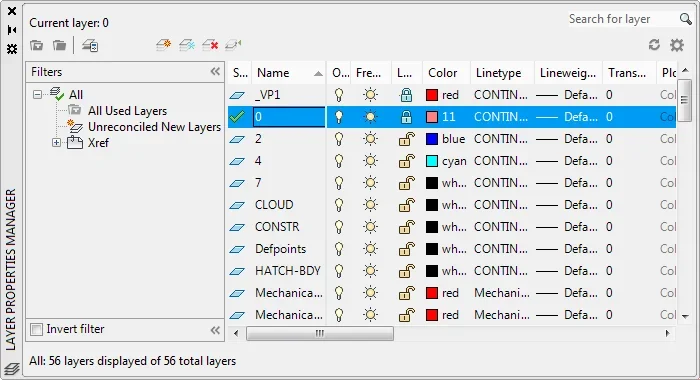
Good morning, I kindly ask if there is the possibility to have the managing window layer of the 2010 version, because the latest versions (2013 and later are unclear and undefined as in 2010.
Thank you all.
Thank you all.

 If you put an image you could better understand what to get
old fashion box:2013 and later are unclear and undefined as in 2010
 new non- modal palette:
 Now you have to explain the difference because I just don't get there.. .
I've already asked her, but it seems we're not worthy of her answer.old fashion box:
View attachment 66041new non- modal palette:
View attachment 66042Now you have to explain the difference because I just don't get there.. .

Of course... so the changes made are not saved. You obviously do not know the difference between a modal and non-modal form. What do I need the ec if the palette can keep it open on the second monitor and keep working? if for some users we would still be stopped to autocad 12 on dosI would prefer the previous version only because I can close the window with esc
Well... I use it normally and I'm not so bad, the problem is to find the carbure for the pc and the installation from floppy.......was per certi utenti saremmo ancora fermi ad autocad 12 su of

when I did not make changes, of courseOf course... so the changes made are not saved.
for the floppy drive, I can give you a couple, the problem is more the dos emulation...Well... I use it normally and I'm not so bad, the problem is to find the carbure for the pc and the installation from floppy...
But what does "more defined" mean? !2010 is more defined
gbarattin and tristan, in my opinion you are both right, from the point of view functional I do not see differences between the two managers, but in fact I think that the manager 2010 is more readable, the texts are slightly larger, the graphics of the mask is more outlined, with greater contrast of colors and less dispersive for the view, but also I understand that you always want to change the "look", even at the risk of getting worse.But what does "more defined" mean? !
That's stupid. .
I use autocad from the far '94 and this difference just did not notice it. If you come to me about the size of the texts and/or contrast, then the battle is already lost. Obviously with a monitor that has 6 or 8 bit color depth compared to one that has 10 or 12 things change. same consideration for the resolution; an account is to work at 1280x1024, other thing is to work in full hd or 4k. because the texts were bigger and more contrasted! But that's not autocad....I think that the manager 2010 is more readable, the texts are slightly larger, the graphics of the mask is more outlined, with greater contrast of colors and less dispersed for the view, but nevertheless I also understand that you always want to change the "look", even at the risk of getting worse.


