My_Key
Guest
Here I am with another problem:
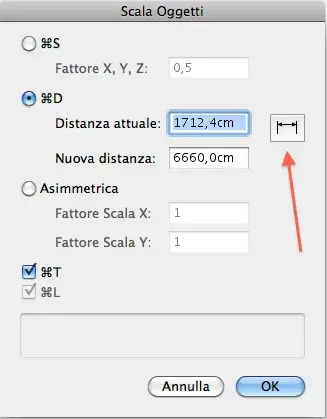
how do elements resize based on a reference side? or, if I have a plant of a house that must be enlarged, can you select one side of the house and give it the desired size so that you autoscali all the design? I did some tests with the tool resizes, but I couldn't select a reference side, vw makes me click on a point and if I move the mouse the design gets bigger and shrinks freely, however without keeping the proportions. .
I hope I explained.
Thank you.
how do elements resize based on a reference side? or, if I have a plant of a house that must be enlarged, can you select one side of the house and give it the desired size so that you autoscali all the design? I did some tests with the tool resizes, but I couldn't select a reference side, vw makes me click on a point and if I move the mouse the design gets bigger and shrinks freely, however without keeping the proportions. .
I hope I explained.
Thank you.