• This forum is the machine-generated translation of www.cad3d.it/forum1 - the Italian design community. Several terms are not translated correctly.

revolution of two profiles.. .

  • Thread starter Thread starter mauriba
  • Start date Start date

mauriba

Guest
Good morning to all,
My name is mauritius and I am new in this forum, I wanted to ask you a pleasure, I can't make a revolution of two profiles or I have on the same floor two different sections but they will have to follow a single revolution so I drew a simple circle that could serve me as a guideline for the possible use of the loft command but unfortunately I can't get anything... you can help me. Is there a command I don't know? ?
program used solid works
Thank you.
 
...the rules of the forum? Did you show up in the section?

If you put a sketch, we know what you're talking about. If you want to make revolution, you don't have to do loft. You've got the unclear ideas, I think.

you can revolutionize multiple areas, launching the revolution command and looking into the property tab on the left below you can add the areas you need. You must have defined an axis. You have to create geometry that doesn't conflict.
 
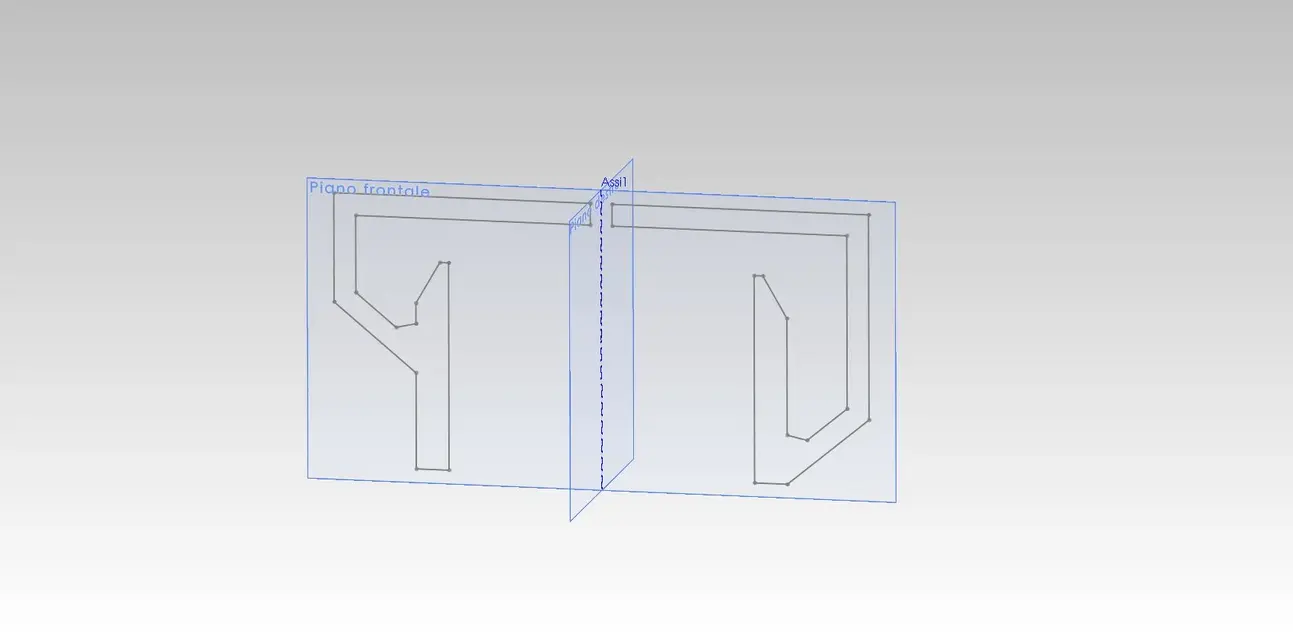
Here is the image with the two profiles, I hope that now the thing is clearer....I meant that I tried to do the operation both with the leadership revolution, and it makes me the revolution following a single profile and the loft does not make me...thank you.
 

Attachments

  • schizzo.webp
    schizzo.webp
    17.5 KB · Views: 63
Here is the image with the two profiles, I hope that now the thing is clearer....I meant that I tried to do the operation both with the leadership revolution, and it makes me the revolution following a single profile and the loft does not make me...thank you.
I have not understood why you want to "turn" 2 profiles in the same function/body.
apart from that it works to me and that "double revolution" makes me quietly, but it creates two intersecting bodies that don't make sense.
Could you explain better and show the section (at least) of the final part you want to get?

greetings
Mar

p.s. you have to do All the program tutorials (and consult the help), you will see that all these basic things will come to you immediately.
 
quoto sampom in full. but what solid is that in 360° is defined by the revolution of its different sections? Let's say we're not here.

or the section is one or is a variable section depending on the angle.

we expect a clearer pattern of the finished product, explanations, sections etc.
 
Good morning to all,
I apologize for being unclear and I hope to be now, then the sketch you see is the section of a tub that externally follows a profile that I could define constant while inside it has a "revolution" that follows two distinct profiles but that join thus creating a inclination inside it (to understand), effectively if I select the two areas and an axis I get two intersecting bodies what obviously I do not need. .
Thank you for your attention!
 
Good morning to all,
I apologize for being unclear and I hope to be now, then the sketch you see is the section of a tub that externally follows a profile that I could define constant while inside it has a "revolution" that follows two distinct profiles but that join thus creating a inclination inside it (to understand), effectively if I select the two areas and an axis I get two intersecting bodies what obviously I do not need. .
Thank you for your attention!
Forgive me but so you don't clarify a good thing:biggrin:You must have post an image of the finite and its "significant sections".

but in the plant at least is all circular?

... maybe an idea I am doing it; Can it be something like the path of a "drum helmet"?
in case that is not the way to proceed. Anyway put a drawing we see.

greetings
Marco:smile:
 
It's just what I meant... seeing that I didn't explain myself well, what I see in the image is the exact section, being a tub is all closed... thank you. Can I know what steps you had to do? !
 
It's just what I meant... seeing that I didn't explain myself well, what I see in the image is the exact section, being a tub is all closed... thank you. Can I know what steps you had to do? !
but I simply believe by revolutionizing the left profile for 180° and the right profile for the other 180° :tongue:

Hi.
p-h
 
It's just what I meant... seeing that I didn't explain myself well, what I see in the image is the exact section, being a tub is all closed... thank you. Can I know what steps you had to do? !
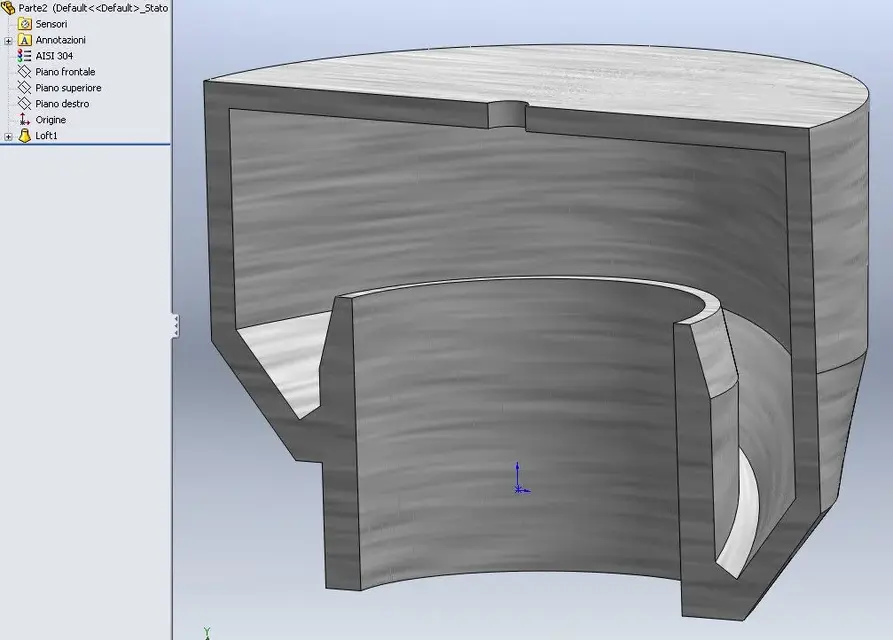
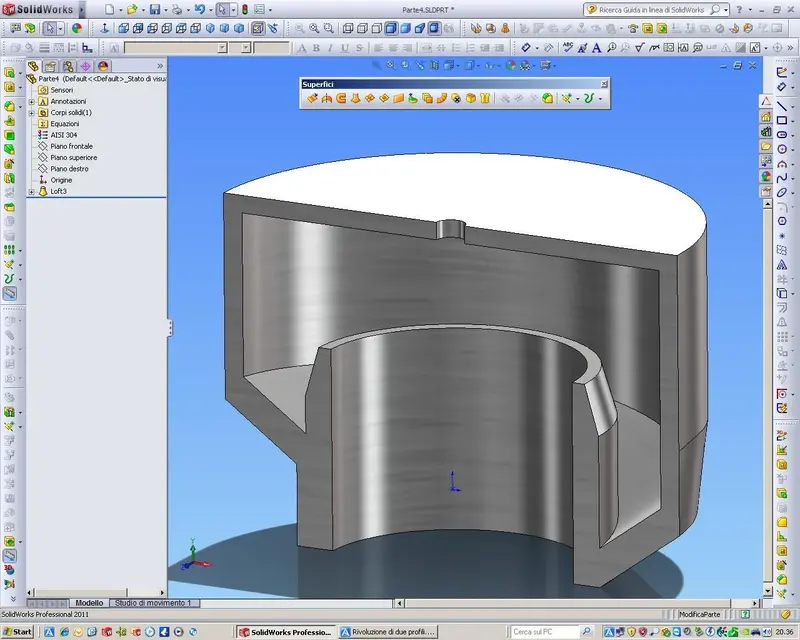
for purely illustrative purposes I put you two models, I'm not a guru, I'm just a metal constructor, but I think when you look at the files you can think of a better system. . .

Hi...

ps: you will see that after this post will come out a lot of models... "more better"
of my... maybe made with a unique function... and very simple... ♪
safeguarding the times of reconstructions and various dances... .
 

Attachments

for purely illustrative purposes I put you two models, I'm not a guru, I'm just a metal constructor, but I think when you look at the files you can think of a better system. . .

Hi...

ps: you will see that after this post will come out a lot of models... "more better"
of my... maybe made with a unique function... and very simple... ♪
safeguarding the times of reconstructions and various dances... .
My mother, how careful you are!:biggrin:
 
Good morning to all,
My name is mauritius and I am new in this forum, I wanted to ask you a pleasure, I can't make a revolution of two profiles or I have on the same floor two different sections but they will have to follow a single revolution so I drew a simple circle that could serve me as a guideline for the possible use of the loft command but unfortunately I can't get anything... you can help me. Is there a command I don't know? ?
program used solid works
Thank you.
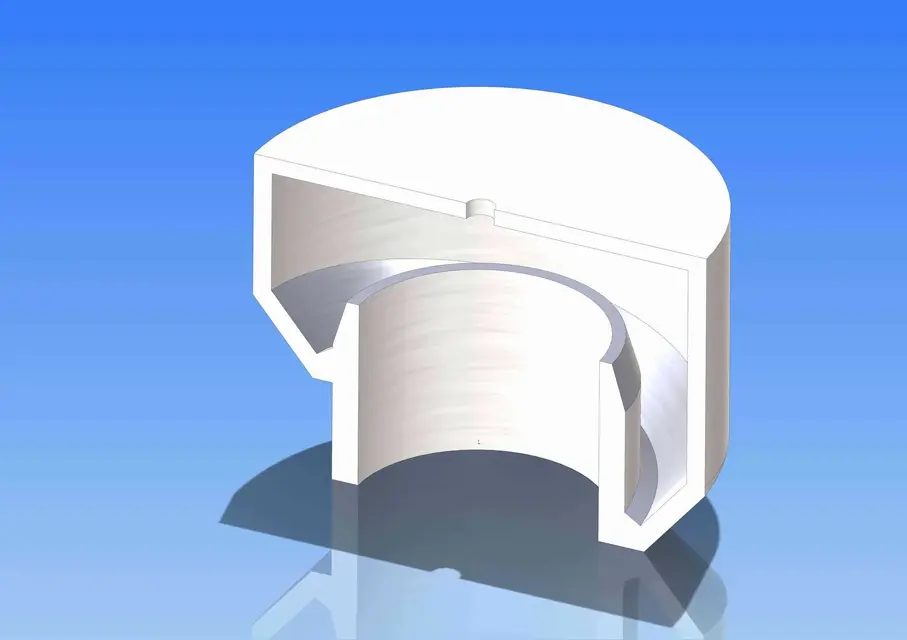
I would do with a loft.
 

Attachments

  • Loft.webp
    Loft.webp
    43.2 KB · Views: 29
I would do with a loft.
Here, you are always the usual:finger:, I did it in 3-4 functions :redface: and you, cool, put it with only one function. . .
I join the request of my father....:biggrin:

Congratulations!


ps: Can you sweep it on 360 ° or 359,9° ?
ps-2: How come you called your part... with my own name? Did you use my sketch? What?

ps3..... don't say I hadn't predicted a piece published in one function. . :rolleyes:
 

Forum statistics

Threads
44,997
Messages
339,767
Members
4
Latest member
ibt

Members online

No members online now.
Back
Top