• This forum is the machine-generated translation of www.cad3d.it/forum1 - the Italian design community. Several terms are not translated correctly.

rivetti e ribattini

  • Thread starter Thread starter Luke88
  • Start date Start date

Luke88

Guest
first of all I apologize for the silly question that I am about to do but use solidworks only for a few days and self-taught.
I have to connect two elements with a rivet, I put it in the hole but I don't understand how I do to "save it". :confused:

thanks for the attention :smile:
 
first of all I apologize for the silly question that I am about to do but use solidworks only for a few days and self-taught.
I have to connect two elements with a rivet, I put it in the hole but I don't understand how I do to "save it". :confused:
You mean you want to put the rivet in the hole then with some command deforms the end as it happens in reality? :confused:
What for? :eek:
 
Well, if I have to represent two elements held between them with rivets or with fights, how can I do if not?
 
Well, if I have to represent two elements held between them with rivets or with fights, how can I do if not?
Okay.
then models the rivet or the rivet already deformed.
you can create the configurations you need for the various rivet sizes, including the variants of each measure that will have different distances between the outer flange and the deformed part that holds the two sheets; you can change these distances according to your needs.
prepare the drilling of the various pieces as "repetition guided by the sketch" of a single hole. insert a single rivet/beat and the others insert them automatically with the repetition guided by the function, where the driving function is the repetition of the holes.
Do you understand? :tongue:
If you understand, this is a possible solution :smile:
 
Okay.
then models the rivet or the rivet already deformed.
you can create the configurations you need for the various rivet sizes, including the variants of each measure that will have different distances between the outer flange and the deformed part that holds the two sheets; you can change these distances according to your needs.
prepare the drilling of the various pieces as "repetition guided by the sketch" of a single hole. insert a single rivet/beat and the others insert them automatically with the repetition guided by the function, where the driving function is the repetition of the holes.
Do you understand? :tongue:
If you understand, this is a possible solution :smile:
I don't understand, it's that I'm still a little "ciuccio." I'm still trying to do as you say, I thought there was a special command to create the connection via rivet after noticing that it was possible to pick up rivets and re-runs from the toolbox. So the only solution is to manually draw the already deformed rivet? ?
 
I have to draw in solidworks two elements held together with rivets, and with a little shame I tell you that I don't even know what a fem:eek analysis is:
All right then do as marcof said.

a fem analysis is an analysis of stress or deformation that is done on structures, dividing them into many tiny bricks of simple form. then the computer thinks to put them all together.
 
All right then do as marcof said.

a fem analysis is an analysis of stress or deformation that is done on structures, dividing them into many tiny bricks of simple form. then the computer thinks to put them all together.
thank you for the explanation, is it not that somewhere I can find examples on how to draw the link?
 
I don't understand, it's that I'm still a little "ciuccio." I'm still trying to do as you say, I thought there was a special command to create the connection via rivet after noticing that it was possible to pick up rivets and re-runs from the toolbox. So the only solution is to manually draw the already deformed rivet? ?
I do not have toolbox, but from your question I assume that the fights/revects are represented not debated.
in this case you change one by creating the protuberance of the riveting at the distance equal to the thickness of the elements to be joined.
It takes more to describe it than to do it.
Hi.
 
I don't understand, it's that I'm still a little "ciuccio." I'm still trying to do as you say, I thought there was a special command to create the connection via rivet after noticing that it was possible to pick up rivets and re-runs from the toolbox. So the only solution is to manually draw the already deformed rivet? ?
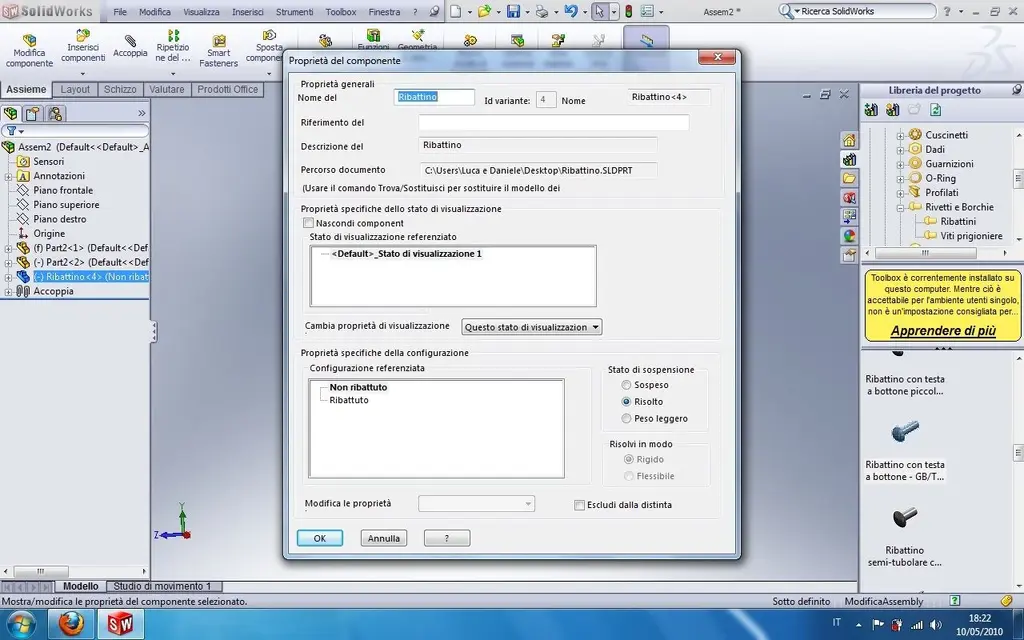
the explanation of marcof is quite clear, however, I attach you a file created quickly (see zip). in the model you find a "unrebated" configuration and another "rebaptised", click on both to see what happens.
only in case you do not know where the configurations are listed I attach this jpg:
 

Attachments

  • Config_Ribattino.webp
    Config_Ribattino.webp
    23.3 KB · Views: 44
  • Ribattino.zip
    Ribattino.zip
    72.6 KB · Views: 46
in the model you find a "unrebated" configuration and another "rebaptised", click on both to see what happens.
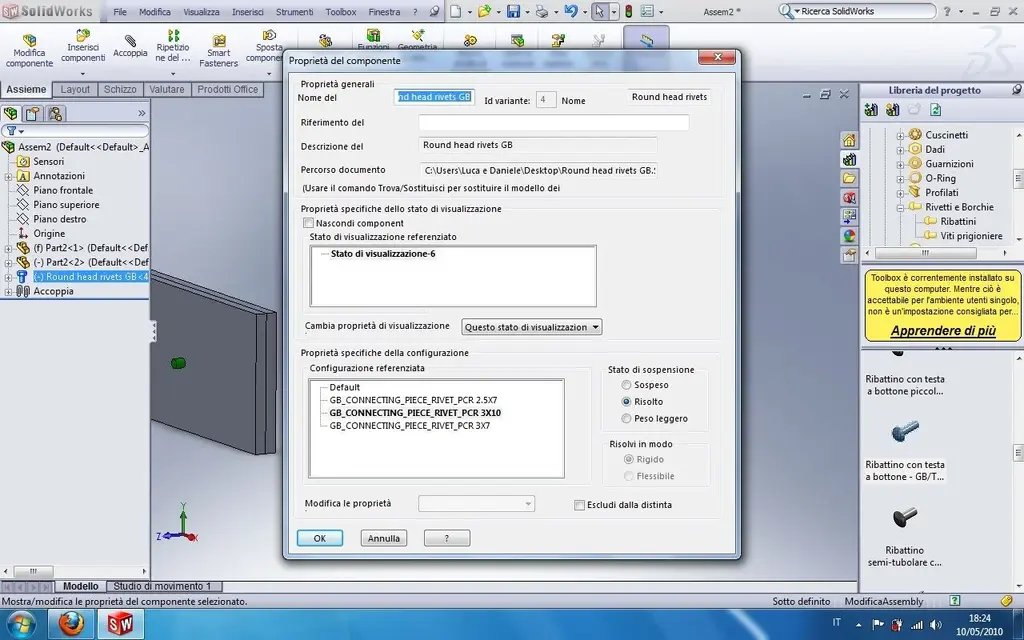
then we almost, if I use the fight that you sent me in the assembly I put it down if I put "rebattuto" in the configuration as I did in photo. If I use a rebate taken from the library I don't do it, I only have to choose the size of the nail or not "rebattuto" or "non-rebattuto". :confused:
 

Attachments

  • Ribattuto-Non Ribattuto.webp
    Ribattuto-Non Ribattuto.webp
    109.7 KB · Views: 27
  • Non ribattuto.webp
    Non ribattuto.webp
    116.2 KB · Views: 20
then we almost, if I use the fight that you sent me in the assembly I put it down if I put "rebattuto" in the configuration as I did in photo. If I use a rebate taken from the library I don't do it, I only have to choose the size of the nail or not "rebattuto" or "non-rebattuto". :confused:
according to me you are making assemblies using components (the ones that posted you and those of the toolbox) without having understood how they were made and especially how they are modified by configurations
configurations have been different than one component, i.e. where certain functions are activated or deleted. in the case of the rivet that made you "sweep" the configuration "rebate" activates the second revolution (the rebate) and simultaneously modifies the share of the length of the stem present in the sketch of the first revolution.
the toolbox rivet obviously has configurations that only vary the main dimensions (length, diameter etc.) and just.
if the variants are rebated/integrated there are no desire to look for them; You have to.
It is not that the cad, if you name a part "ribattino" understands that you have to create the fight function eh! :smile:

I suggest you study the part configurations well to understand what they need and how they use them, starting from examples already made as what posted you "sweep"
 
then we almost, if I use the fight that you sent me in the assembly I put it down if I put "rebattuto" in the configuration as I did in photo. If I use a rebate taken from the library I don't do it, I only have to choose the size of the nail or not "rebattuto" or "non-rebattuto". :confused:
It's not like sweeping you're "fighting." It's just another design that you call back alternately with configurations. and he's there because he modeled a sweep of healthy plant. those of the toolbox have only "dimensional" configurations and appear in the supply state, new to be crushed.
Don't you think the nail is endowed with its own life and sweeping with a magical command makes it crush? :smile:
are always solid, static and "inanimate" models. If you want other types of configuration/visualization you have to draw them, they are added to that list and call them back to the need.

greetings
Mar
 
Of course it was obvious that the control for the fight should be created :biggrin: I simply thought it was already possible because I find it useless to be able to represent a rivet without which it can be "dipped".

Always remember that I started drawing only a few weeks:tongue:
 
Of course it was obvious that the control for the fight should be created :biggrin: I simply thought it was already possible because I find it useless to be able to represent a rivet without which it can be "dipped".
You can represent what you want, as long as you model it before:smile:
 
Of course it was obvious that the control for the fight should be created :biggrin: I simply thought it was already possible because I find it useless to be able to represent a rivet without which it can be "dipped".

Always remember that I started drawing only a few weeks:tongue:
but it's not a "committee for the fight". are different models of different shape, you can show them either (or how many others you want, as long as you draw them).
It is not the same detail that "crashes" in command.

greetings
Marco:smile:
 
but it's not a "committee for the fight". are different models of different shape, you can show them either (or how many others you want, as long as you draw them).
It is not the same detail that "crashes" in command.

greetings
Marco:smile:
I was misunderstood.by command for the fight I meant to make different models to alternate.
Thank you all.
 

Forum statistics

Threads
44,997
Messages
339,767
Members
4
Latest member
ibt

Members online

No members online now.
Back
Top