• This forum is the machine-generated translation of www.cad3d.it/forum1 - the Italian design community. Several terms are not translated correctly.

Saldature profiled

  • Thread starter Thread starter deep70
  • Start date Start date

deep70

Guest
Hello everyone,
I unfortunately lost my library of profiles for welding, please someone could pass me a recent library for s.works 2018? I found a dated 2016, which I can't load.
thank you very much to all in advance for possible answers / data aid.
 
No. I mean you take one by type of those in the indicated post and create configurations with the data table.
 
I will pass on to those who created me (sw 2017).... when I need a new one (e.g. rectangle tube) I open a similar one and change quotas .... then save it with new name
 

Attachments

thank you very much for the collaboration strudel, very kind.
Thanks again and good evening to you.
 
Hi.
... sincerely I had never placed the problem, but if you can do for welding profiles, surely it is much better.... you never end up learning... x luck

Thank you.
Good day
 
I mean?
you searched https://www.cad3d.it/forum1/threads/risorse-utili-per-utenti-solidworks.13375/? in post #14 you find some, but there are others.
being simple parts with inside a sketch and nothing else should not trouble you if in previous versions.
If you need to make the new library, I suggest you take advantage of the configured profiles
Hello,
I introduce myself to the discussion because I recently started using the weld profiles, but I have problems importing the libraries I found in the mentioned post. the problem exists because the folder structure that goes to look for sw is composed as follows: standard folders -> file with .sldlfp extension (which determines the shape of the profile) -> configuration of the latter (which determines the size)

If I try to introduce the standards listed in that post the structure is this:
folder of standard-> folder that determines the shape of the profile -> individual .sldlfp files with each size.

the problem is that what asks solidwork does not collimate with the structure of the file that has the annex, but also downloading the standard profiles from solidworks directly (contained solidworks->weldments->iso) the thing does not coincide.

How can you do to overcome this problem? ? ?
Is there a library with configured profiles? I couldn't find her.

Thank you in advance.

greetings
 
solidworks does not have a search setting for configured profile method or not.
is the type of profile that require a specific folder structure.
the profile configured i.e. a single sldlfp file with different configuration inside requires the structure folder/profile sldlfp
the profile non configured i.e. a file per size requires the structure folder/type profile/profile sldlfp
in the options in the folder path card should only be indicated the main folder
this debate Did you fix it?
 
nonstd.webpThanks for the answer. the problem persists, if I define the upper folder I can insert the profile type, I can put the size but the last field remains empty and therefore do not finish the configuration. You'll tell me to get in a folder. I did and at that point I can define only the standard (so instead of rectangular tubular 2 I will see iso) from there on is as if sw looked for a sldflp file to configure the type, but actually in the folder structure (of the file downloaded from this forum) as there are other folders. Down

I hope I've been clear... .
Thank you.
 
question 1: Do you have configured profiles?

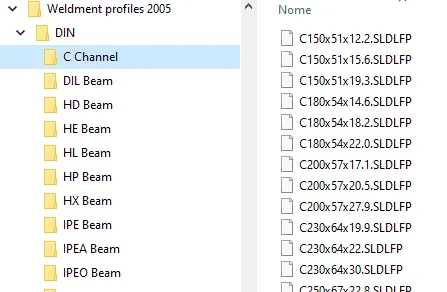
in the image the structure of un configured profile folders
in the case of profiles configured instead of the folder c channel there will have to be one file c channel.sldlfp that contains configurations of the various sizes

summarizing the image:weldment profile is the folder to indicate as path in system optionsHome is the folder that is read in the box standard part property managerc channel is the folder that is read in the box type part property managerc150x521x12 is the profile that is read in the box size of the property manager
 

Attachments

  • Immagine.webp
    Immagine.webp
    20.9 KB · Views: 20
Last edited:
hi.I introduce myself with a question: can you create configurations of a structure created with the welding profiles? I mean, if I make a structure with a profile, can you associate configurations by removing or adding a group?
 
It is not clear what you want to get.
explain better and maybe add an image.

I do not believe that your question is inherent in the question dealt with in this discussion (location weld profiles)
 
hi.. I introduce myself in the discussion x not create another one.
I use 2017 and I installed 2020 with curiosity to see if really the changes that have introduced in welding can be useful.
When I install a new version I configuro perfectly like the previous one by pointing to a folder of settings that is a perfect copy of the one used with the previous version. in 2017 the folder is...\solidworks 2107 and in 2020 it is...\solidworks 2020. within these there are all subfolders with all settings and customizations, also the subfolder weldmen profiles. These are perfectly identical. 2020 does not read my welding profiles, despite correctly configured in the path of options files.
Have you noticed this?
 
I didn't try to point to those of 2017, but I don't think that it changes something x because they are just the same, just move to other position x don't let the files update that I couldn't continue to use with the old version. now sincerely I have uninstalled 2020 and when I decide to use it maybe I will try equally.
have greatly simplified the modeling of compplesse instruments that in reality would require complex sketches in space, made both with 3d sketches or with 2d properly placed. . look at the news of 2020 on welds... you will soon find a video doing research "new solidworks 2020".
clearly say that they work in my everyday reality nn I know, x that cha maybe they would try
 
I didn't try to point to those of 2017, but I don't think it changes something x because they're just the same, just move to other position x don't let the files update that I couldn't continue to use with the old version
if you do not go to edit the sldlfp file you have no problem with updating because once inserted in the profile the file has no connection with the sldlfp file; in poor words, if you save in 2020 a part with a structural profile the profile file used remains in the 2017 version.
 

Forum statistics

Threads
44,997
Messages
339,767
Members
4
Latest member
ibt

Members online

No members online now.
Back
Top