• This forum is the machine-generated translation of www.cad3d.it/forum1 - the Italian design community. Several terms are not translated correctly.

save as new document

  • Thread starter Thread starter marcofa
  • Start date Start date

marcofa

Guest
on the catia r20 version no longer appears to me the option with check to save as new document. What to do?
Mar
 
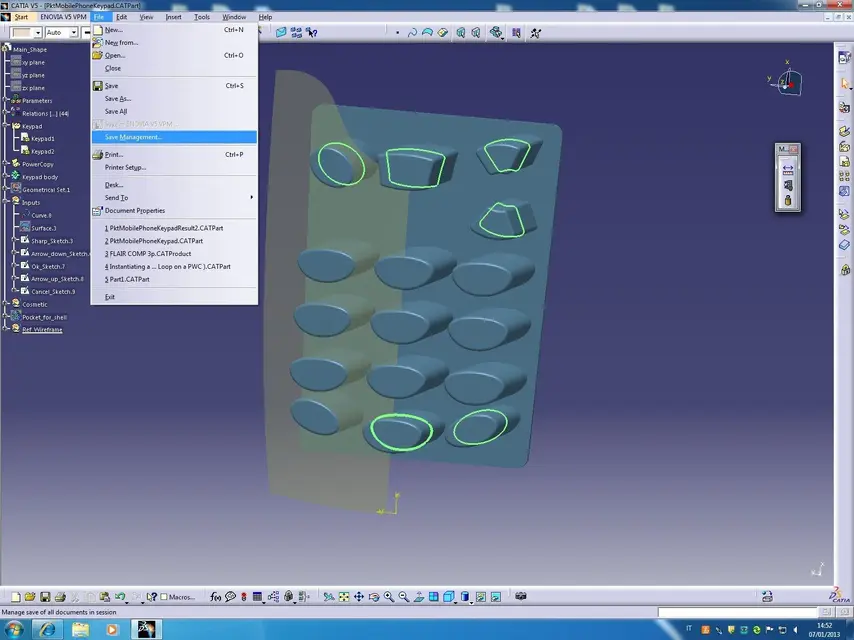
from the main menu, top on the screen
follow these signs
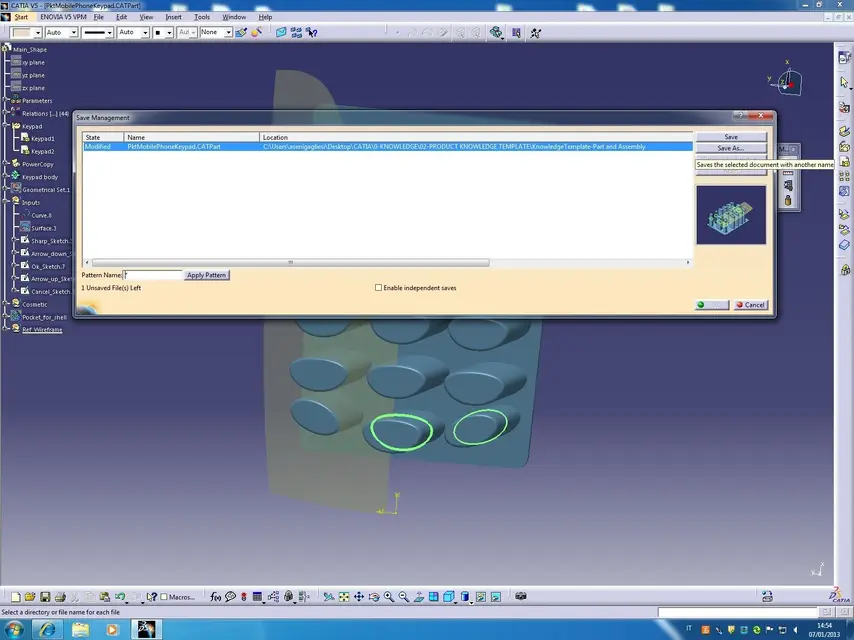
file -- save management-- point your document --- save as
Okay.
 

Attachments

  • File-SaveManagement-1.webp
    File-SaveManagement-1.webp
    112 KB · Views: 28
  • File-SaveManagement-2.webp
    File-SaveManagement-2.webp
    106.4 KB · Views: 20
doing as you say the document is saved with the same id.
instead the previous command saves as a new document, introduces a new id.

incorrect corrige are in catia r21 not r20.
Mar
 
please someone can tell me how to save as a new document in catia r21.
in r19 when I was saving by name, in the window there was a check saved as a new document. in r21 there is no tick in the window.
I want to save as new document and with different id.
the alpole system saves with different name, but with same id in an alternative way to the save with different name. which creates casino (same id)
Thank you.
Mar
 
if you are looking for the uuid forum you should find the various possibilities to save with new uuid
 
I know very well, having posted a lot on the subject.
here the problem is simple operation. I'll explain better.
using r19 when I wanted to create a modified version of an existing part, without deleting the original, I made all my beautiful afterlife changes saved by name: a beautiful window opened in which on the lower left there was the option to check "Save as a new document".
popping up this option, changing the name of the part and giving ok saved a new document with new id and new name without affecting the existing one.
After migrating to r21 when I save by name, in the window I am not offered the option "Save as a new document".

I want to know how to do this.
Mar
 
That's what I'm trying to explain. if I did not err I had posted the methodologies to have a different uuid
 
scusate se insisto ma c'è qualcosa che non funziona nella comunicazione.
lo stato dell'arte riguardo uiid è la seguente:

catia identifies the files on the basis of uuid, even if the names are equal this uuid can't be seen or edited in any catia function and each catpart or catproduct should have such number. here is a short list of options:

1. create new uuids
file + new ones
file + new ones from
file + save as - option save as new documentinsert new product
insert new part
document creation

2. keep track
file + open
file + save management
file + save
file + saveas
send to directory
file + close
file + save
file + save all

attached two screenshots of r20 window 7 64 and r21 window 7 64
As you can see, in r20 in the saving window by name, on the bottom left there is the option saved as a new document, while in r21 there is no more.
questions:
is there no more of you, or is it my anomaly?
if there is no more, what alternative procedure should be done to obtain the same result that is to save a new part with new uiid?
Mar
 

Attachments

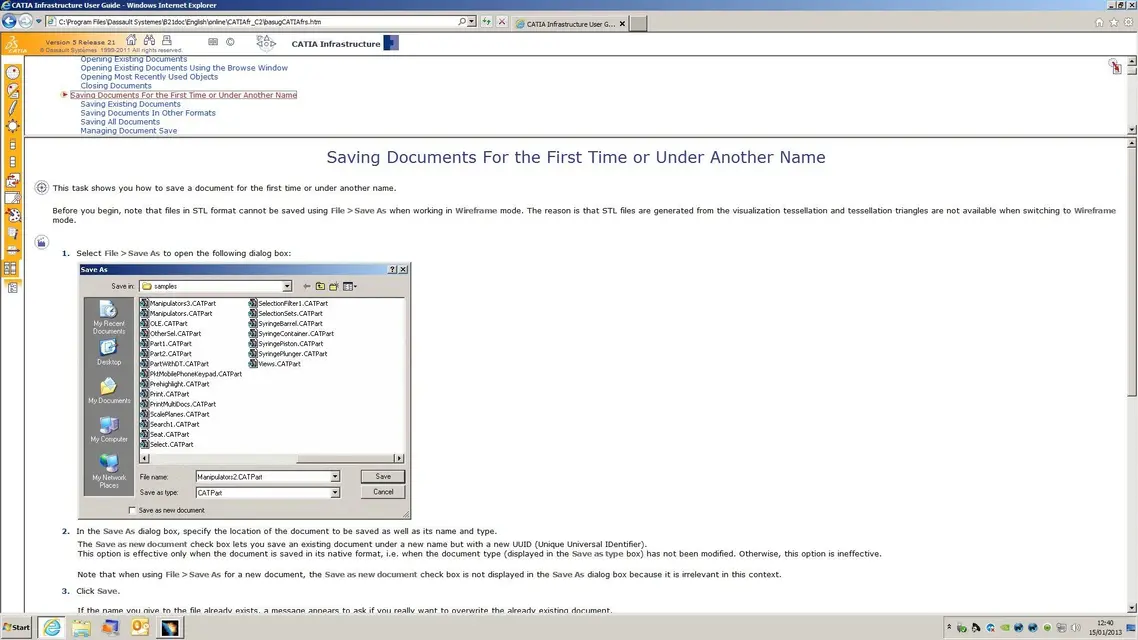
I also add that in the doc of r21 attached, the option is present! ! !
Why don't I see the option in the window? ? ?
Mar
 

Attachments

  • doc.webp
    doc.webp
    164.5 KB · Views: 12
Hi, I did a test with r22 and the option is present.
Unfortunately I have no r21 available.

at this point I would say to see if in the options you disabled something. But what?

Let's see if someone in the forum who has r21 has the same problem.

other idea:
if you have the possibility to reuse the "original" casettings of ds test with those, so at least we better locate the problem
 

Attachments

  • save_as.webp
    save_as.webp
    68.1 KB · Views: 14
Last edited:
I have two pcs, one with r20 with the correct window and another with r21 and the different window without the option.
Can I take the r20 casetting and copy them to r21?
Mar
 
I tried to copy the r20 casetting that has the right window with the option, in the pc with r21 and the window without option.
nothing changes, the window remains the same without option.
So it's not catsetting.
Can it depend on window 7?
Mar
 
No! never reuse the catsettings of a previous version!
You have to recreate them, I know it's annoying but it's a practice you do once.

I with w7 and r20 sp07 I have the option available.

What does the support say?
 
with new catsetting does not change anything.
I doubt it's window 7.
can you find someone who has r21 to know which window you have?
Mar
 
I exhume the post....

actually on the r21 sp3 no new uuid option!

Has anyone resolved?

:

greetings
 
I installed r21 on win7, the option appears only when it is useful, i.e., if I create a new file, or if I open an existing file with "new from...", the first save does not appear, as it already creates a new uuid, after the first save if I repeat "Save with name" the option and present.

greetings
 
I don't appear in your own situation, so there's something abnormal.
Can you post a photo of the "Save Name" window with the option present please?
Thank you.
Mar
 

Forum statistics

Threads
44,997
Messages
339,767
Members
4
Latest member
ibt

Members online

No members online now.
Back
Top