• This forum is the machine-generated translation of www.cad3d.it/forum1 - the Italian design community. Several terms are not translated correctly.

save external parts to the axieme

  • Thread starter Thread starter Damvr
  • Start date Start date

Damvr

Guest
Good morning to all,
I repeat a question made in a previous discussion.
since I am in this forum I discovered that I am very poor in sw and thank you for having solved my problems so far, said this, about "saving the outside parts to the axieme" I work with axiemi saved in the library I use and resize according to the needs, of course every time I save them with different name on the final folder, so I do save with name- rhino-I include all the components with advanced references-
then on the save window by name with click references to include virtual components (photo 2)
What do I forget? because cmq the addresses of the parts remain the original ones. .
I can save them outside.
 

Attachments

  • FOTO 1.webp
    FOTO 1.webp
    70.7 KB · Views: 12
  • FOTO 2 .webp
    FOTO 2 .webp
    75.7 KB · Views: 13
those who show are not files saved internally otherwise you would have the word "save internally to the assieme" as from image; even if seeing that the check, which you did not select, to include virtual components is active can mean that maybe they are in sub-assiem?
However with save by name you are saving only the first level file and you are telling him to keep the existing references.
to save the whole package you need to use the pack&go or save as a copy

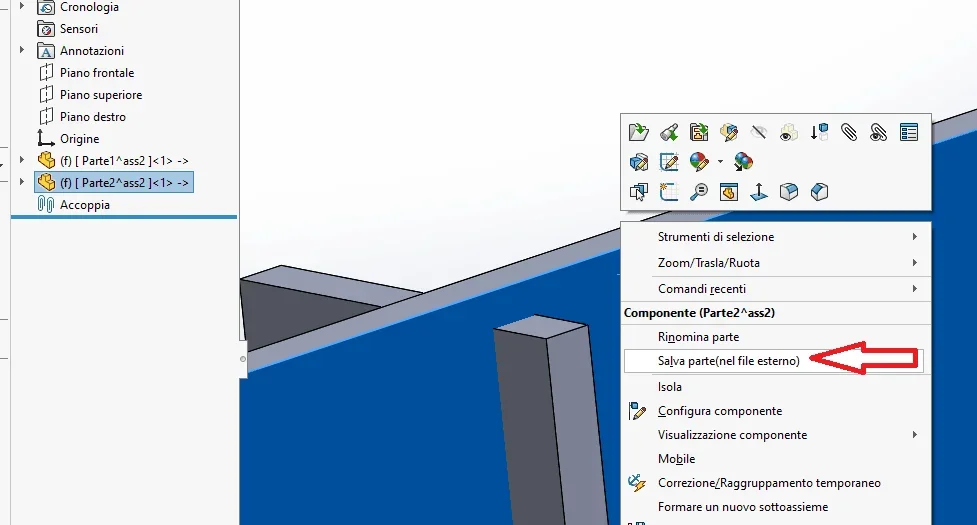
to save files externally you have to click on the particular right-click and select save externally (you can select multiple files simultaneously)
 

Attachments

  • Cattura.webp
    Cattura.webp
    24.6 KB · Views: 12
those who show are not files saved internally otherwise you would have the word "save internally to the assieme" as from image; even if seeing that the check, which you did not select, to include virtual components is active can mean that maybe they are in sub-assiem?
However with save by name you are saving only the first level file and you are telling him to keep the existing references.
to save the whole package you need to use the pack&go or save as a copy

to save files externally you have to click on the particular right-click and select save externally (you can select multiple files simultaneously)
Thank you. done, among other things all the problems I had were precisely because the axioms nn were saved correctly (can it be? )
in the old discussion drake told me that I have to contact the administrator to cancel this discussion because it is the same question asked on the other side you can tell me how I can do it?
 
in the old discussion drake told me that I have to contact the administrator to cancel this discussion because it is the same question asked on the other side you can tell me how I can do it?
writing a private message to @cad3d
 
to save files externally you have to click on the particular right-click and select save externally (you can select multiple files simultaneously)[/QUOTE]Excuse me, should I click where?
I don't understand which detail I have to click to save externally
 
just to clarify, because perhaps we speak using terms that are misunderstandings; part saved internally, also known as virtual, means that while being present inside the axieme there is no physical file on the pc folder.[edit]a virtual part is identified in the tree on the left with the symbol -> a fainco of the name
 
just to clarify, because perhaps we speak using terms that are misunderstandings; part saved internally, also known as virtual, means that while being present inside the axieme there is no physical file on the pc folder.
I understand that you told me a thousand times but I don't understand the procedure to save it externally, where do I have to click?. . I'm sorry, but I realize more and more than I know sw.
 
put an image of the context menu when selecting the part by clearly showing the symbol -> in the tree
 

Attachments

  • Immagine.webp
    Immagine.webp
    34.4 KB · Views: 10
a part is virtual or is not virtual; depending on how it is you have the possibility to save it externally.
 
I saw that massive responded well... I mistakenly answered you in the other discussion that if you want to ask you to cancel it.
 
I mistakenly answered you in the other argument that if you want to ask to cancel it.
It's not your fault. @damvr that messed up asking for clarification from one side to another.
As the other discussion was about another problem, moderators could move the last answers, from post #8, to this.
It's still a task. @damvr ask for it, alternatively you must hope that some moderator will notice the mess; In the meantime, only one of the two discussions will be useful
 
It's not your fault. @damvr that messed up asking for clarification from one side to another.
As the other discussion was about another problem, moderators could move the last answers, from post #8, to this.
It's still a task. @damvr ask for it, alternatively you must hope that some moderator will notice the mess; In the meantime, only one of the two discussions will be useful
Good morning I apologize for the mess. I remember your colleague told me to make a request to cancel one of the two discussions. I did not because in the meantime I had to leave for health reasons, and I have not followed my discussions. .
 

Forum statistics

Threads
44,997
Messages
339,767
Members
4
Latest member
ibt

Members online

No members online now.
Back
Top