
• This forum is the machine-generated translation of www.cad3d.it/forum1 - the Italian design community. Several terms are not translated correctly.

save local models from toolbox

  • Thread starter Thread starter Matteo
  • Start date Start date

Matteo

Guest
hello to all, I have a problem related to the exchange of files with a provider. I receive a folder (obtained with pack and go) where the files from the toolbox are missing (checking the references of the axieme in fact are all addressed to the standard library folder). It would make no sense to direct them to my bookstores because they are different.

I was wondering: is there a possibility to tell swx to save the aprti coming from toolbox in local, or consider them as normal parts to export with the pack and go (change also references)?

Thank you in advance!

Matteo
 
hello to all, I have a problem related to the exchange of files with a provider. I receive a folder (obtained with pack and go) where the files from the toolbox are missing (checking the references of the axieme in fact are all addressed to the standard library folder). It would make no sense to direct them to my bookstores because they are different.

I was wondering: is there a possibility to tell swx to save the aprti coming from toolbox in local, or consider them as normal parts to export with the pack and go (change also references)?

Thank you in advance!

Matteo
if you use toolbox configurations, swx recreates them.
If you use toolboxes as separate parts for each size, in the pack&go there is a flag to be enabled.
If you didn't enable it, you'd do p&g with the flag.
 
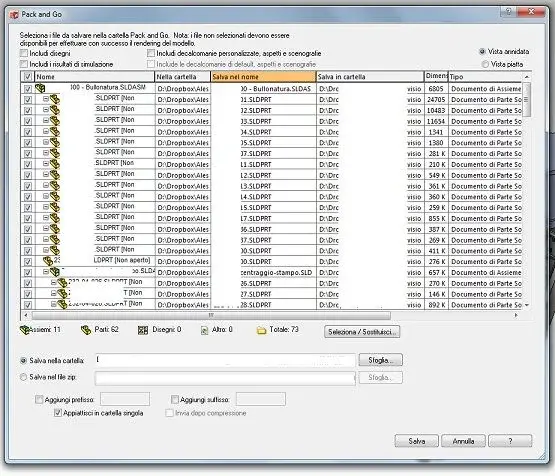
Thank you. the problem is that it does not find (and neither do I) the flag in the pack & go window!
 

Attachments

  • pack&go.webp
    pack&go.webp
    56.6 KB · Views: 25
If you don't have the flag, it means you use 2012.
do you need to know how to create toolboxes, how to configure or how to single parts?
how one works must work the other too.
important that you also have the latest version of sp...because toolboxes were made a slaughter in 2012.
I recommend the SP3.
if not out, the sp2.
 

Attachments

  • tb.webp
    tb.webp
    41.8 KB · Views: 18
I was wondering: is there a possibility to tell swx to save the aprti coming from toolbox in local, or consider them as normal parts to export with the pack and go (change also references)?

Thank you in advance!

Matteo
- Decompress the p&g zip in a folder.
- disable this setup.
 

Attachments

  • tb.webp
    tb.webp
    25.5 KB · Views: 18
hello to all, I have a problem related to the exchange of files with a provider. I receive a folder (obtained with pack and go) where the files from the toolbox are missing (checking the references of the axieme in fact are all addressed to the standard library folder). It would make no sense to direct them to my bookstores because they are different.

I was wondering: is there a possibility to tell swx to save the aprti coming from toolbox in local, or consider them as normal parts to export with the pack and go (change also references)?

Thank you in advance!

Matteo
I often send my designs to customers but I did not find any problems.
with the p&g zip should recreate all files (as long as they are selected), even the toolboxes.
I think he didn't make you a pack & go.
I attach 2 axiemi, one created by selecting the files and zipping them into the "non-complete pack" file, the other "complete pack" performed with the pack & go by inserting the files (all) in a zip (it runs it automatically).
Try to open the two axioms that I put you, one at a time alternately.
save them in two separate folders.
deactivate the item that mentions soliduser in the previous post.

files prepared with sw 2010 sp 5.0
 

Attachments

thanks to both (soliduser and mike): it works!

Now I try to replicate everything on the supplier's pc.

Bye!
 

Forum statistics

Threads
44,997
Messages
339,767
Members
4
Latest member
ibt

Members online

No members online now.
Back
Top