
ing_alberto
Guest
I would like to realize an abacus made in such a way that the characteristics of the tightening highlighted by the brakes:
 with the characteristic data of the tightening as :
• Thermal transmission
• Solar radiation heating index
• thermal exchange coefficient
• model
• manufacturer
when I make the abacus locks turned out in this position as from photomontage
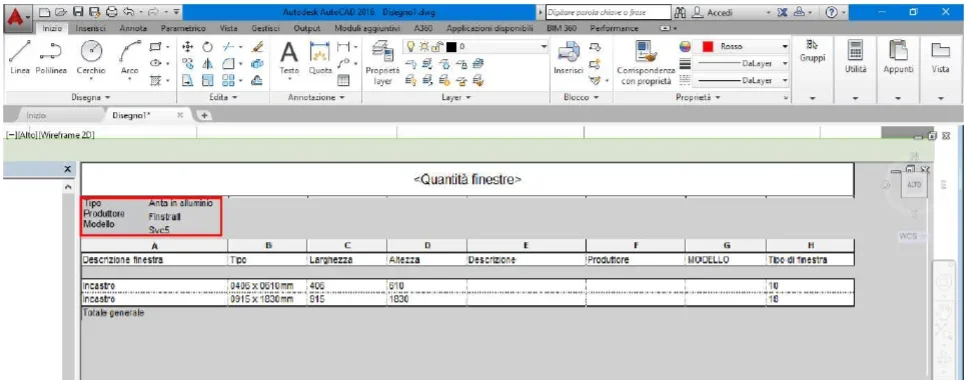 I did a test.
the image represents what I get now, the data as:
• type
• manufacturer
• model
but I would like to know what they mean
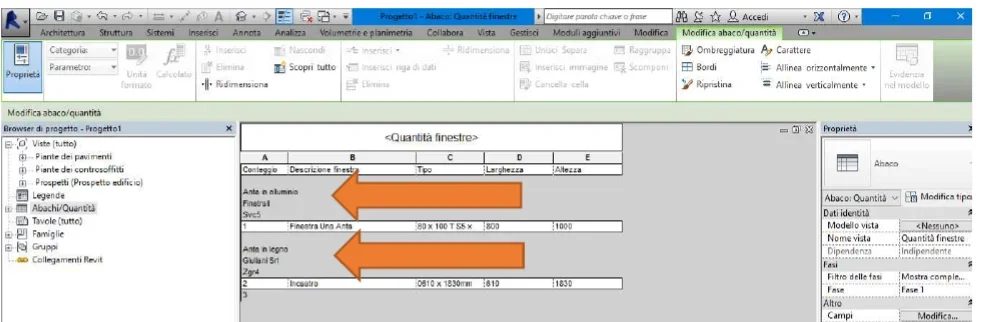 I would like an abacus set like this if possible
 I would like to see what it means:
• type
• manufacturer
• model
with the characteristic data of the tightening as :• Thermal transmission
• Solar radiation heating index
• thermal exchange coefficient
• model
• manufacturer
when I make the abacus locks turned out in this position as from photomontage
I did a test.the image represents what I get now, the data as:
• type
• manufacturer
• model
but I would like to know what they mean
I would like an abacus set like this if possibleI would like to see what it means:• type
• manufacturer
• model