
• This forum is the machine-generated translation of www.cad3d.it/forum1 - the Italian design community. Several terms are not translated correctly.

select and quote

  • Thread starter Thread starter Esselle
  • Start date Start date

Esselle

Guest
Good morning, if memory does not deceive me I remember that in the last version of solid I could do the following operation.

environment creation wizard holes (for example)
sketch environment for defining the position of the points that will become holes.
with window two points, I impose a geometric condition (e.g. horizontality) and step to the quotation.
in the last version I could quote without re-checking was as if you remembered the selection. now the selection is lost and must be remade, using the instrument quota.

Do I have to activate something to get this opportunity?
 
in the last version I could quote without re-checking was as if you remembered the selection. now the selection is lost and must be remade, using the instrument quota.

Do I have to activate something to get this opportunity?
Never seen anything like that. Are you sure?

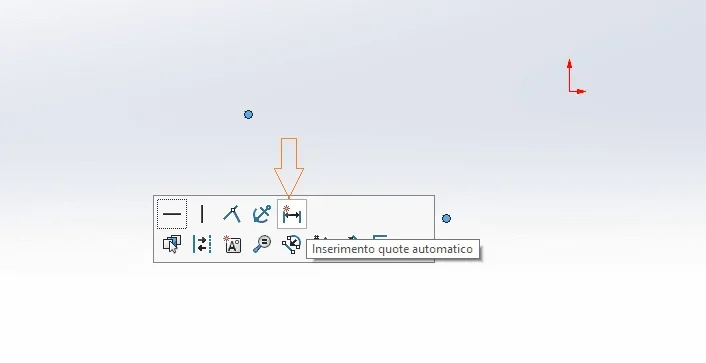
I find only this method:
selection of points
I see fast commands
select automatic quota insertion

but not if it's what you're looking for
with two points makes a linear quota
with 3 points makes an angle
with 4 or more ago... Nothing.
 

Attachments

  • Immagine.webp
    Immagine.webp
    6.5 KB · Views: 5
That's exactly what I'm looking for. I have never used this system, I am sure (99%) that it worked the same way, but going to click on smart quota after selecting. and I'm sure because it's one of the first things I remember having noticed in this 2020 that I couldn't do. are in fact usually select points, impose geometric conditions and then quote.
 
no, the procedure you described in post n.2 I can do it perfectly. I remember that you could do the same thing, but instead of clicking on the automatic quota, I could go on the button of the toolbar smart quota.
 
probably select automatic quota instead of smart quota.
you can associate the automatic quotation to a mouse movement or a button or insert it into the toolbar
 
probably select automatic quota instead of smart quota.
I am always 99% sure, because the doubt is right to have it working as I say, and it was also very convenient. automatic quota, like almost all automatisms, not use.

thanks always for availability.
 

Forum statistics

Threads
44,997
Messages
339,767
Members
4
Latest member
ibt

Members online

No members online now.
Back
Top