
• This forum is the machine-generated translation of www.cad3d.it/forum1 - the Italian design community. Several terms are not translated correctly.

select bodies for table placing

  • Thread starter Thread starter Lorenz578
  • Start date Start date

Lorenz578

Guest
Good morning.
as object, I would need to know if there is a function similar to what a sw is called "select bodies"
in a multibody part, I would like to be able to put on the table only what they select.
for example my sheet is composed of two solid bodies called "solido1" and "solido2"
I would need to select only solid2 and put it on the table.
Is that possible?
Alternatively I saw that you could enter the whole view of the part and then hide the bodies that we do not want to show. You can also do this, but I feel strange not being able to have a specific function that selects the individual body to put on the table.
I tried to look on the guide, or other topics already open, but I found nothing.
Thank you.
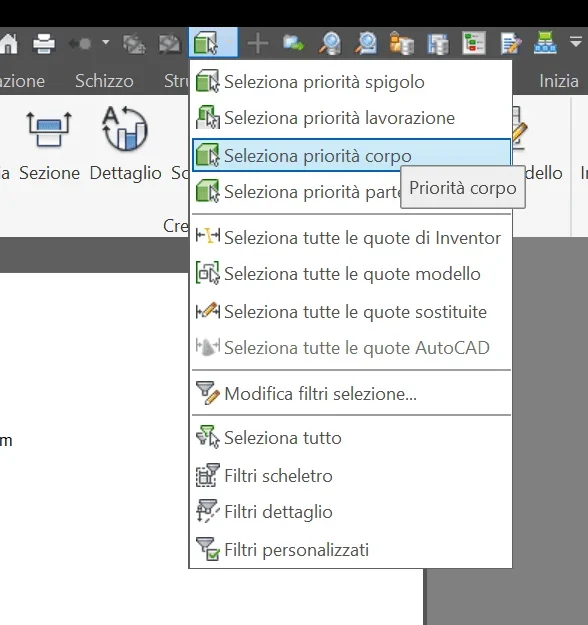
 
in all environments (axieme, part, idw) are the filters of selection. among these is present select body priority that allows you to select a body of a multibody. at this point by selecting the item and button dx you can do several things including switching off/lighting, dissecting or not a body or putting or not hidden lines. You must then remember to select edges or what you need with respect to the context on which you work. I recommend putting fast buttons because filters are very useful to use compared to the context on which you work.
 

Attachments

  • Immagine.webp
    Immagine.webp
    33.2 KB · Views: 4
in all environments (axieme, part, idw) are the filters of selection. among these is present select body priority that allows you to select a body of a multibody. at this point by selecting the item and button dx you can do several things including switching off/lighting, dissecting or not a body or putting or not hidden lines. You must then remember to select edges or what you need with respect to the context on which you work. I recommend putting fast buttons because filters are very useful to use compared to the context on which you work.
Hello and thank you.
useful selection filters, but I still can't put on the table only the body that select
 
put it on the table with everything visible, then remove from the display the bodies that you do not care about.
 
put it on the table with everything visible, then remove from the display the bodies that you do not care about.
"alternatively I have seen that you could enter the whole view of the part and then hide the bodies that we do not want to show. "

as I had written in my initial comment:)

Therefore I deduce there is no function that allows to directly insert the body that interests me.
Okay, thanks (y)
 
creating a visual representation in the 3d model with the solid body concerned as the only visible, when creating the view on the table you can choose which representation of the model must use.
 
creating a visual representation in the 3d model with the solid body concerned as the only visible, when creating the view on the table you can choose which representation of the model must use.
Okay.
I still have to go hide the parts and create the view I need in the solid (instead of doing it directly on the table)
at time levels the procedure is equal.
I was hoping there was a direct command that would let you select the solid body without having to do any other operation.
thanks for the information:)
 

Forum statistics

Threads
44,997
Messages
339,767
Members
4
Latest member
ibt

Members online

No members online now.
ciao
Back
Top