• This forum is the machine-generated translation of www.cad3d.it/forum1 - the Italian design community. Several terms are not translated correctly.

semisection .idw

  • Thread starter Thread starter ManuelDiceglia
  • Start date Start date

ManuelDiceglia

Guest
Good morning to all,
I write to try to solve my problem that once solved would save me a lot of time:
I would like to know how to get a semisection view in a .idw file. I have no problem creating the semisection on a .iam but I can't transfer the view to the .idw because it shows me the whole assembling.
I tried to do "design view applications" but nothing.
I tried with "custom view orientation" and it shows me the dissected aid but when I go to confirm the position, on the table it always shows me whole.. .
If someone knows how to do it, please help me.
 
I don't know what you mean by "signation", but when you work on a 2d .idw you can do all the sections you want using the "section" command alongside what you use to place the main view.
 
I don't know what you mean by "signation", but when you work on a 2d .idw you can do all the sections you want using the "section" command alongside what you use to place the main view.
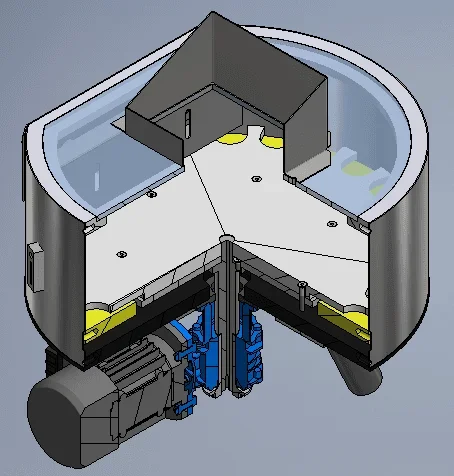
I have not specified: with semisection I mean for example a cut of 1/4, 2/4 or 3/4 of a set (as attached image). 1543649258965.webpI tried to do the section through the command in the .idw but I can't place it properly because it allows me to place it only orthogonally and I need a perspective exactly as in the attached photo.
 
Look, there's no problem doing something like that.
If you do the view in the plant, click on it and go on sketch, open the sketch setting and you can trace the section lines you prefer.
out of the sketch environment, you can do the section by touching the broken line that you tracked.
One thing that is meant to be done is to track the section lines without entering the sketch environment and, above all without putting constraints on the geometry that you want to dissect, in this way the program seems not to do what we want.
 
I guess Manueldiceglia intends to put on the table the perspective view in section.
in this case, after the steps indicated by stefanobruno (creation of the section from Orthodox views) just create a perspective projected view of the newly created section.
Of course, if the orthogonal and initial section views do not need to suppress them and you only have the prospective view in the section.
 
I guess Manueldiceglia intends to put on the table the perspective view in section.
in this case, after the steps indicated by stefanobruno (creation of the section from orthogonal views) just create a projected perspective view of the newly created section.
Of course, if the orthogonal and initial section views do not need to suppress them and you only have the prospective view in the section.
Okay, after the steps you have indicated I have come to have the perspective view dissected. Now the fact is that I would like to turn it as you with a view of a main component through the "custom view orientation" command.
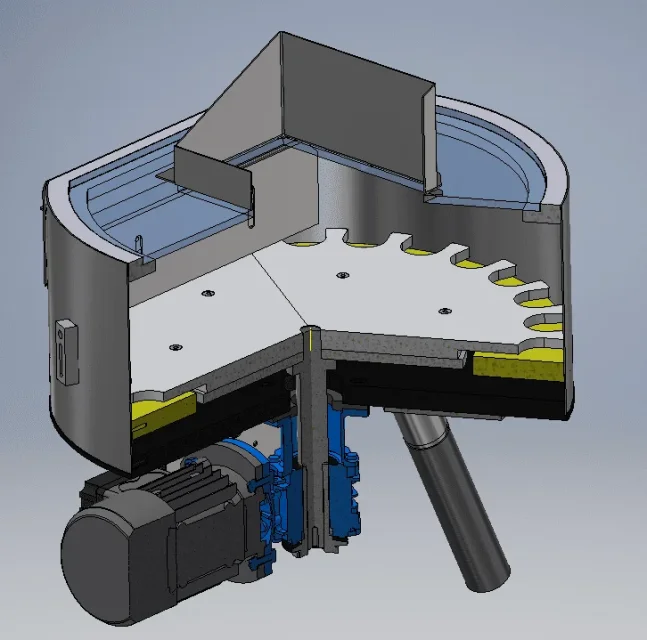
the result obtained in idw Questo:1543660041577.webpWhat I would like would be a view where you can see the interior well. so I should turn it upwards of some degree but the view is fixed and I can't place it in any other way beyond the preset orthogonal ones.
to explain to me I allege the view I would like, made by . ed:1543660307736.webp
 
ecoo is a problem in which I banged on the head this week, then I have inventor 2019, when I put the basic view I have the opportunity to enter the modeling environment, rotate the view as I want and insert it as a base view. so far everything ok. I had the need to put a view in semi section perspective as in the pictures above. here I created a visual representation in the .iam using the appropriate command. all right here when I step from one view to the other in the iam environment. in the idw if I try to put a basic view using the view configuration created in the modeling environment there was no way to do it. I was touched out of the table to make a view, create the section plan as I wanted, create the section, create the perspective view from the section and finally go drag it into the table area. ideas? ?
 
Now there's another bitch... As much as I could have the prospective saw last time, I can't...
I create the main view, design the lines through sketch to outline the cut, create its orthogonal projection but, I can not create its assonometric view because it just doesn't make me click on the view...
Is there something I did wrong? I did the same steps the other day. . .
 
evidently non you did the same steps last time, otherwise you would have got the same result.

You noticed you were given directions, but you do different things? If you ask why they don't work. . .
 
Now there's another bitch... As much as I could have the prospective saw last time, I can't...
I create the main view, design the lines through sketch to outline the cut, create its orthogonal projection but, I can not create its assonometric view because it just doesn't make me click on the view...
Is there something I did wrong? I did the same steps the other day. . .
You probably skipped this step:
when you have done the first section, right on this view->change section->projected property.
then, as to how to guide a silky view, there remains a mystery to me too...:cry:
 
ecoo is a problem in which I banged on the head this week, then I have inventor 2019, when I put the basic view I have the opportunity to enter the modeling environment, rotate the view as I want and insert it as a base view. so far everything ok. I had the need to put a view in semi section perspective as in the pictures above. here I created a visual representation in the .iam using the appropriate command. all right here when I step from one view to the other in the iam environment. in the idw if I try to put a basic view using the view configuration created in the modeling environment there was no way to do it. I was touched out of the table to make a view, create the section plan as I wanted, create the section, create the perspective view from the section and finally go drag it into the table area. ideas? ?
I had also thought about the same thing, but also I did not succeed with 2018 (bug of inventor according to me because in the ancient version it worked). I arranged myself by making a copy of the axieme by calling it _section and by working together to make a size of everything where I care to dissect.
So I put this second together on the table as I care
 

Forum statistics

Threads
44,997
Messages
339,767
Members
4
Latest member
ibt

Members online

No members online now.
Back
Top