• This forum is the machine-generated translation of www.cad3d.it/forum1 - the Italian design community. Several terms are not translated correctly.

separate cut not working version 2018

  • Thread starter Thread starter skia51
  • Start date Start date

skia51

Guest
Hello everyone
from the 2009 version of solidwrks, I use the same profiles and the same distinct cut, today that I transferred all profiles and the distinct pattern in solidworks 2018, suddenly this does not work as before.
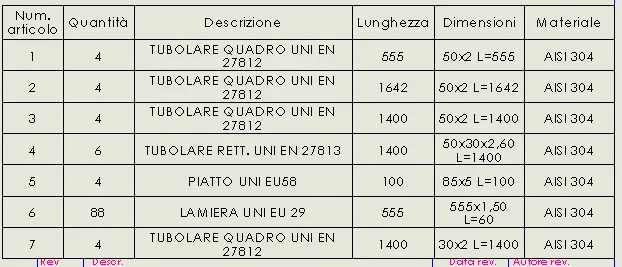
allego 2 images the first is the cutting distinction with the version of solidworks 2018, the other is the same on the aversion 2016
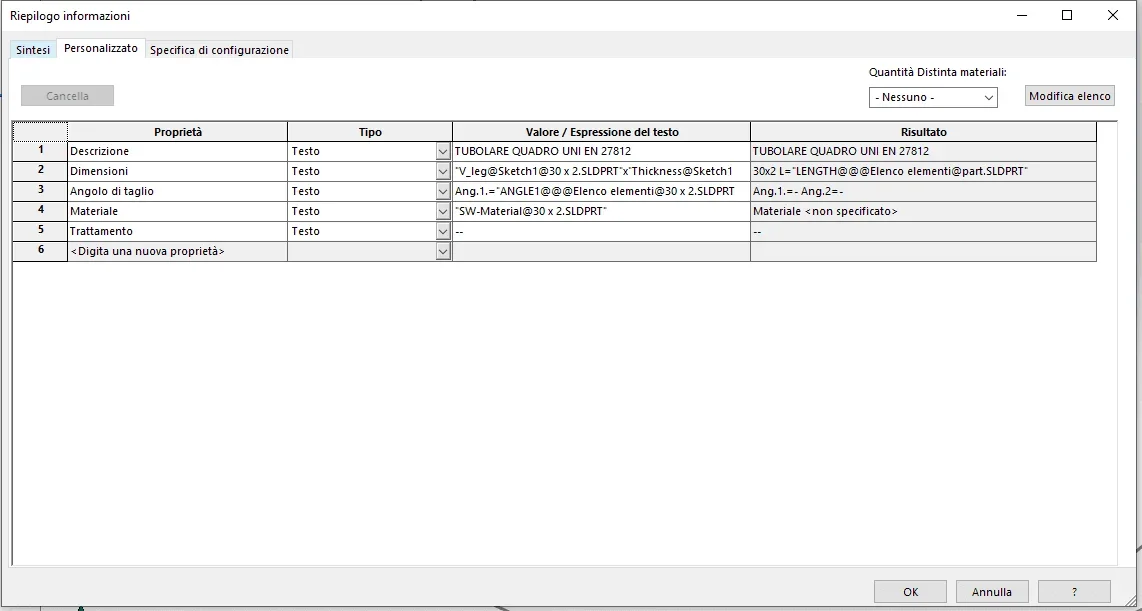
How can I do that to match the two distinct? I also attach an image of the properties of the separate cut in part mode, what is that column with the symbol of a chain? in the favor of the distinct version 2016 does not appear.
thanks to who will help meDISITNTA 2.webpDISTINTA 1.webpproprieta.webp
 
if you attach the file you can study the situation.
the chain simply indicates the connection to the properties.
active check means that all fields are connected and properties have un editable gray background
without check that no field is connected and all properties have white background
with the full picture that some fields are connected (in gray) and others are not (in white)
 
if you attach the file you can study the situation.
the chain simply indicates the connection to the properties.
active check means that all fields are connected and properties have un editable gray background
without check that no field is connected and all properties have white background
with the full picture that some fields are connected (in gray) and others are not (in white)
Hello Mass, thanks for the help
I attached a part made with the 2018 version (tirant) and a made with the 2016 version (shuttura)
then the separate template
 

Attachments

when you have to do analysis of abnormal events between versions it is essential to have the same file or in any case the same situation, in this specific case the stosso profile used, while in your examples it is not so.

the error is in the syntax of the string that brings gift lenght 3 @ instead of 1
file 2018
"v_leg@tubolare square uni en 27812 40 x 2(2)@glm-11.02.04 tirante.sldprt"x"thickness@tubolare square uni en 27812 40 x 2(2)@glm-11.02.04 tirante.sldprt" l="length@@@tubular square uni en 27812 40 x 2(2)@glm-11.02.04 tirante.sldprt"
file 2016
"v_leg@tubolare square uni en 27812 25 x 2(1)@parte3.sldprt"x"thickness@tubolare square uni en 27812 25 x 2(1)@parte3.sldprt" l="length@square tubular uni en 27812 25 x 2(1)@parte3.sldprt"

how to solve it I don't know why you have to see how profiles are managed
 
when you have to do analysis of abnormal events between versions it is essential to have the same file or in any case the same situation, in this specific case the stosso profile used, while in your examples it is not so.

the error is in the syntax of the string that brings gift lenght 3 @ instead of 1
file 2018
"v_leg@tubolare square uni en 27812 40 x 2(2)@glm-11.02.04 tirante.sldprt"x"thickness@tubolare square uni en 27812 40 x 2(2)@glm-11.02.04 tirante.sldprt" l="length@@@tubular square uni en 27812 40 x 2(2)@glm-11.02.04 tirante.sldprt"
file 2016
"v_leg@tubolare square uni en 27812 25 x 2(1)@parte3.sldprt"x"thickness@tubolare square uni en 27812 25 x 2(1)@parte3.sldprt" l="length@square tubular uni en 27812 25 x 2(1)@parte3.sldprt"

how to solve it I don't know why you have to see how profiles are managed
Hello Massive
the files are different because I had to take a file made with the 2016 version and one with 2018, in any case the change of syntax between one version and the other is a fact however atypical.
I'm doing tests by adding 2@ where in the command but nothing changes. If instead I remove the 2 @ to the length item, the returned value remains equal as if the change of command syntax did not produce changes.
I have to understand how to do without having to change all profiles
 
files are different because I had to take a file made with the 2016 version and one with 2018, [/QUOTE.
fai una nuova parte in 2018 usando gli stessi profili della 2016
se cancelli i 2 @ di troppo restituisce il valore lunghezza
 
then I did some tests by changing the properties of the separate cut in part mode:
the item length (not editable) brings 3@, my voice size brings 1@, if I add 2@ nothing changes.
if rendo editable the item length and gate 2@ the returned value remains the same.
deleting the 2@in the length item the command becomes equal to that in the size item and only then returns the required value, and as if they had to match the two commands but the match only happens after changing the lenght command.
in any case how to avoid modifying each file created with the 2018 version?
 
do a part using the same profile used in the example of 2016.
if you continue to give you error you are looking for why 2018 writes 3@ instead of 1@
If you don't make a mistake, the problem might be in the profile.
 
do a part using the same profile used in the example of 2016.
if you continue to give you error you are looking for why 2018 writes 3@ instead of 1@
If you don't make a mistake, the problem might be in the profile.
I'm literally freaking out
I took the same profile as the 2016 version
and here are the profile propertiestub3030.webpthe strange thing is that the lenght command has 3@
I do a part using this element and this is the distinct cuttub30302.webpthe command suddenly contains 1@ and not 3
but to complicate even more things there is this:
add 2 @ to the command, nothing happens,
I delete the two @ added and "magicly" solid returns the value that appears in the item length.tub30303.webp
 
this is the result by changing the string in the example 2018.
see that with only 1 @ the result is correct.
 

Attachments

  • Cattura.webp
    Cattura.webp
    67.8 KB · Views: 4
in the example of 2016 no 30x2 profile is used, but 25x2

attach both the 25x2 profile actually used in the glm-06.01.01 structure.sldprt and that 30x2 of your last post
 
You don't have to do them all at once.
try with someone, already the two attachments could suffice, and verify that it is a version problem. . . .
 
You don't have to do them all at once.
try with someone, already the two attachments could suffice, and verify that it is a version problem. . . .
tried with some profiles, I opened them and saved them with the current version, nothing changes
 
at least this excludes that it is the version.
I had doubted why using them with 2019 did not give me the problem.
 

Forum statistics

Threads
44,997
Messages
339,767
Members
4
Latest member
ibt

Members online

No members online now.
Back
Top