• This forum is the machine-generated translation of www.cad3d.it/forum1 - the Italian design community. Several terms are not translated correctly.

set a thermal analysis

  • Thread starter Thread starter stef_design
  • Start date Start date

stef_design

Guest
Hey, guys, I never did a thermal analysis before today.
so I ask you a hand (always if you have time and want):smile:

It's very simple. I have two bodies (a and b) at two different temperatures.
example:
body to : t=100°c
body b : t=20°c

I wanted to know how much heat transferring the body to the b and what will be the final temperature of the body b?!?

premise: the two bodies are aluminum and have a contact surface.

as imposed the analysis in ansys wb 11.
I tried to import the file into simulation environment but don't know if it's a stationary or transitory thermal analysis? ! ?
thanks for the help:wink:
 

Attachments

  • corpo A e B.webp
    corpo A e B.webp
    33.6 KB · Views: 33
then, if I don't remember the approach should be this:
I write this formulin:

(T2-tf)

where:
q= transferred heat quality
m1= component mass 1
c1=specific heat of component 1
t1=Initial temperature of component 1
m2= component mass 2
c2=specific heat of component 2
t2=Initial temperature of component 2
tf= final body balance temperature

applying this formulin, if you only care about the final temperature of the bodies, you do not need to use ansys. If you just want to use ansys and you only care about tf then the analysis is static.
If you want to see the temporal evolution of temperature in the bodies then do a transient type analysis.

I hope I'm not wrong! :wink:
 
If you just want to use ansys and you only care about tf then the analysis is static.
If you want to see the temporal evolution of temperature in the bodies then do a transient type analysis.

I hope I'm not wrong! :wink:
Thanks stefano. the image model is very simplified. This is just proof. If then I understand the procedure I wanted to apply it to a much more complicated geometry.
I tried to do an analysis with ansys 11.
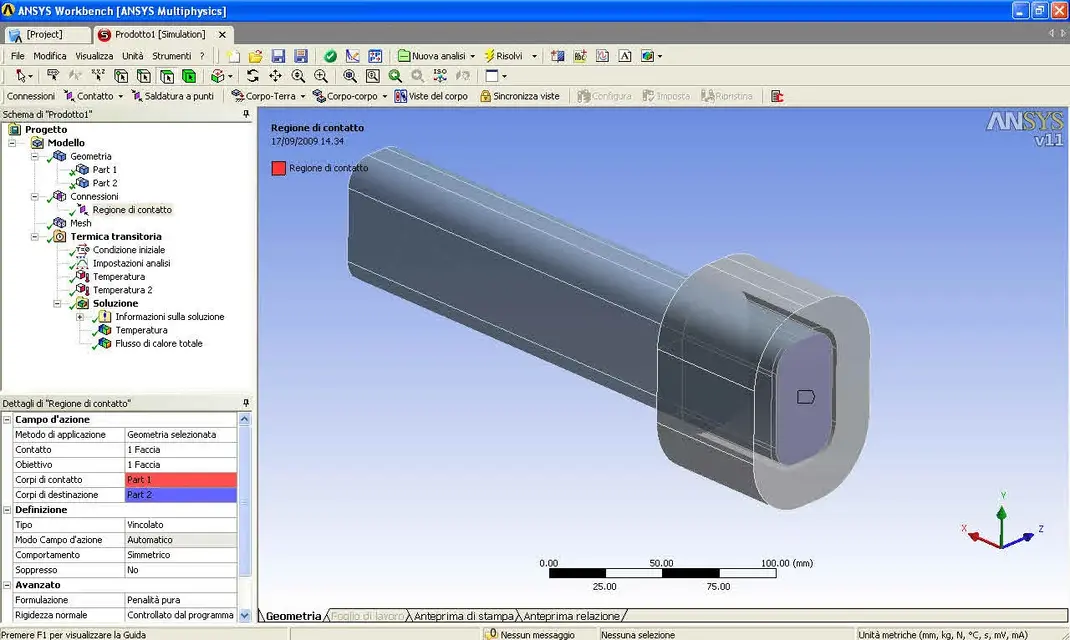
on pdf you can see the various steps. I don't understand where I'm wrong:confused:
Hi.
 

Attachments

Thanks stefano. the image model is very simplified. This is just proof. If then I understand the procedure I wanted to apply it to a much more complicated geometry.
I tried to do an analysis with ansys 11.
on pdf you can see the various steps. I don't understand where I'm wrong:confused:
Hi.
you applied 20 degrees to one body and 100 to the other..

What are the 20 degrees? 100? Are they initial conditions? the temperature of one face? the temperature of the environment around solids?

bio
 
Okay I figured out how to make a thermal transient. proceed as follows:
1-"click on analysis settings"
2-the first head should be called "number of steps": insert 2 (2 loadstep)
3-the field below should be called "current pass" or something like that and there should be written "1", and tells you that the final time of step number one is 1 second. All right, the field below in English is called "auto time stepping", you can put it on off. So in the first step of analysis we set as final time 1 sec. and disabled what is called "automatic time stepping".
4-hour on the field "current timestep", in English "current timestep", enter 2 so you will see all settings for the second step of analysis. as a final time you should give enough time to your bodies to achieve a balance temp. I know... 10 sec. then on "automatic time stepping" you can leave it as it is.
5-click on your first temperature condition: at the bottom right of the screen you will see a small tabellina with the analysis steps and temperature values. to step zero leaves so. in step 1 insert the initial temp of your body. click the right mouse button on step 2 and select the "active/unactive" option: the cell becomes grey which means you have removed the temperature clam in the second step.
6-Thousand Step 5 thing on the other body. during the solution the first step simply establishes the starting condition with the initial temps of the bodies; the second step starts from the first and calculates the evolution in the time of the thermal state of the bodies.

so you will have the solution to your question. ah, check in the results that at the end of the simulation the temps of the bodies are in balance! ! !
 
Thank you very much stefano for your availability. I attached you a pdf.
Try to take a look at him when you have time.
Thank you very much:
 

Attachments

to the eye and cross the two bodies of your model do not "touch".
Expand at the top left the branch of geometry and that of connections.
What do you see about geometry? are two separate bodies or are two bodies within one part? I'm sure you'll see 2 distinct bodies.
then look at the connections: What do you see? Send me an image!
 
to the eye and cross the two bodies of your model do not "touch".
Expand at the top left the branch of geometry and that of connections.
What do you see about geometry? are two separate bodies or are two bodies within one part? I'm sure you'll see 2 distinct bodies.
then look at the connections: What do you see? Send me an image!
Yes, right. are two distinct bodies. :finger:
basically in caia I did the two-piece axieme and then made the iges. Of course, in the cad, I put the bond between the two contact surfaces. This bond then I see there is also in ansys.
Do I have to do something else? ! ?

thanks again:smile:
 

Attachments

  • 17-09-2009 14.35.webp
    17-09-2009 14.35.webp
    97.2 KB · Views: 37
10 seconds seem a few for the second step...
test with 100 seconds
in fact with 100 things have changed. How come?!? and if instead of 100 I put 500 what happens?!? you go by attempts.. .

I have a doubt in the picture 2:
If I put myself, for example, at the second 50, how come the tabellina left does not update?!? I always have to "resolve."

Is everything okay with you?
 

Attachments

  • 1.webp
    1.webp
    105.7 KB · Views: 26
  • 2.webp
    2.webp
    108.5 KB · Views: 22
you go more or less for attempts, guided by common sense.
It's like trying to empty a bottle. if the neck is tight (the contact surface is small) it is clear that it takes more time!
then you have to keep in mind the thermal conductivity of the bodies: a piece of aluminum leads faster the heat of one of wood.. .

If you want to see results in an intermediate time go to the solution branch that interests you, enter the time you want to see, click the right mouse button and evaluate the results.
 
If you want to see results in an intermediate time go to the solution branch that interests you, enter the time you want to see, click the right mouse button and evaluate the results.
do you mean in the image?! dx key above a time and "recall this result"
 

Attachments

  • 17-09-2009 17.40.webp
    17-09-2009 17.40.webp
    117.4 KB · Views: 20
If you want to see how the two bodies behave at a time x test with a static...these settings, put 2 load step by 1 second. .

Of course with the transient you can see the progress over time, with the static no :d

bio
 
Hey, guys.
I took over the thermal analysis and I had some doubts.

1) regarding mesh.
ansys builds the mesh automatically, is there any option to set to have a precise mesh + and therefore also results +precise? ! ?

2) the boiler (which is the assembly for analysis) is inserted inside a box.
inside the box has a uniform temperature of 80°c. instead the room temperature remains.
I could build the box with the cad and import it. but how do I tell him that the air is at t 80°c?!?

thanks again boys:smile:
without you I would be...:36_3_4:
 

Attachments

  • info mesh.webp
    info mesh.webp
    56.5 KB · Views: 7
  • volume.webp
    volume.webp
    40 KB · Views: 10
I forgot to ask you something else:
If I have to simulate water passing through the inernum as I do? ! ?

For example, I could shape to cad the volume of water but then how do I tell him that volume is water? ! ?

thanks:finger:
 
You're getting into the world of the "conjugate heat transfer" and the thing gets complicated. I think ansys alone doesn't do it anymore. here we start with the cfd coupled to the fem... You should use cfx, fluent, starccm or other things like that since you have fluids like air and water at stake.
 
You're getting into the world of the "conjugate heat transfer" and the thing gets complicated. I think ansys alone doesn't do it anymore. here we start with the cfd coupled to the fem... You should use cfx, fluent, starccm or other things like that since you have fluids like air and water at stake.
but without demanding very precise results, you can have a result with ansys wb. For example, I can assign to a volume the "material" water and to another the "material" air.

I improperly use the material term because I thought there was a possibility to assign properties to the parts as you do with the materials.
Thank you.
 
is not a matter of precision, risks taking whistles for whistles and making mistakes of 100%!!! leave the modeling of air and water: on wet surfaces you have to put conditions to the contour of the type "convection", you have to know perfectly the temperatures of the fluids (and hope that they do not vary much along the surfaces on which you put the conditions to the convection), you have to know if the bike is laminar or turbulent, you must then give at least decent estimates of the convection coefficients. . .
for the convection coefficients you realize that the water stops has values of 10:20 while if it is moving goes from 100 to 1000... I'll let you imagine what kind of variability you can have if you miss estimates!
 
Okay, but let's put that I have a normal straight tube inside which it passes water to 25°c.
How can I simulate it? ! ?
 

Forum statistics

Threads
44,997
Messages
339,767
Members
4
Latest member
ibt

Members online

No members online now.
Back
Top