• This forum is the machine-generated translation of www.cad3d.it/forum1 - the Italian design community. Several terms are not translated correctly.

set the scale and units

  • Thread starter Thread starter Ilario
  • Start date Start date

Ilario

Guest
I humbly apologize for the question that may seem stupid, but they are now years old that I no longer go behind the autocad configurations working mainly with inventor. all that is standard I had already set it in its autocad times, but I no longer remember how to set the units of measurement, in the sense that if I make a line and type 10 on the keyboard, those must be 10cm and not 10mm. Is it possible or do I have a wrong memory? I have already tried in format -> unit, but it does not give me the result I want.. .

Thank you.
 
type 10 on the keyboard, those must be 10cm and not 10mm. Is it possible or do I have a wrong memory? I have already tried in format -> unit, but it does not give me the result I want.. .

Thank you.
Do you draw everything in cm?
And you want the odds in cm?
If so, I think the right way is what you've already tried.
What is the result you get and what do you want?

Bye.
 
of quotas I do not need it, I just need the scale 1:1 of drawing is correct, only for convenience of export in real scale.
I have to draw the plant of my house (which I will put in wip of 3dstudio) and I wanted from the plant taking the measure of 10 am 10 cm. I have not yet succeeded... .
I know that drawing in mm then climbing I would be fine without big problems, but I wanted to know if it was possible to draw directly in the correct scale in cm.
 
is a problem only when you import or export the design in autocad or other sw, to make sure you get the right units.
If, for example, you put them in thumbs, when you insert it into another design with mm units, you automatically propose a scale of 25.4
However, the command to set the units is _dddunits
 
Hi.
tools-options-preferences-input scale-(original design unit/destination design unit).
 
is a problem only when you import or export the design in autocad or other sw, to make sure you get the right units.
If, for example, you put them in thumbs, when you insert it into another design with mm units, you automatically propose a scale of 25.4
However, the command to set the units is _dddunits
it is not said, it can be a problem even in the press, if I design by entering the values in cm and then I want to print in room 1:1 I can not, because for him those that I entered in cm are mm. example: I want to make the limits of an a4 I write for lines I create 210 and 297 and mold in scale 1:1 ok, but if I want to draw in cm and write 21 and 29,7, when mold I have to print in scale 1:10.
the command you told me is the same as going in format -> units, but there are only the type of unit of measurement (decimal, fractional, architectural, etc...) but not the "real" units of measurement.
the only one that reports units is the section for inserting objects or blocks where for different scales you just convert the unit.
Hi.
tools-options-preferences-input scale-(original design unit/destination design unit).
same thing, already tried, is only valid for import or export, not by direct design in a certà unit measurement.


I know that there is no way and I remember badly, it draws only in mm and climbs all at the end to have the unity of interest.... .
 
there are no "real" units of measurement in autocad, you always draw in scale 1:1 but you have to decide what your units correspond to (mm, cm or meters) only to set, consequently, the values for the plotting.
 
there are no "real" units of measurement in autocad, you always draw in scale 1:1 but you have to decide what your units correspond to (mm, cm or meters) only to set, consequently, the values for the plotting.
Yes, okay, scale 1:1, but always and only mm or wrong? If you say so it means that I can decide to set that 1 on the keyboard corresponds to 1cm, but my question is: where do I impose it?

I have a logical doubt that perhaps depends on my deficiency; 1:1 scale is always and in any case referred to mm (in the metric system) in each field and application? That is, if I am a mechanic and mechanical design 1:1 is easy that corresponds to 1mm:1mm, but in the architectural context where the mm do not even know what it is (to make an example since the tolerances on a house in mm seem a little absurd) and work in 1:1 cm corresponds to 1cm:1cm or even there is considered as 1mm:1mm?
the doubt comes because if I mold in 1:1 having drawn in cm (1 by keyboard = 1cm for me) in theory if I create a rectangle of 21x29,7 to print an a4 everything should return, instead I have to print in 1:10.

I have the impression that I'm complicating my life alone, but I want to come to the bottom to understand where I'm wrong to reason or where you set in autocad what I want.
 
in autocad you don't have to set anything, we make a practical example, a 3 meters x 4 meters local drawings:

- 3000 x 4000 if you decide that your units are mm
- 300 x 400 if you decide that your units are cm
- 3 x 4 if you decide that your units are meters

the only difference will be when plotting, if you decide to plot in scale 1:100 you have to set:

1 mm = 0.1 units (if drawings in meters)
1 mm = 10 units (if drawings in centimeters)
 
So all I've said right now is right, in autocad you draw for units only in millimeters.

Thank you.
 
So all I've said right now is right, in autocad you draw for units only in millimeters.

Thank you.
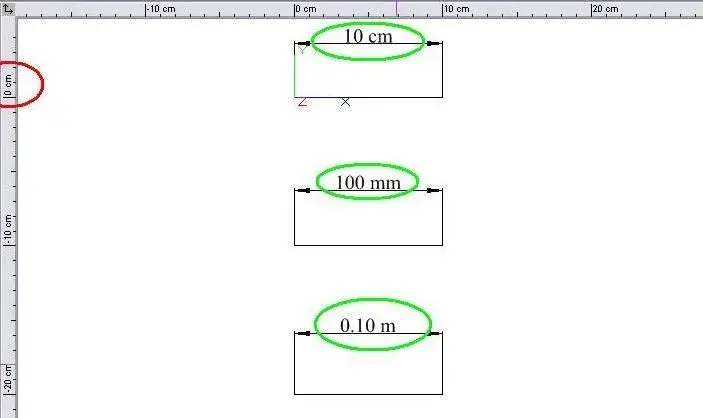
azz... strange that you can't set the value... Since it is possible to do so in turbocad... :confused:

but a curiosity since autocad is a thousand years that I do not use it...
in the window that opens from > unit format (or keyboard unit command) in the unit box to adjust content scale etc... can't you select cm instead of mm? Doesn't it change anything? :confused:
in theory should automatically set printing at 1:10 (at least in turbocad does so)

Hi.
p-h
 

Attachments

  • 1.webp
    1.webp
    12.6 KB · Views: 8
It's strange to me too, but from all the evidence I've done until now and from all the answers I've had, most likely you can't. I do not know in turbocad, but in autocad they set themselves identically, I repeat, my problem (if so you can define, because a quick and painless solution I have already found, I just wanted to know if you could ovviare or not) is the scale of unit to input the keyboard values. only this, I don't have to print anything, I just wanted writing 10 to be 10cm and not 10mm, but obviously you can't. to do better I will do everything in mm and eventually I will scale everything for 10 and just.
 
....I just wanted writing 10 to be 10cm and not 10mm, but obviously you can't. to do better I will do everything in mm and eventually I will scale everything for 10 and just.
I don't know.
in autocad you don't have to set anything, we make a practical example, a 3 meters x 4 meters local drawings:

- 3000 x 4000 if you decide that your units are mm
- 300 x 400 if you decide that your units are cm
- 3 x 4 if you decide that your units are meters...
You're the one who decides what those "10 autocad units have to do."
for whom an "autocad unit" corresponds a centimeter, who a meter, who a millimeter.
the setting difference is only in the printing phase.
a local one, as in the example of gp, can be drawn (from a point of view of "autocad unit" entered) in different ways.
who will type 3000x4000, who 300x400, who 3x4... depending on how you prefer to consider the value you type (that "prefers" then is always linked to the type of jobs that one does.... if design a road track along kilometers would be a bit crazy to consider a autocad unit corresponding to 1 mm)
 
I don't know.


You're the one who decides what those "10 autocad units have to do."
for whom an "autocad unit" corresponds a centimeter, who a meter, who a millimeter.
the setting difference is only in the printing phase.
a local one, as in the example of gp, can be drawn (from a point of view of "autocad unit" entered) in different ways.
who will type 3000x4000, who 300x400, who 3x4... depending on how you prefer to consider the value you type (that "prefers" then is always linked to the type of jobs that one does.... if design a road track along kilometers would be a bit crazy to consider a autocad unit corresponding to 1 mm)
I repeat the last time and then it is enough, because I have understood so much that the question is so and just according to all the answers you have given me:

I realized that I can decide how to work, but in fact if I decide to work in meters and write 1 on the keyboard, in fact, that is not a meter, but I am working not in scale 1:1, but in scale 1:1000 because the only unit he recognizes can be only the mm (or 1 inch, but I am talking about the metric system decimal), but not 1 meter, as if the scale is 1:1 and I write 1 That means I drew 1mm and not 1m. I realized that then in print, export etc... Just specify the scale, but I want more and you can't..... End.
you draw 1:1 scale and you should work in mm...
Exactly, I think this is the end.

So it's not that I decide how much the unit corresponds, but I decide what scale I'm working on, then if I want everything in real scale I have to scale everything at the end or write the values in mm (although they are km) from the beginning.
 
So all I've said right now is right, in autocad you draw for units only in millimeters.

Thank you.
no, you draw in units as you said rightly gp above are not in millimeters nor inches are units.

is the next phase (print) that decides which units are.

that is then we have to consider precision, always from _units are set both units and precision. this allows you to define the accuracy of the units and decimals that you have to manage.

therefore if you diegnify an autodtradale planimetry will manage km and m if you draw a motere tree mm tenth cent etc.... is always linked to the functionality of the units.
 
I have found, I apologize to all for my insistence and stubbornness, you have all explained to me but unfortunately I was thinking with the bows (know, when one is convinced of one thing it is hard to "open the eyes" until he slams our head....).

as you have told me drawing with the unity that I consider more appropriate without worrying. when importing the file into another software I will specify that unit of measurement adopt per detected unit, while for scale printing I must refer to the scale in mm.

Thank you and excuse me again... .
 
I have found, I apologize to all for my insistence and stubbornness, you have all explained to me but unfortunately I was thinking with the bows (know, when one is convinced of one thing it is hard to "open the eyes" until he slams our head....).

as you have told me drawing with the unity that I consider more appropriate without worrying. when importing the file into another software I will specify that unit of measurement adopt per detected unit, while for scale printing I must refer to the scale in mm.

Thank you and excuse me again... .
I don't know if we could forgive you.
but maybe a couple of rounds of beers (and coca-cola, for me not drinking) will benefit to soften us for a possible forgiveness....:biggrin::tongue:
 
I don't know if we could forgive you.
but maybe a couple of rounds of beers (and coca-cola, for me not drinking) will benefit to soften us for a possible forgiveness....:biggrin::tongue:
No prob. Now and place and I will be there....
 

Forum statistics

Threads
44,997
Messages
339,767
Members
4
Latest member
ibt

Members online

No members online now.
Back
Top