• This forum is the machine-generated translation of www.cad3d.it/forum1 - the Italian design community. Several terms are not translated correctly.

setting "from layer" the color changes only partially

  • Thread starter Thread starter reggio
  • Start date Start date

reggio

Guest
hi, I happen to have a strange thing known about "big" axiemi: selecting a "wide" part of the axieme and assigning it color from layer, only a small part of the design changes appearance even if approaching the line and selecting it, it indicates having layers and correct color (but the color displayed is not what you would expect)

...to facilitate understanding I made a video of what happens, would you know how to help me understand how to select everything and assign layers in one shot just avoiding the strange attempts that I am forced to do now?
[video=youtube_share;0eA-tAXpfUk]https://youtu.be/0ea-taxpfuk[/video]
 
Last edited by a moderator:
Remember that attaching the file prevents us from inventing things that do not exist in reality? on, shoot the dwg...
 
compressed due to the size of slightly higher than that granted by the forum,
deformed as a design not owned, but the defect to me makes it equal ...:confused:
 

Attachments

to me correctly modify the color also by selecting all the design.
Let's begin to exclude a few things:
Does it make you the same problem on other designs?
if you cover everything on a new design (where did you verify that everything works) what happens?
If you make changes from the property palette how does it behave?
if you eliminate a lot of the design, so you have a few hundred entities, how do you behave? in case of positive test (modified color) proceed by eliminating less and less until you find the critical point (to understand if it is a limit of number selectable objects for editing)
 
... on "big" axiemi: selecting a "wide" part of the axieme and assigning the layer color, only a small part of the design changes appearance ...
increases the variable value ribboncontextsellim i.e. the maximum number of selectable and editable items from the multifunction bar.
 
I don't use the ribbons, so I don't know the limit she was talking about.
but when you select all objects and change color, can you try to force a regeneration? command rigen.
my impression, watching the video, is that the video card does not transpose the color change. . .
 
hello and thank you all :d
to me correctly modify the color also by selecting all the design.
...and you seemed...
Does it make you the same problem on other designs?
the big ones
if you cover everything on a new design (where did you verify that everything works) what happens?
I go
If you make changes from the property palette how does it behave?
non ho capito...
if you eliminate a lot of the design, so you have a few hundred entities, how do you behave?
funzia
but when you select all objects and change color, can you try to force a regeneration? command rigen.
I had tried before and tried now: unfortunately it is not necessary.

increases the variable value ribboncontextsellim i.e. the maximum number of selectable and editable items from the multifunction bar.
changing ribboncontextsellim solve! sin the max value is 32767
 
changing ribboncontextsellim solve! sin the max value is 32767
if you need a higher value you can create a button with this statement:^c^c(command "_change" (ssget) "" "p" "c" "dalayer" "")I did a test on 700,000 items and it didn't bother.
 
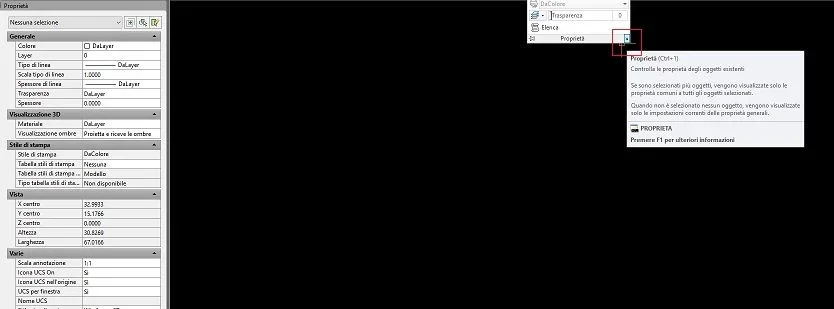
Regardless you have solved the mysterious mystery regarding the properties I mean the one on the left to which you access through the arrow indicated by the red pane.
If the problem is the limit of ribbon objects through that card you should not have had difficulty. Maybe I managed the first shot because I don't use the ribbons on my balesImmagine.webp
 

Forum statistics

Threads
44,997
Messages
339,767
Members
4
Latest member
ibt

Members online

No members online now.
Back
Top