
• This forum is the machine-generated translation of www.cad3d.it/forum1 - the Italian design community. Several terms are not translated correctly.

setting problem on change part in sw

  • Thread starter Thread starter Ermes0732
  • Start date Start date

Ermes0732

Guest
Good morning, everyone.
I have a setup problem on sw 2021.
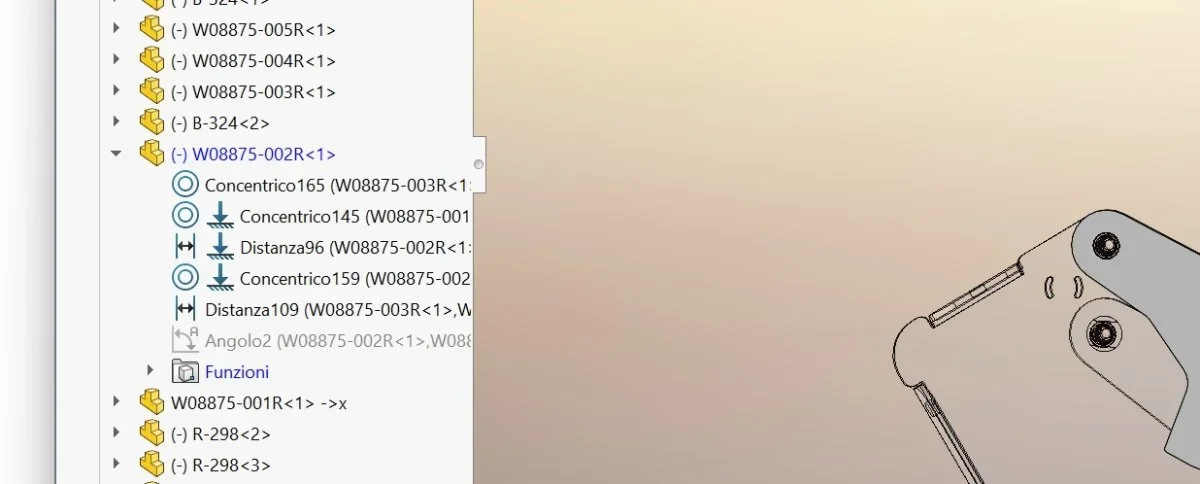
normally when I make a change of part in a set in the feature manager I first find the open functions (of that part) and then the closed constraints.
I've been inverted lately.
first I find the open and colored constraints, and the functions are after closed at the bottom of the constraints.
The thing is annoying because it makes me waste time and I can't find the solution.
I asked some colleagues, but no one knows how to solve it, because it never happened to him.
I have zeroed out the options but nothing.
I think no one knows how to solve this.
of course without reinstalling sw.
Thank you.
 

Attachments

  • prob.webp
    prob.webp
    38.1 KB · Views: 19
Good morning, everyone.
I have a setup problem on sw 2021.
normally when I make a change of part in a set in the feature manager I first find the open functions (of that part) and then the closed constraints.
I've been inverted lately.
first I find the open and colored constraints, and the functions are after closed at the bottom of the constraints.
The thing is annoying because it makes me waste time and I can't find the solution.
I asked some colleagues, but no one knows how to solve it, because it never happened to him.
I have zeroed out the options but nothing.
I think no one knows how to solve this.
of course without reinstalling sw.
Thank you.
it is the display of the tree. you have to click with the dx button the name of the upper axieme in the feature manager ->shaft display->able "view functions". at this moment your selection is on "view couplings and addictions".
Let us know if you solved it.
 
solved! Thank you.
now I can click directly at the precise point in the part to edit and in the feature manager it highlights its sketch.
other problem if you can answer me.
Sometimes I happen on axioms like radial movements with 50 60 pieces, like automatic movements of frames for armchairs.
I happen that the constraints disconnect and the pieces move backwards if dragged from the mouse arrow by a vain towards the opposite and lose the constraints.
if I close and reopen solidworks then everything is settled.
Sometimes it tells me that I have exhausted my memory but I have 64 gb of ram and rtx 5000 from 16gb w11.
Perhaps it is a solidworks disease and all or all those who make certain mechanisms suffer.
Bye.
 
consider that every movement that runs solidworks must carry out a recalculation of all the constraints and positions of the elements, this goes to saturate the cache that vine cleaned up at every restart of the program.
already having all or many untied parts as from your first image is not good for performance, also having the movement tied to the mouse (i.e. the dragging) implies that whenever you touch the model you can make micro movements that must be recalculated.
50/60 details are an inetia, but if they are not fully bound, if you have activated the move by dragging, if you have movements like levers or lightning, you can imagine how much recalculations are and how you can saturate the cache in a moment.
start deactivating the move by dragging and switching on the soosta function and wheel via keyboard (you can also use the numeric keypad without necessarily making a combination); then model by binding immediately or almost every component you insert, you will see that you gain in performance and the problem of the pieces that move on the contrary should disappear.
if you are looking in the forum I have talked about other times of settings to improve performance
 

Forum statistics

Threads
44,997
Messages
339,767
Members
4
Latest member
ibt

Members online

No members online now.
Back
Top