• This forum is the machine-generated translation of www.cad3d.it/forum1 - the Italian design community. Several terms are not translated correctly.

Sfalsata

  • Thread starter Thread starter Sp4rk0
  • Start date Start date

Sp4rk0

Guest
Good morning.
I would have the need to put as welding annotation the staggered welding, I also read in the guide but what it says to do, see attached image, I do not find it right.

I tried to contact the assistance service and did not know how to respond, they simply advised me to create a block with the triangle and add it below.

Do you know if there's any way to insert the staggering into the annotation in any automatic way?

Thank you.
 

Attachments

  • Cattura.webp
    Cattura.webp
    11.6 KB · Views: 41
that I appease the staggered welding is indicated in this way (iso 2553)
 

Attachments

  • Immagine.webp
    Immagine.webp
    40.3 KB · Views: 41
eh, the customer indicates them in a different way, maybe in germany they have another method, even if it should be universal. . .
Thanks anyway.
 
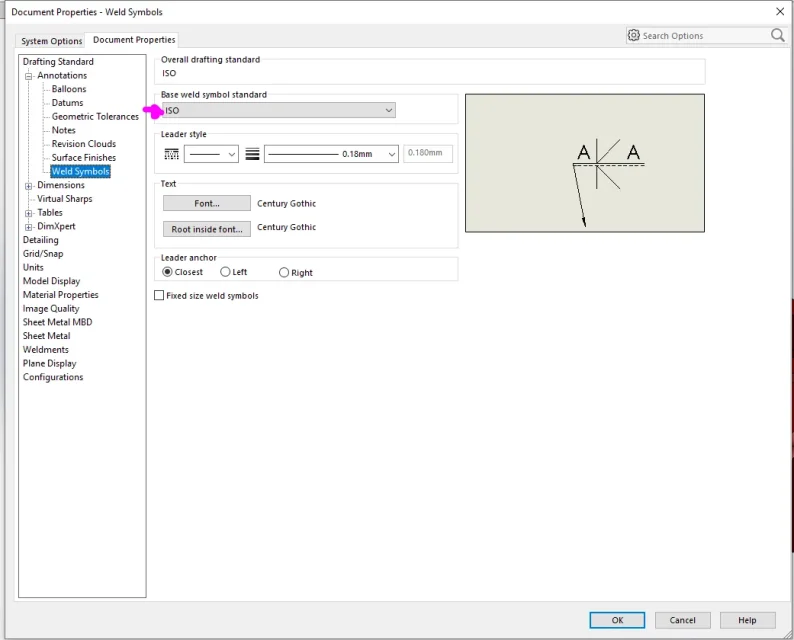
that symbol you can get it if in the properties of the document you put as an application
 
there is no add, probably during installation you did not include anxious libraries
 
I will ask those of the assistance, unfortunately the company pc I do not manage it, I can not install or update the solid
 
in my solid version I can't find it, maybe I miss some add. I designed the hand triangle:-d
I saw this discussion now by chance. to find the symbols, without changing design standards, just select "other symbols" in the welding symbol selection window.
if not enough, you have to go into the document-> annotation-> welding symbols and as standard take hold. This is a setting that will only concern that design.
 

Attachments

  • saldatura.webp
    saldatura.webp
    26.5 KB · Views: 14

Forum statistics

Threads
44,997
Messages
339,767
Members
4
Latest member
ibt

Members online

No members online now.
Back
Top