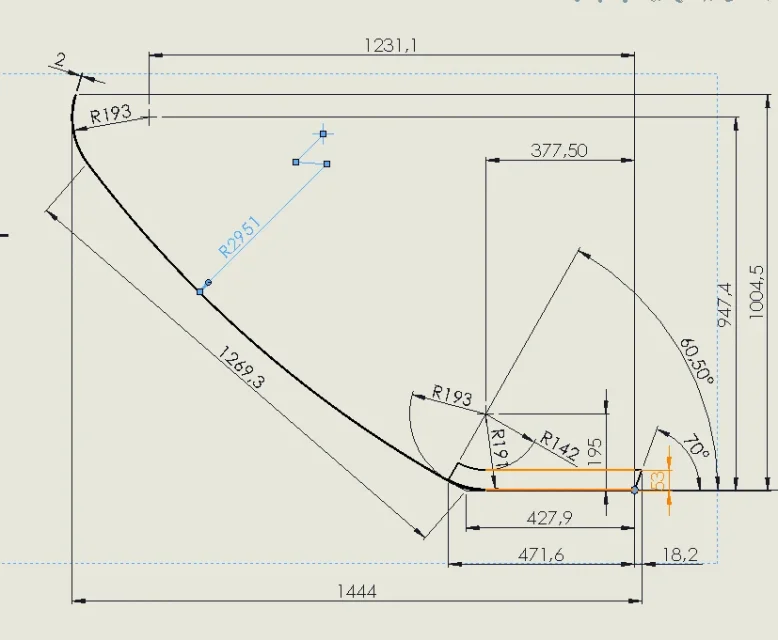
You are right that there are too much odds, but the customer wants them like this... I meant anyway if solidworks allows to make a share like that.. thank many anyway for the answer-according to the baldassini, yes.
then on that design I see a little too many quotas, but maybe it is wanted to provide the maker more reading keys.. .
I've explained badly maybe. what I would like to do is to quote the origin or the quota from radius center to a fixed reference.Sorry, I misunderstood your question.View attachment 59567
hi Masses, which image do you refer to?Of course you can.
Where did that image come from?
the first, the one where you see the radius of shortcuthi Masses, which image do you refer to?
is the table in question. .the first, the one where you see the radius of shortcut
Thank you so much, as usual number one!quoti by selecting the radius center of the angle and the reference element; to remove the center of the quota text otherwise you will go mad to fix it wherever you want
in the figure in black the quotas from the real center and in brick red those from the center of the quota
Wait for Mass.. But how do you get the odds in red? to me only the odds in black or the standards..quoti by selecting the radius center of the angle and the reference element; to remove the center of the quota text otherwise you will go mad to fix it wherever you want
in the figure in black the quotas from the real center and in brick red those from the center of the quota
I don't mean the color,, I just can't make the odds that I'm on the sheet. .the red quotas are the guided ones and are my color setting.
I don't even remember because I had changed color from natural gray; I've gotten so used to it that I don't mind