• This forum is the machine-generated translation of www.cad3d.it/forum1 - the Italian design community. Several terms are not translated correctly.

share <reali> on projected table/isometrica</reali>

  • Thread starter Thread starter saracf
  • Start date Start date

saracf

Guest
hello to all, as a monster in the annex I would like to create quotas
and,
or better still quotas
f,g (even if I can't even create axles because it is ironed sheet)
while I can only quote
a,b,c,d which, however, are wrong quotas:

how would you correctly insert quotas and,h,f,g?
 

Attachments

  • quote ortogonali.webp
    quote ortogonali.webp
    69.4 KB · Views: 29
hello to all, as a monster in the annex I would like to create quotas
and,
or better still quotas
f,g (even if I can't even create axles because it is ironed sheet)
while I can only quote
a,b,c,d which, however, are wrong quotas:

how would you correctly insert quotas and,h,f,g?
you have to create, by sketching on the drawing sheet, a point so you can hook up with the quota line.
 

Attachments

  • quota.webp
    quota.webp
    50.3 KB · Views: 20
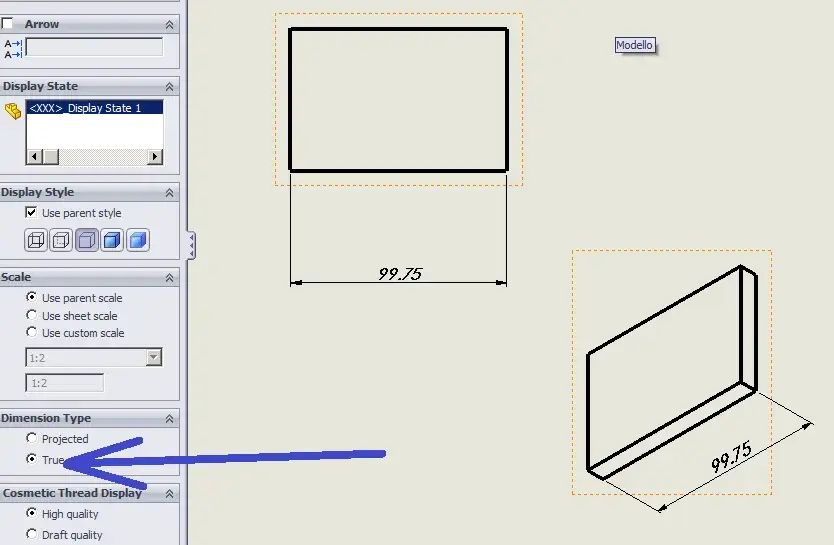
in the properties of the assonometric view, you have to choose to use the real dimensions instead of the projected ones.
 

Attachments

  • Immagine.webp
    Immagine.webp
    26.4 KB · Views: 31
so you see better... .
hello to all, I go out a little from the title of tread to ask:
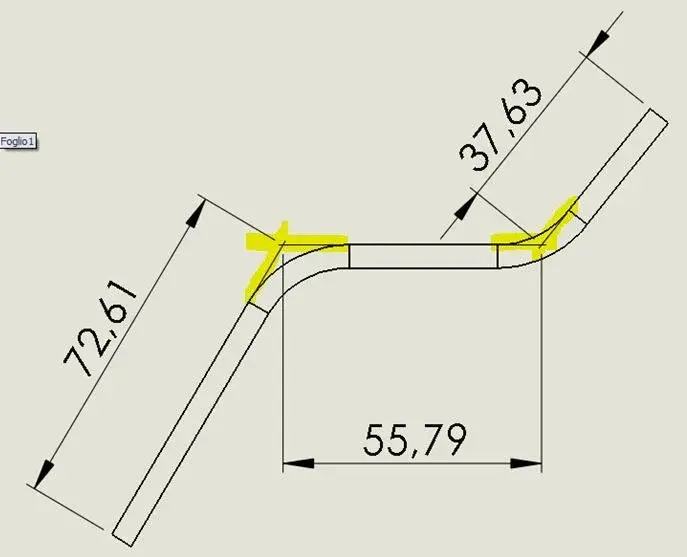
is there nothing that facilitates the creation of the "theoretical stones" made with line of half-work to quote the exact length of the side of the fold?

nothing automatic?
 

Attachments

  • creaspigolo.webp
    creaspigolo.webp
    16.3 KB · Views: 6
hello to all, I go out a little from the title of tread to ask:
is there nothing that facilitates the creation of the "theoretical stones" made with line of half-work to quote the exact length of the side of the fold?

nothing automatic?
search for "virtual sharp" in the help, now I don't remember exactly the Italian word that is used in the guide.
 
search for "virtual sharp" in the help, now I don't remember exactly the Italian word that is used in the guide.
Thank you very much
tools, options. in the document property tab, select virtual sharps. + ctrl key and select two sketch entity + click point.
 

Forum statistics

Threads
44,997
Messages
339,767
Members
4
Latest member
ibt

Members online

No members online now.
Back
Top