• This forum is the machine-generated translation of www.cad3d.it/forum1 - the Italian design community. Several terms are not translated correctly.

share transparency in a product

  • Thread starter Thread starter MorganPa
  • Start date Start date

MorganPa

Guest
Bye to all,
I have a seemingly trivial question but it often makes me sclerable and I have not found a solution neither from me nor in the forum:
if I am in a product (classical visualization shading with edge) and, to make verifications I want to put in transparency (opacity at 75%, 50% and so on) only a part of the product, why do I change the display of all the product and not only the part?
I tried to activate myself first on the general product, then on the secondary product, then on the same part but the situation does not change.
that then the thing that perplexes me is that I happen to do it occasionally, so I don't understand what logic it uses for this function.

second question, is it possible to put even within the part a face in transparency? even there, sometimes he did, sometimes not!

Thank you all for your help!
 
strange, to me it works:unsures:
in a product if they place me on the catpart or on a catpart face. I can put transparency.
the version I use is 2017
 
Hi.

If you haven't followed the logic of fathers and children, you may have messed up everything. . .

Let's start with: if you select a face you can make it transparent but you have to do it with the active part, this will always remain transparent (even if you load it in the product)
to return the selections and bring it back to "automatic", or if you have done so with so many faces, select the solid or the geometric group then button dx - object - restore properties - apply to child elements but attention, report everything: colors transparency etc. at origin.

and now we pass to the product: all the coloring or transparency you do, have effect only in the product (the part only undergoes it within that product)

so it goes from if I have to make a part transparent in the product, they select it from the tree and the transparent kidney.

if I have a product father and child products with inside the parts, I will select the parts from the tree that I want to make transparent and transparency will be stored only in the product father.
If I want it to remain stored in the child product, I must activate it apply transparency and then save it (and in the father product I must also recharge it if not remains with the attributes assigned to it by the father product.

Now I suggest you bring everything back to origin and try again with this logic.

to return to the origin: select the product father, button dx - mode selection - all and then from the graphic properties transparency - automatic

Let me know.
 
Hi.

If you haven't followed the logic of fathers and children, you may have messed up everything. . .

Let's start with: if you select a face you can make it transparent but you have to do it with the active part, this will always remain transparent (even if you load it in the product)
to return the selections and bring it back to "automatic", or if you have done so with so many faces, select the solid or the geometric group then button dx - object - restore properties - apply to child elements but attention, report everything: colors transparency etc. at origin.

and now we pass to the product: all the coloring or transparency you do, have effect only in the product (the part only undergoes it within that product)

so it goes from if I have to make a part transparent in the product, they select it from the tree and the transparent kidney.

if I have a product father and child products with inside the parts, I will select the parts from the tree that I want to make transparent and transparency will be stored only in the product father.
If I want it to remain stored in the child product, I must activate it apply transparency and then save it (and in the father product I must also recharge it if not remains with the attributes assigned to it by the father product.

Now I suggest you bring everything back to origin and try again with this logic.

to return to the origin: select the product father, button dx - mode selection - all and then from the graphic properties transparency - automatic

Let me know.
Hello, gianni55, thank you for your help.
but it doesn't work.. .
first of all we start with clarifying the first doubt in relation to transparency... Sometimes I get the transparency of the single face with the solid rest (like I prefer)trasparenza 1.webpsometimes I happen transparency with all the wireframe style part (see below)
trasparenza 2.webpWhy? how do I choose the first display instead of the second?

then, following your subdivision, we start from the parts:
the transparency of individual faces works me in part where the body contains details in step, in body with some operations, makes me transparent all the part (see below)
1.webp
2.webpI would always like the first visualization ipology (the one with the yellow part and the blue background).

in the product instead, regardless of where I active (I tried both on the main product, and on the secondary one and also on the single part) but if I go to change the opacity from 100% to less, I change all the product, not only the part that interests me or even the individual faces, and also if I open the part from the product in a new window and the transparent rendo, the changes are not kept in the moment I return in the product window. .

Thank you very much for your help! :
 
Hi.

the first image (the one you prefer) is obtained by selecting the face and giving it transparency but in shading mode with edges,
while the other you say happens to you sometimes is shading mode with edges and hidden edges, in fact you see that all hidden lines covered: are two different conditions. . .

now we pass to the product: single faces from the product you can not do!
the rest has to do it by force as the product (which becomes blue) but then you have to select the part on the tree (the part and not the product)
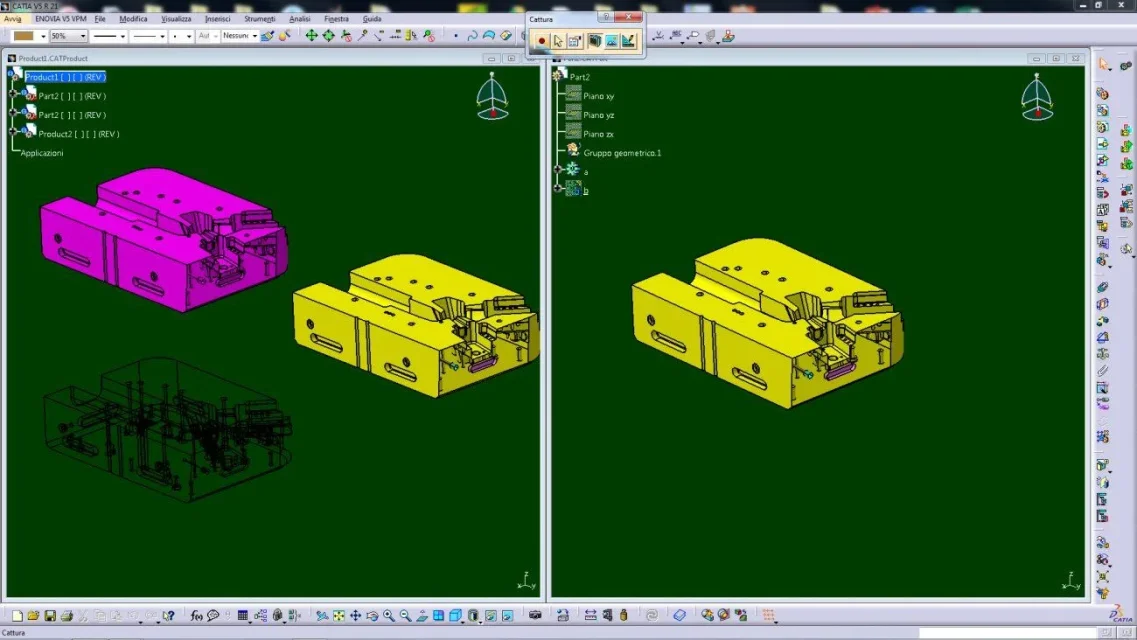
Capture_008.webphere as you see the part is yellow with transparent face, in product 1 is both natural and colored of magenta, in product 2 is all transparent.

Let me know.
 
Hi, gianni55,
thanks for the explanation.
I made you a couple of pictures, so maybe you know if there's a mistake, because I feel like I'm doing what you're saying...
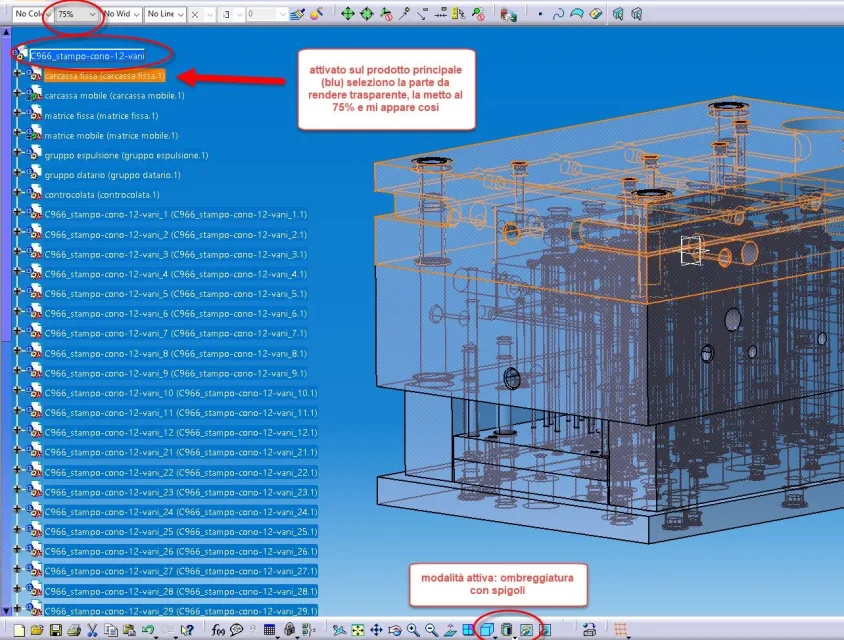
So, just to start, as they recommended in other forums, I go to the main product --> select everything --> opacity 100%, then I put myself in the mode you say: shading with edges (see photo)prodotto 1.webpthen, activated on the main product (blue), select the part to make transparent and put to 75%, the result is this:prodotto 2.webpWhere's the mistake?
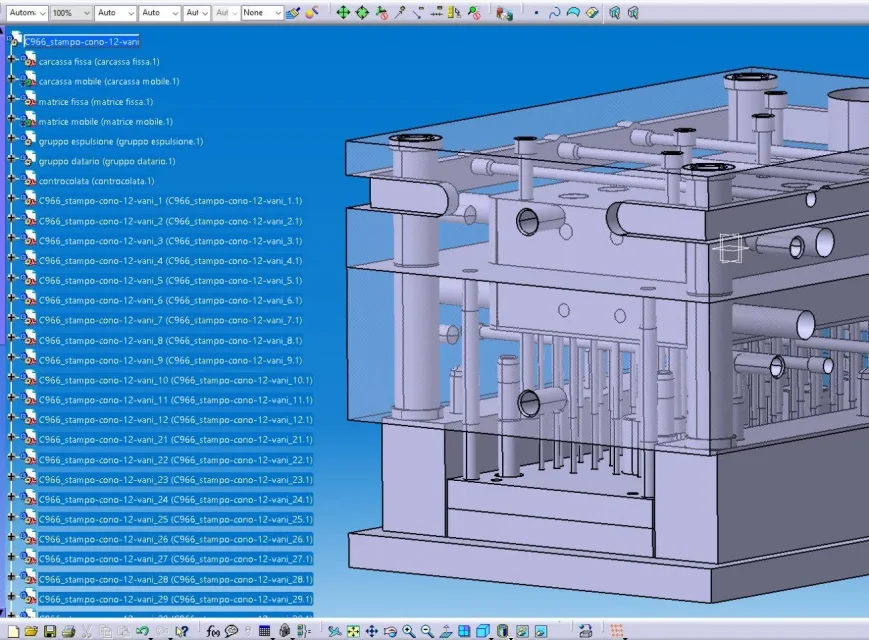
to emphasize that however before doing "select everything, opacity 100%", somehow I managed to make transparent the various parts I needed (see picture below), so I don't think it is a tree problem.prodotto 3.webpsame thing also happens in the single part, you see me exactly as in the product if I go to open a part in another window and transparent rendo.

thanks for the help
 
Hello, morganpa.

first image ok (no transparency)

second image is the problem: transparency throughout the product and in low transparency mode (screen door)

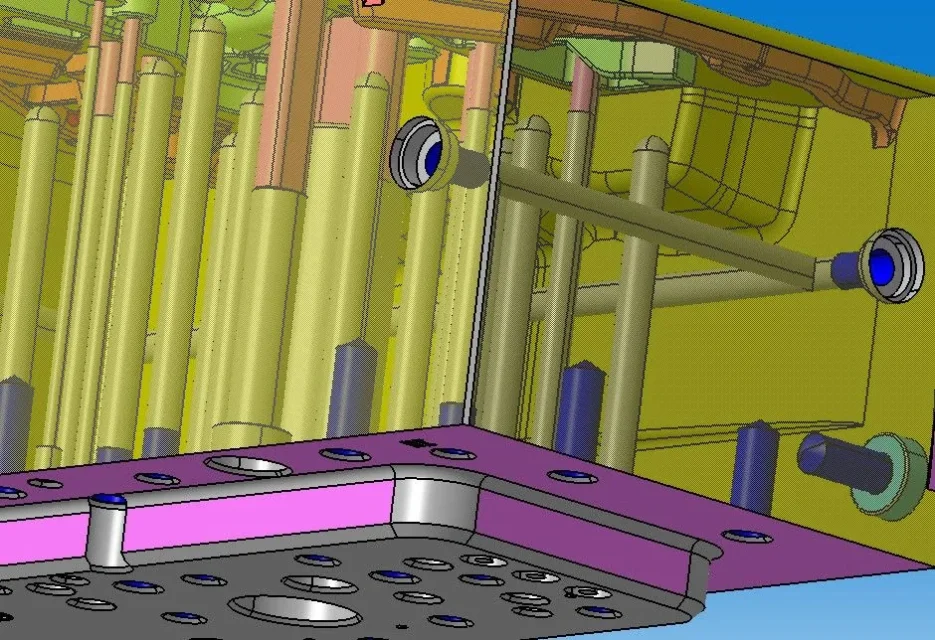
third image: part with faces in transparency: This can only have been done with the active catpart, but here it is in high transparency (alpha blending)

the strange thing is that: in the options or impose one or the other.. .


try to go to menu - tools - options - general - performance and restore default values (box button on the left)

and do some evidence

Let me know.a.webp
 
Hello, morganpa.

first image ok (no transparency)

second image is the problem: transparency throughout the product and in low transparency mode (screen door)

third image: part with faces in transparency: This can only have been done with the active catpart, but here it is in high transparency (alpha blending)

the strange thing is that: in the options or impose one or the other.. .


try to go to menu - tools - options - general - performance and restore default values (box button on the left)

and do some evidence

Let me know.View attachment 59519
I have restored it, but of that tendon there the only thing I change tendingly is the accuracy of the 3d (what you have, like me, on fixed at 0.02).
restoring it gives me the same problem, but experimenting at this moment I noticed that it brings me back to the third image (without activating myself on the cat, but remaining on the product) maintaining the opacity of the car product (which leads me to no opacity), instead of 100% as I set. I don't know for what reason, but if I impose the opacity of the project to 100% and then I go to change the opacity of a single part, I return to the situation of the image 2...
Now I try to see if this happens also other product
 
Hi.

But why didn't you just follow what I wrote to you in the first post?

that is:

"Now I suggest you bring everything back to the origin and try again with this logic. "
"to return to the origin: select the product father, button dx - selection mode - all and then from the graphic properties transparency - Automatic automatic"

this used to reset all graphic properties until then applied. . .
 
Hi.

But why didn't you just follow what I wrote to you in the first post?

that is:

"Now I suggest you bring everything back to the origin and try again with this logic. "
"to return to the origin: select the product father, button dx - selection mode - all and then from the graphic properties transparency - Automatic automatic"

this used to reset all graphic properties until then applied. . .
I did it because I read it, but here not on another post. the error was to put 100% instead of automatic.
but I do not understand why if you put 100% and only select one part from the product, you change all the product instead of just the part keeping the product to 100%. .
 
I tried to recreate your condition but I couldn't. . .

the graphic properties will have their fathers/children hierarchy and the automatic value reset the properties (fall for everything, color, lines, transparency etc.


or by force of evidence had messed up everything, otherwise check to be updated (service pack, driver card etc.)

But now it works? ? ?
 
I tried to recreate your condition but I couldn't. . .

the graphic properties will have their fathers/children hierarchy and the automatic value reset the properties (fall for everything, color, lines, transparency etc.


or by force of evidence had messed up everything, otherwise check to be updated (service pack, driver card etc.)

But now it works? ? ?
Hi.
Yes, I reset everything and use that product method without opacity and modify it in the pieces... Now it seems to work!
Thank you.
 

Forum statistics

Threads
44,997
Messages
339,767
Members
4
Latest member
ibt

Staff online

Members online

Back
Top