
• This forum is the machine-generated translation of www.cad3d.it/forum1 - the Italian design community. Several terms are not translated correctly.

share value and lines of halfway below

  • Thread starter Thread starter AndreaG85
  • Start date Start date

AndreaG85

Guest
Good morning.
I find myself in difficulty because I am cheisto of maintaining the diametric or however symmetrical quotas in the half-works, but so the axis and the value indicated of the quota inters.
Does anyone of you know if there is any way to create "a break" of the half-axis around the odds valleys?1648197748790.webp
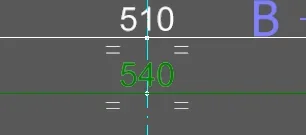
 
the client has inventor and autocad mechanical. autocad mechanical can do it. I don't know how to do it in inventor (I don't use autocad)
 
the client has inventor and autocad mechanical. autocad mechanical can do it. I don't know how to do it in inventor (I don't use autocad)
without entering into the merit of inventor, which I do not know, in autocad, both mechanical and normal, the operation is as follows:
at the height there is a background of the same color of the background of the design and therefore mon is the line that is interrupted, but the quota that hides it.
you have to imagine the quota cime a rectangle containing a text; normally this rectangle is transparent because the quota is placed without overlapping with other entities. However, for the most diverse reasons, you can give a background to the rectangle (for example red background and yellow text); said this you can assign to the rectangle the same background of the screen (so in print you will not notice) and then say that the quota is in the foreground compared to another entity.
I don't know how much help you can.
 
I did some proof but I can't. the behavior indicated by stones (I never realized it worked so, thank you) seems to extend in part to inventor, in fact the text covers the restraint of the section; However in styles I did not find flags to extend it also to the axes, neither under the voice quotas nor text... and I didn't find a way to fill the background of the quota.
Maybe someone else comes up with other ideas.
as an emergency you could do the axes like sketches and manually manage the thing, but I wouldn't wish it to anyone.
1648211766619.webp
 
without entering into the merit of inventor, which I do not know, in autocad, both mechanical and normal, the operation is as follows:
at the height there is a background of the same color of the background of the design and therefore mon is the line that is interrupted, but the quota that hides it.
you have to imagine the quota cime a rectangle containing a text; normally this rectangle is transparent because the quota is placed without overlapping with other entities. However, for the most diverse reasons, you can give a background to the rectangle (for example red background and yellow text); said this you can assign to the rectangle the same background of the screen (so in print you will not notice) and then say that the quota is in the foreground compared to another entity.
I don't know how much help you can.
I imagined a trick like that. only problem can not find how to make in inventor, because in the characteristics of the text I did not find the possibility to change the background color
 
I think there is something in my settings with inventor 2022 the axis lines stop automatically behind the quota.
 
I imagined a trick like that. only problem can not find how to make in inventor, because in the characteristics of the text I did not find the possibility to change the background color
you tried to do a search with terms inventor dimension background mask
 
I found only one online thread that talks about it, for inventor. but it is for notes with leaders or without, not directly for dimensional quotas where precisely the possibility of change of the background color is just removed from the menu
 

Forum statistics

Threads
44,997
Messages
339,767
Members
4
Latest member
ibt

Members online

No members online now.
Back
Top