• This forum is the machine-generated translation of www.cad3d.it/forum1 - the Italian design community. Several terms are not translated correctly.

shared with model managers

  • Thread starter Thread starter Shaba
  • Start date Start date

Shaba

Guest
Hello everyone
we just went to workmanager model manager

All right, but I have a problem
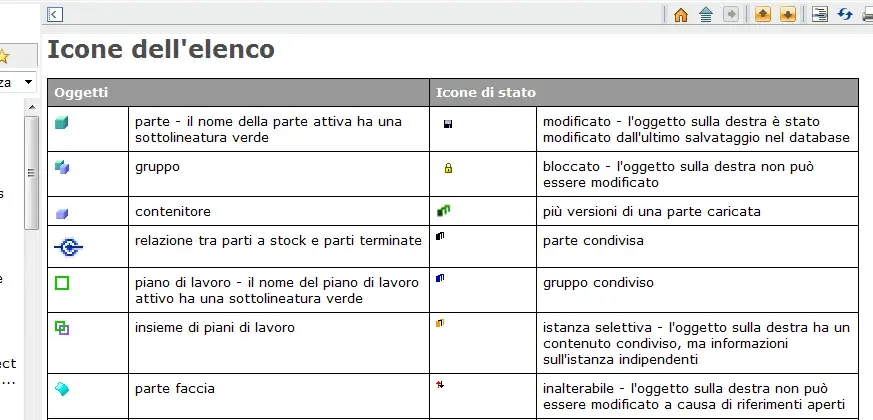
if I load a part from mm and then load the same part, saved in local before the passage to mm instead of sharing it keeps me divided like a sort of "version"
and adds me 3 species of green squares

I had the same id could not simply share it as he did before with workmanager?

"bla bla blah blah was caric. previously and was self-shared (instead of charging it)"

Now he doesn't do it anymore.

How could I solve this?

Thanks :cool:
 

Attachments

  • Image1.webp
    Image1.webp
    4.8 KB · Views: 5
Hello everyone
we just went to workmanager model manager
Actually, to look at the guide, it seems an indication relative to the different versions.

time ago I had lost time behind mm, and I remember that it was possible to set different loading rules, and especially rescue.

by default, every time you save a 3d, mm does a marginal revision (I think you call it that) automatically. if you simply want to overwrite you should select the item in the drop-down menu of the save window. now, I remember that it was possible to choose as a default option to save the "overwrite" instead of making a marginal revision, you should look for the option.

In your case, it is likely that the system has created a new revision of the part, and then having uploaded the same part, but with a previous revision level, the two shared parts appear distinct in the model tree.

I hope I've been helpful, but pdms aren't exactly my favorite soil.
 

Attachments

  • guida.webp
    guida.webp
    41.7 KB · Views: 7
opppss, I confused revision with version, now comes the president and degrades me.... :frown:
 
according to your image it seems to me to be a version
The good thing is that in the v17 manco's help, that icon appears to me. .
 
help me!
I have seen that on an old pc without mm does not make me this problem
in the sense that I share quietly

what could depend on?
Setting?
 
hi, it is a standard modeling operation introduced by version 17
if you upload a mm model you enter information that in the local model saved in a pre-17 case there is no reason why he keeps them as versions. from what I know you cannot disable it.
This behavior does not happen if the local model was saved after loading by pdm version >17
 

Forum statistics

Threads
44,997
Messages
339,767
Members
4
Latest member
ibt

Members online

No members online now.
Back
Top