
• This forum is the machine-generated translation of www.cad3d.it/forum1 - the Italian design community. Several terms are not translated correctly.

sheet metal profiles

  • Thread starter Thread starter mandorlim
  • Start date Start date

mandorlim

Guest
Hello everyone.
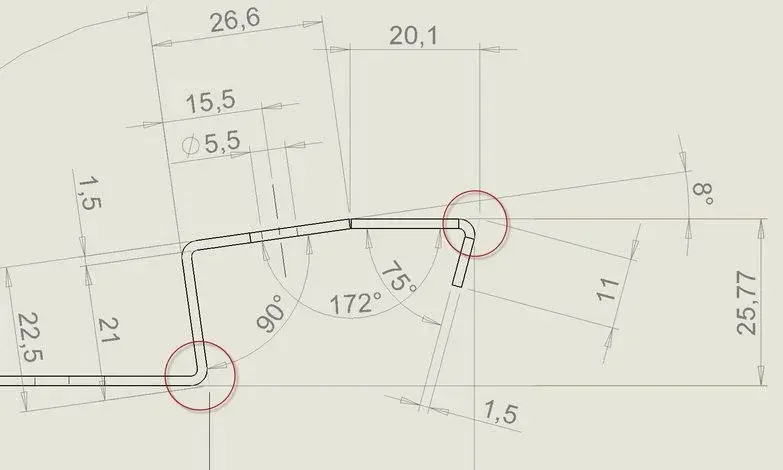
I kindly asked if someone knows how to quote with solidworks the intersection points between non-orthogonal lines and radiated between them.... I'll explain.
being the corners of the parts in radiated sheet metal and not to live edge, I would need to go to take with the quotation the intersection point between two straights, but until now with solidworks I did not succeed.
I can only if I manually design the extension of the lines using the sketch, but it's not the maximum ...
Does anyone know the correct procedure to quote intersection lines?
 

Attachments

  • linee_intersezione.webp
    linee_intersezione.webp
    19.8 KB · Views: 94
in the table create a point * that belongs to the vertical line and that belongs to the horizontal line. so you get the point of the false edge that you can quote as a geometric element.

it is to try the method of automatic centering notches configured with the extension of the straights and dot creation. should be automatic because just click on the radius, but I never tried it if it then makes you quote the point.

the first method works

However it is good to quote the development of the sheet, while the "fold" should be quoted only if you do not have the parameters of development and in a sensible way, without using 1000 odds as I see in the example attached by you
 
Hello everyone.
I kindly asked if someone knows how to quote with solidworks the intersection points between non-orthogonal lines and radiated between them.... I'll explain.
being the corners of the parts in radiated sheet metal and not to live edge, I would need to go to take with the quotation the intersection point between two straights, but until now with solidworks I did not succeed.
I can only if I manually design the extension of the lines using the sketch, but it's not the maximum ...
Does anyone know the correct procedure to quote intersection lines?
It happens often.
if you select a board, then the other holding ctrl and then go to the "point" tool, it will appear to the resulting intersection.
I set a y key on my keyboard so in a few moments
I find the point where I need it.
 
thank you 1000!!!!, now I try.

for how it is better to quote .... depends on who will make the piece.... the caves that will use for bending, knives and retreats, each workshop has its own tables...
it is useless to quote the flat model as almost all require the model explained in dxf or dwg and then adjust the retreats in case the explanation method used by them does not correspond to the one used in the cad.

the table with the bending quotas, serves precisely to the bending and to those who will have to do control ... are not useless.

thanks and hello
 
I agree, I also quote the drawings for our folder, when they are particular pieces, I carry out a print in scale 1:1.
:smile:
 
It happens often.
if you select a board, then the other holding ctrl and then go to the "point" tool, it will appear to the resulting intersection.
I set a y key on my keyboard so in a few moments
I find the point where I need it.
thank you 1000!!!!, now I try.

for how it is better to quote .... depends on who will make the piece.... the caves that will use for bending, knives and retreats, each workshop has its own tables...
it is useless to quote the flat model as almost all require the model explained in dxf or dwg and then adjust the retreats in case the explanation method used by them does not correspond to the one used in the cad.

the table with the bending quotas, serves precisely to the bending and to those who will have to do control ... are not useless.

thanks and hello
the point that signaled you mike is called virtual sharp and you can define in the options the default appearance of that entity.
 

Forum statistics

Threads
44,997
Messages
339,767
Members
4
Latest member
ibt

Members online

No members online now.
Back
Top