
• This forum is the machine-generated translation of www.cad3d.it/forum1 - the Italian design community. Several terms are not translated correctly.

sheet thickness and configurations

  • Thread starter Thread starter tanticapelli
  • Start date Start date

tanticapelli

Guest
Bye to all,

I'm wrong or in the parameters "lamiera" (as mentioned in the feature manager of a sheet part) can specify only the radius in relation to configurations and not the thickness? and the same thing also happens on the basis-flangia (where could I possibly overwrite the thickness)?

Thank you.

so many hairs
 
and certain that the sheet has the same thickness, it has always been so. unless you make a multibody
 
double click on sheet metal, the thickness appears (with a symbol of global value), you change it and just tick it to this equation
 
In post #4 I wrote a half-crown, I apologize.
as written instead in the post #6 you can do it by recalling the quota with double click on the sheet function.
in that case the possibility of specifying the configuration appears in the editor of the quota, which in the property manager of the function is not present (while there is the radius as you could notice).
strange that with all users who make mental pippe on the most absurd requests and fantomatic bugs or shortcomings no one has ever noticed this actual lack.
I'll get you a file to show you how it works
 

Attachments

In post #4 I wrote a half-crown, I apologize.
as written instead in the post #6 you can do it by recalling the quota with double click on the sheet function.
in that case the possibility of specifying the configuration appears in the editor of the quota, which in the property manager of the function is not present (while there is the radius as you could notice).
strange that with all users who make mental pippe on the most absurd requests and fantomatic bugs or shortcomings no one has ever noticed this actual lack.
I'll get you a file to show you how it works
I understand massive, thank you for sending me the example.
as I always say, attach the files object of the problem otherwise you do not understand anything!!! aaahhhrrrrrrrrrrrrrrrrrrrrrrrrrrrr

Thanks again

so many hairs
 
Good evening, I apologize if I take a post two years ago, but I have the same problem. from the example is clear, there is the quota and it is possible to change it for each configuration. but on my specific design, with double click on sheet, I only get out the portion of the fold radius and factor k, no thickness quota. How do I do that?

Thank you so much!
 
specifies the version of solid (to be written in the profile), could be a bug
by the example is clear,
means that in the example, which I imagine you refer to the post #7 file, does it work?

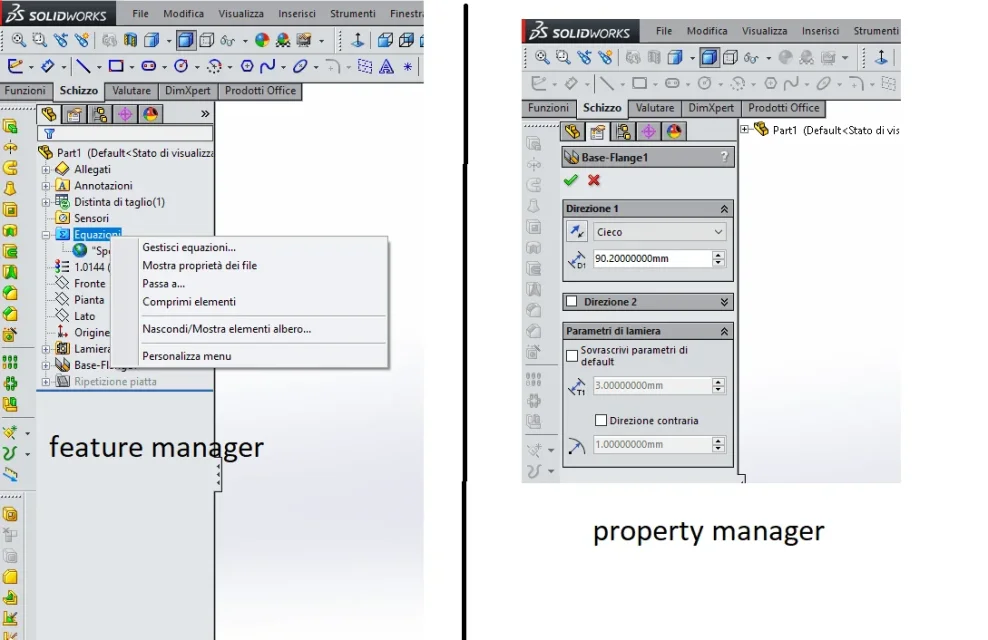
attach image of what appears to you with double click and image of the equation card

in future memory, use correct terms otherwise you risk wasting posts just to understand what you are talking about; This is not drawing, but part file.
 
Sorry, I don't usually write on the forums. However, 2018 version of sw (hide profile).
Yes, as an example, I mean the file you uploaded in post #7.

I found the solution myself. Basically:
  1. right click on the "equations" from the right menu (property manager?) and click on "manage equations"
  2. select the tab, through the buttons on the top left, "view of the quota"
  3. I look for in the list the quota "spessore@lamiera"
  4. select the box with the set value,
  5. change from "all configurations" to "this configuration"
  6. imposed the thickness of the selected configuration
thanks the same for the prompt answer!
 
It is however very strange that with double click on the sheet function does not appear the value.
Yes, as an example, I mean the file you uploaded in post #7.
but you did not answer my question: in that file the double click displays the quota?
right click on the "equations" from the right menu (property manager?) and click on "manage equations"
Maybe you mean left. That's the feature manager. for property manager means the settings tabs of the individual functions
 

Attachments

  • Immagine.webp
    Immagine.webp
    65 KB · Views: 12
your example, part file you uploaded in the post #7, with the double click display the quota together with factor k and bent radius. performing the same operation on my part file, only bend radius and k factor are displayed.

Yes, I meant the menu on the left, I messed up. feature manager, fixed, and who forgets it (cit.).
 
does it, not display the thickness, even with other files?
if the answer is yes:
were made with the same template?
if you use a different template still does it?

If you can attach the file I try to take a look at
 

Forum statistics

Threads
44,997
Messages
339,767
Members
4
Latest member
ibt

Members online

No members online now.
Back
Top