• This forum is the machine-generated translation of www.cad3d.it/forum1 - the Italian design community. Several terms are not translated correctly.

shift component in the shaft

  • Thread starter Thread starter fidippide
  • Start date Start date

fidippide

Guest
Good morning, I wondered how a component could be moved into a catproduct. Thank you very much!

 
dear gianni, I tried but for the component I would like to move on the tree does not work. the component in question is marked by a different icon, with a red symbol inside. What does that mean? I attach image. Thank you!Image 1.webp
 
but in the image I see nothing particular. all icons are to indicate a component normally inserted in a catproduct.
 
but in the image I see nothing particular. all icons are to indicate a component normally inserted in a catproduct.
I can't move with the procedure indicated by gianni, the components that present that red symbol on the icon. I can move those who don't present that symbol. Thank you.
 
red symbol would be the red terna?
are classic catpart.. .

but what error message does it give you?

(to move you intend to reorder the parts in the tree, it is not that you meant to move them in 3d)

explain better
 
attention, you must have the active product, and select the product you want to move the components
 
red symbol would be the red terna?
are classic catpart.. .

but what error message does it give you?

(to move you intend to reorder the parts in the tree, it is not that you meant to move them in 3d)

explain better
Good morning, I intend to move inside the tree. those components with red lantern does not make me move them; the others without yes. Thank you!
 
I realized that it does not move them, but without the error message or better its image, I can not understand, as it never happened to me. . .
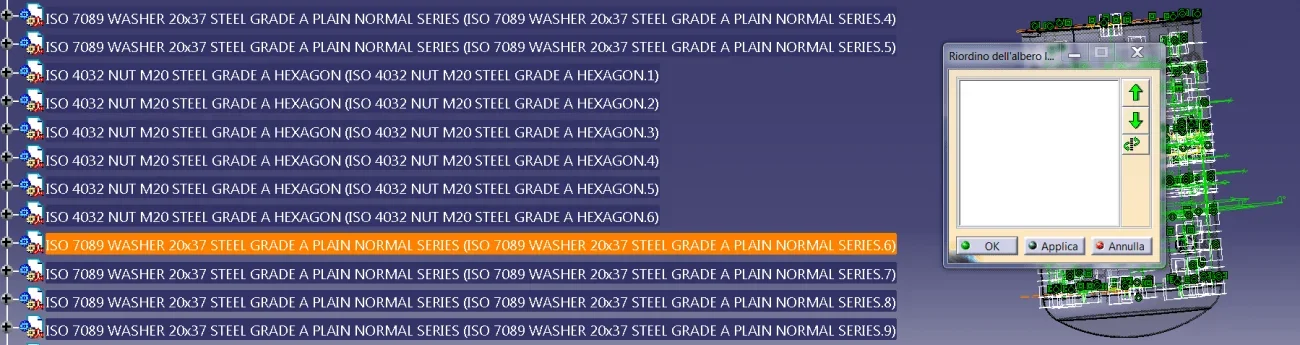
 
I realized that it does not move them, but without the error message or better its image, I can not understand, as it never happened to me. . .
does not display the component in the window of the tree reorganization and strange thing, if I click on the arrows nothing happens and strange thing, if I click on the arrow below the program closes.
Image 1.webp
 
It seems that you don't find the components... Maybe not loaded? no longer present? with mistakes?
is the particular present?
However the fact that if you click on the arrow closes the program makes you think of a bad program installation: more overlapped versions without eliminating the previous, cat setting not "clean", lack of the correct service packs etc.

I don't know.
 
Good morning I join this discussion to ask such a question... I can't say that if you want to open a new question apart, I couldn't find a question like that, but I don't think you can. I happened to make the copy and paste of a function, but in some cases I had the need to bring that function/shock up compared to other functions. . I hope someone can give me some tips, thank you.
 
in the discussion we talked about moving parts into the product, I think you want to move features inside a part. and specifically within a body
Yes, you can move (with limits that are logical order): select the features, then dx key - object xxxx, reorder.
the knots appearing in yellow show that the operation cannot be moved (over or under the highlighted nodes).
Let me know.
 
I can't move with the procedure indicated by gianni, the components that present that red symbol on the icon. I can move those who don't present that symbol. Thank you.
that I am non have the red icon are catproduct..
those who con The red icon is catpart.
If you want to reorder the catparts (red icon) you must first place with the mouse on the catproduct father and then you can reorder them.attention However, if to reorder you intend to move a catpart from one catproduct to another.. This cannot be done with the reorder. but you have to use the size and paste with the resulting loss of constraints that are to be settled with "define contextual associations"
 
hi vittorio, your answer to fidippide is correct but the question was of 2018, unfortunately now you have settled ste82 with a question (I think) relating to a part.. .
ste82: perhaps it is better if you open a new question in the catpart area
 
Good morning, I would first like to thank you for the promptness and assistance given... Thank you! I confirm that with the method recommended to me by you gianni55, tx dx "reorder" I can change the position... was what I needed. I will certainly try to open a new question for the next few (I thought that having known that command, this was similar). I like the forum you share beautiful things:)
 
Good morning I join this discussion to ask such a question... I can't say that if you want to open a new question apart, I couldn't find a question like that, but I don't think you can. I happened to make the copy and paste of a function, but in some cases I had the need to bring that function/shock up compared to other functions. . I hope someone can give me some tips, thank you.
option not required but that can be useful.
especially if you have so many leotards and many geometrical sets to build surfaces and wireframes, you can also reorganize a geometrical set (and related under sets) directly into the body. So inside that geometrical set you can put all the geometry, (organize it under sets) parameters , formulas, which you need to manage that body and if you want to create "n variations" of that body, you just copy

eye only, in this case, to maintain all relations between geometries and formulas under that body/geometrical set, otherwise then risks that you have 20 different leotards related to the same variable that had remained outside ...
 

Forum statistics

Threads
44,997
Messages
339,767
Members
4
Latest member
ibt

Members online

No members online now.
Back
Top