• This forum is the machine-generated translation of www.cad3d.it/forum1 - the Italian design community. Several terms are not translated correctly.

show only

  • Thread starter Thread starter zanna83
  • Start date Start date

zanna83

Guest
hi to everyone, I am beginning to use wf5 uin these days, I come from myself and I wonder if there is something equivalent to the exhibition only in the assembly environment is a function I had learned to use and I miss.


Thank you.
 
I do not know what function is "show only in assembly environment". who's been doing pros for three, even if he's still doing it.
 
there is a function that attenuates all other components.
go to the template tree, right click on the component and choose "active".
or open to open it in a separate window.
 
Many cads have the possibility to display one or more selected componants in modalita assembly, in proe I never found this command, would be very useful in large assemblies.
a solution should be to create a macro.
 
I think it is useful when I have to model composts within other components, hid outside gums and I work only on what I care about.
Since we are on the subject of hidden components I pose another question: when I hid components, can you revizualize them all without having to go recheck them all one by one?
 
I think it is useful when I have to model composts within other components, hid outside gums and I work only on what I care about.
Since we are on the subject of hidden components I pose another question: when I hid components, can you revizualize them all without having to go recheck them all one by one?
I think it's a matter of goat wool and it doesn't make a difference.
in pro/e select the component, right-click>open and work in another window without having to hide.

I also wrote something you didn't read carefully.
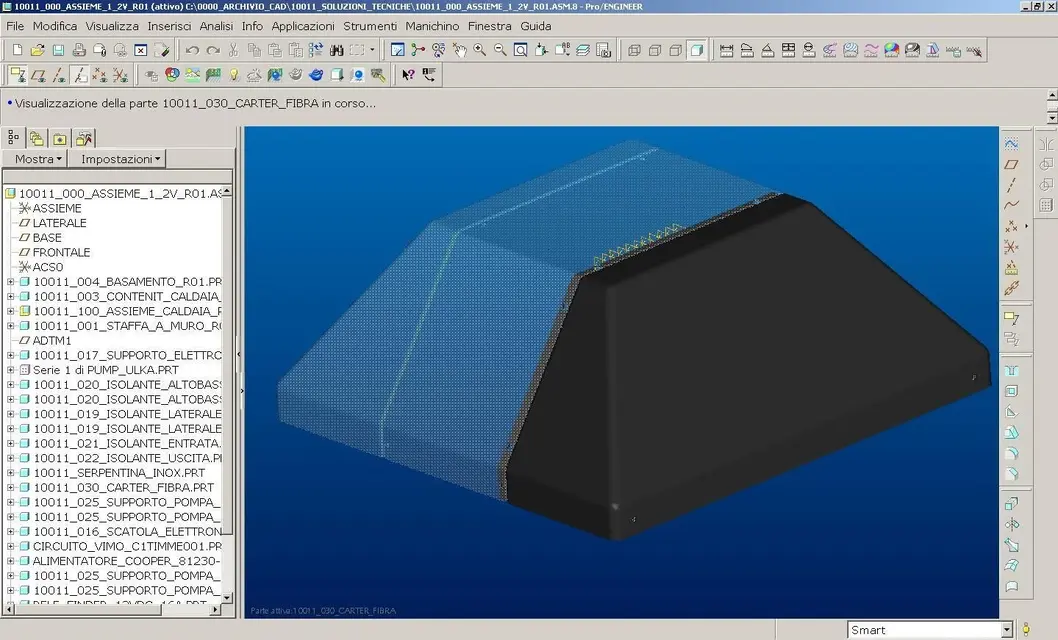
in pro/e if active a component the others become semi-transparent (see image).

when I'm finished, reactivate the axieme and all come back to normal display

the hide command is also only relative to the session, when I reopen the file together the components return all visible
 

Attachments

  • Immagine.webp
    Immagine.webp
    182.9 KB · Views: 16
I read that they become transparent, but if I have a set with many components and I have to do cutting or copying surfaces from other components I do them together and sometimes it becomes difficult to do these with all semi-transparent components that do not serve.
 
then select all components then press ctrl and click on the component you want to keep visible, right click hide.
when you are finished go to view>visibility>show everything.
 
I think it is useful when I have to model composts within other components, hid outside gums and I work only on what I care about.
Since we are on the subject of hidden components I pose another question: when I hid components, can you revizualize them all without having to go recheck them all one by one?
for this there are layers and rappr.simplified.:cool:
 
but...
if the assembly is complex is not that you can make a simplified representation for each component only to hide others.
 
I have mainly used wf 2.0 and I have never seen semi-transparent components. Need a special option to activate the transparency function?
apart from the whole function described in swx is called island and I use it so much when working in the context of the whole, it is really very useful.

x maxopus:

Have you started using wf 5.0?
 
How's Mister coming back from the holidays?
If you could call yourself vacations.. Yes! :-) all right and you?
I have mainly used wf 2.0 and I have never seen semi-transparent components. Need a special option to activate the transparency function?
apart from the whole function described in swx is called island and I use it so much when working in the context of the whole, it is really very useful.

x maxopus:

Have you started using wf 5.0?
It seems to me that this function integrated it from the wf3 forward, in the wf2 it was not yet present.

cmq when you hide the components from the model tree, you do not notice but temporary are put in the tree levels under hidden elements.

in the new versions the simplified rapprs have greatly enhanced, so you can do it on demand.
 
dear ozzy you have to understand, we accustomed to the use of the mid we have a very narrow mind shape, I will have to put myself to look well also these simplified representations that we have seen only of striscio... .
 
I have mainly used wf 2.0 and I have never seen semi-transparent components. Need a special option to activate the transparency function?
apart from the whole function described in swx is called island and I use it so much when working in the context of the whole, it is really very useful.

x maxopus:

Have you started using wf 5.0?
as pat says, in the wf2 there was no such display.

for the wf5 I got to cuff us on a trial version (I have not yet renewed the maintenance and I am firm to the wf4).

there are a lot of news also regarding the wf4
from the interface point of view they completely revised the toolbars in drawing environment (which are now ribbon type) and it seems that this thing will be extended to all environments from wf6.
 
dear ozzy you have to understand, we accustomed to the use of the mid we have a very narrow mind shape, I will have to put myself to look well also these simplified representations that we have seen only of striscio... .
the important thing is to know that there are things then I know that putroppo you have to have time to unleash us to understand the pros and cons, quiet you always know where to find me. :wink:
as pat says, in the wf2 there was no such display.

for the wf5 I got to cuff us on a trial version (I have not yet renewed the maintenance and I am firm to the wf4).

there are a lot of news also regarding the wf4
from the interface point of view they completely revised the toolbars in drawing environment (which are now ribbon type) and it seems that this thing will be extended to all environments from wf6.

confermo!

attendiamo con ansia project lightning. :smile:
 
but...
if the assembly is complex is not that you can make a simplified representation for each component only to hide others.
for each single component not.
I usually share asm in simplified rapp (logics for my way of working) and then on them I activate the component on which I have to intervene.
Bye-bye.
 
there is a function that attenuates all other components.
go to the template tree, right click on the component and choose "active".
or open to open it in a separate window.
for those who want not to attenuate all the components when you activate one to work on it, just set the variable (from the wf4 onward) "dim_inactive_components" on never in the config.pro

Hello everyone

a, I forgot: ave, ozzy, morituri te salutent
 

Forum statistics

Threads
44,997
Messages
339,767
Members
4
Latest member
ibt

Members online

No members online now.
Back
Top