• This forum is the machine-generated translation of www.cad3d.it/forum1 - the Italian design community. Several terms are not translated correctly.

simulated distellation operation

  • Thread starter Thread starter Stefano_GS
  • Start date Start date

Stefano_GS

Guest
Good morning.
While I was drawing, I was doubtful if there was no better way than I used.
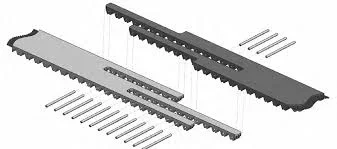
Let's say I have to draw something similar to the attached image.
the product in reality is obtained with die-cutting operation.
I to model it proceed like this:
- I realize the base belt
- design the sketch of the interruption
cut the left part and save as left part
- with the same sketch of first cut the right part and save it as the right part
- I'll create a set where I'll double the parts.

how would you proceed?PPJ.webp
 
instead of cutting you can simply split the part in two.
select the break sketch
> greed function
Part size
> select the body to cut and the parts to hold

If you want to have game of mating there are its ways:
1 on the two saved parts use the move face command, with offset option
2 instead of dividing the part as said it initially enters the break sketch, selections and uses the offsett command in bidirectional mode to create a schoizzo that you create in a function only both parts
 
Thanks for the answer, I completely ignored this command.
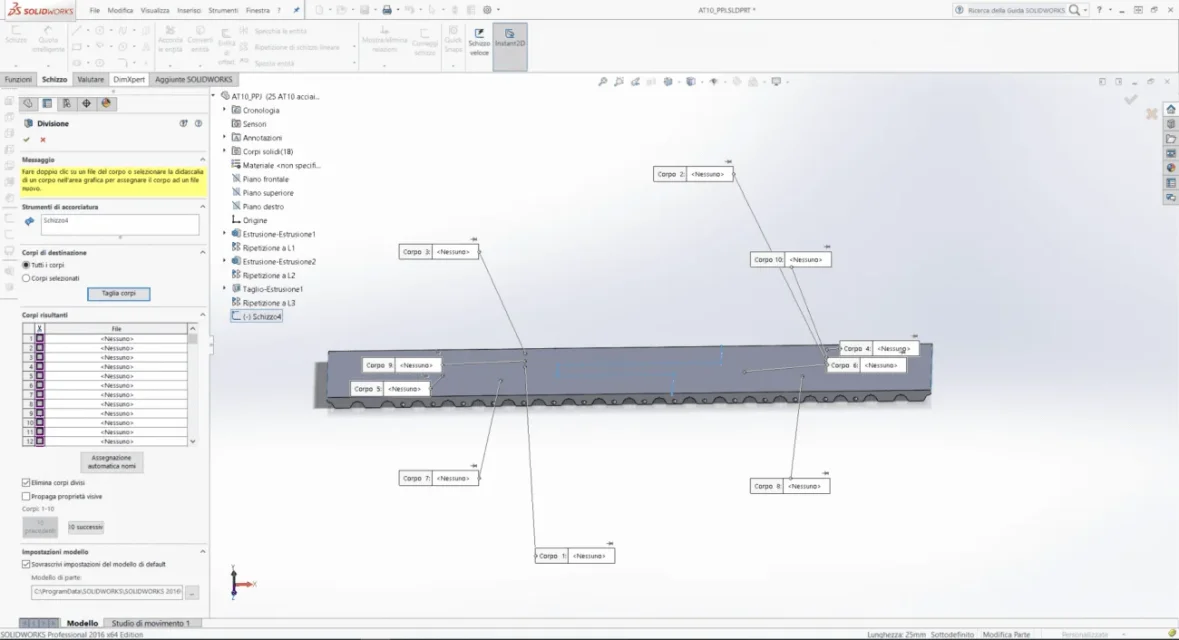
I did some tests and it works very well on a parallelepiped, when I try on my component it generates dozens of different bodies and I don't know if it is possible to group them
Report sample imageDividi.webp
 
It's because you're also splitting the thorns, since in the feature manager you've activated the option "all bodies". change in "selected frames", then select the object to divide.
 
I want to share everything.
what I would like to get are two parts, one right and one left including holes if possible.
the pins then I would insert them into the axieme.
 
I want to share everything.
what I would like to get are two parts, one right and one left including holes if possible.
the pins then I would insert them into the axieme.
then, since you don't have a parallelepiped but 18 solid bodies, it can't be the same.
 
If you have shaped the thorns in the part and then you have to insert them into the asses something does not come back.
or are in one place or are in another.

putting everything in the environment part, so also the thorns, with the split function you can specify that you want to cut only one body. launch the command, you are proposed n divisions (all bodies crossed by the sketch) and you select only the two parts that interest you; all other bodies will not be divided.
 
I did not model the thorns in the environment part, in the part I shaped only the holes
 
in the post #3 screen I see 18 bodies. whether they are thorns, dowels, or other is indifferent, when cutting the model specific to screen what you want to cut
 

Forum statistics

Threads
44,997
Messages
339,767
Members
4
Latest member
ibt

Members online

No members online now.
Back
Top