
• This forum is the machine-generated translation of www.cad3d.it/forum1 - the Italian design community. Several terms are not translated correctly.

size graphic inventor

  • Thread starter Thread starter costeel
  • Start date Start date

costeel

Guest
Good morning, everyone.
I'm impracticing with inventor 13.
I have a problem with graphic size (f7).
I made a welded set of a frame, I would now add a beam composed in a section in the middle, to work I need the "graphic cut" but if the seleziono does not give anything.
I tried to do it on other drawings on certain it does and on others not.

If you can help me... thank you
 
graphic size works if you are in the sketch, otherwise you have to use view in section in view
 
Yes the beam I want to add I want to make compote by means of a sketch, but I don't understand why it doesn't work me f7, maybe I set something innately that doesn't show me.
Thank you
 
Where do you make it from?

f7 cuts the part or together active at that time.

If you have created a skeleton part to define the sketch to design with the frame generator the other parts of the frame will not be cut by f7 but will be displayed in transparency.
excuse for little clarity
 
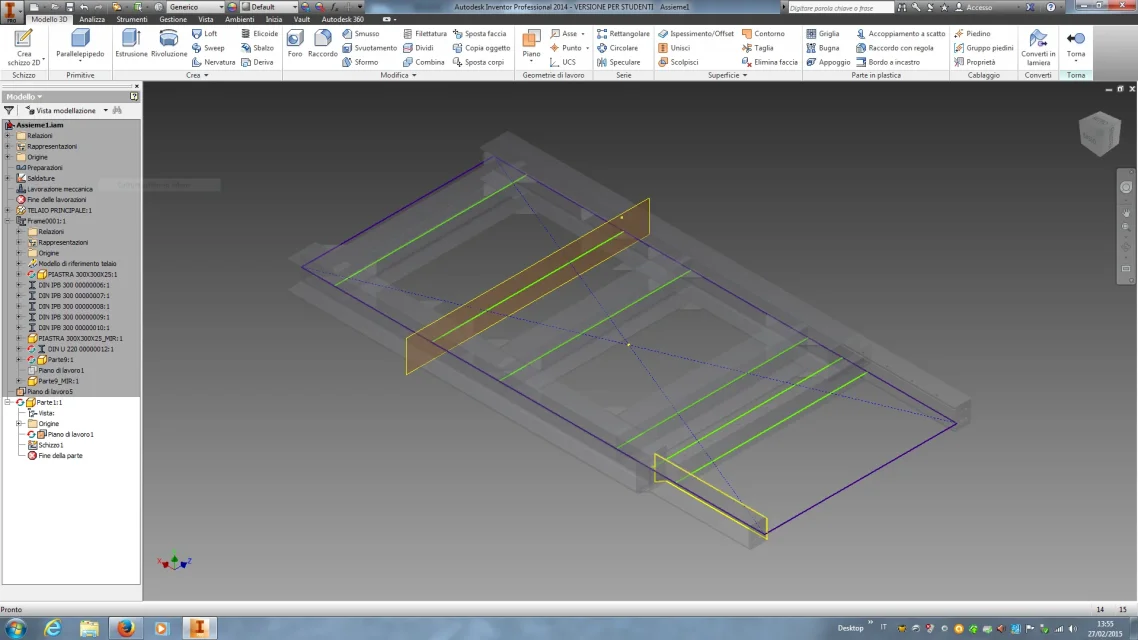
I created a part 1:1 with a new work plan 1 on which I sketch 1.
when I go to do the sketch to make the beam composed if I make f7 I don't cut me heb
of the thief in correspondence of the plan.
allego photo screen inventorschermata inventor.webp
 
I created a part 1:1 with a new work plan 1 on which I sketch 1.
when I go to do the sketch to make the beam composed if I make f7 I don't cut me heb
of the thief in correspondence of the plan.
allego photo screen inventorView attachment 39939
It's normal that f7 doesn't cut the elements since0 are not active at that time that you work on part1

the f7 cuts only the solids contained in the part where the sketch is created.

However if you want to cut on the floor, there is another system, go to the level of view - appearance- graphic size and select the plan of part 1 (always in the axieme) - then enter the part and you will already have the dissected view.

But this is another speech independent of the sketch.

However, if you want advice, don't worry about making the exact line as soon as possible with frame generators, you can shape it as you want.

I hope I helped you.
 

Forum statistics

Threads
44,997
Messages
339,767
Members
4
Latest member
ibt

Members online

No members online now.
Back
Top