
• This forum is the machine-generated translation of www.cad3d.it/forum1 - the Italian design community. Several terms are not translated correctly.

size symbols

  • Thread starter Thread starter TECNOMODEL
  • Start date Start date

TECNOMODEL

Guest
I would need to create in a template of geometry control symbols, roughness etc that are smaller than I use now.
I would like them to be used only when I create a table with that template.

If I understand everything, I would say that I have to create a new style in the template, and so far no problem.

How do I change the size of the symbol? Just change the height of the text you use and adapt accordingly?

Finally, where do I require that template uses the created style and instead the other templates use what I already use today?

thanks for the help
 
to change the size of the symbol you have to do as you did.
the problem is that when you use your idw as a template the information is taken from the date design folder and overwritten on your model. so you can:
1) create two date design folders and two projects each of which aims at its and its templates and use the project according to the template.
2) use the same date design and the same design and create two styles of symbols and use a single template from which you select the style to use.

Hi.
 
is not possible having 2 different templates make them use different styles?

I have a table harvest template and another for work cycles. in the latter for problems of space I would like to use smaller symbols.

if I open the cycle template, create a new style and select to use that change then apply to the table template?
 
created in tempate the two styles and then save them in the design folder date from which it draws inventor.
at this point all idw will have the double possibility of style.
 
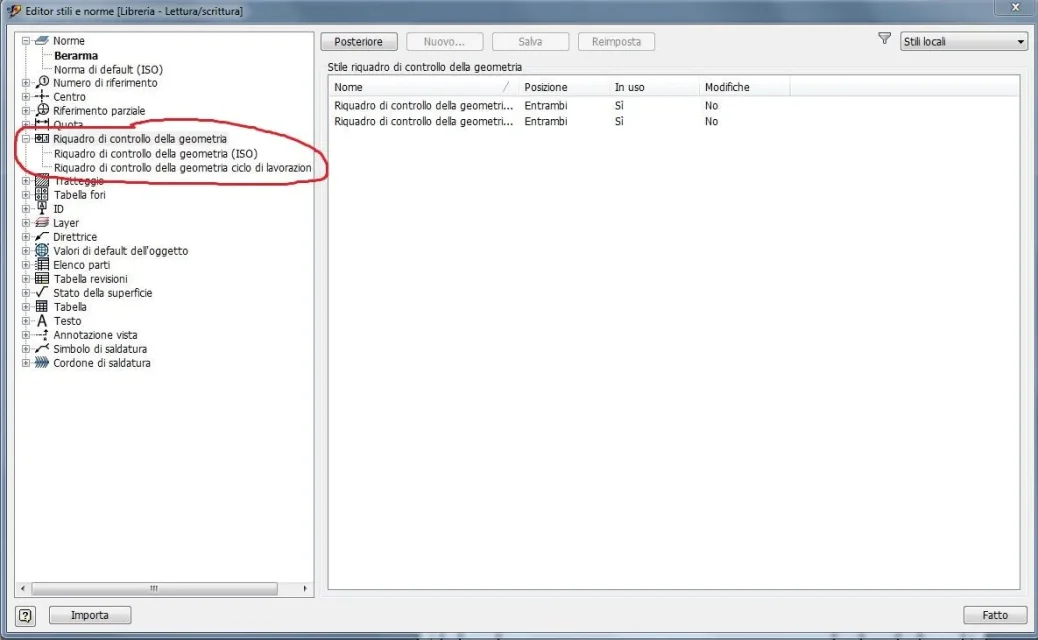
I created the 2 styles and saved them in the library coma from imageEditor stili.webpBut within the standard referred to by "default values of the object" I only see the type selected within the style.

how can I do so that I can select from time to time which style to use?
Valori default.webpor is it better to also make a new norm to use only for working cycles?
 
That's right. now you just need to check that the project you have current has the item "use style library" set to read-write (to change it uses the dx button). then go to the newly created idw file and in ribbon management > styles and norms use the save command. In this way all styles are saved in the date design folder (put a backup copy first).
from here on, inventor will read from that folder and whenever you open the model you will choose which of the two styles to use.
 
Sorry, but I didn't have time to follow the post. I would do two distinct rules so that I could control all different styles with just one click and not choose them one by one. Did you still work it out?
 
Sorry, but I didn't have time to follow the post. I would do two distinct rules so that I could control all different styles with just one click and not choose them one by one. Did you still work it out?
I did this, thank you very much.
 

Forum statistics

Threads
44,997
Messages
339,767
Members
4
Latest member
ibt

Members online

No members online now.
Back
Top