
• This forum is the machine-generated translation of www.cad3d.it/forum1 - the Italian design community. Several terms are not translated correctly.

slowdown and program block

  • Thread starter Thread starter bulbodepaja
  • Start date Start date

bulbodepaja

Guest
Good morning.
I have the following problem: solidworks slows down in rescues and more trivial operations.
I will describe our computer configuration:
solidworks 2010 (sp0 on two pcs and sp1 on one pc)
3 workstations running solidworks, these 3 pcs are connected by a gigabit switch (netgear gs108) to a server where drawings are stored (win server 2003r2, gigabit lan, xeon 3.0ghz,2 x 160 gb scsi 10000 rpm raid1).
I want to specify that switches and cables have been tested and work correctly all at gigabit.

the problem is that you notice a terrible slowdown of all pcs even in the most trivial operations (quotes, selection of faces etc.); in the rescues is slow and often stops and to open the assemblies takes too much.
another problem is that by selecting the faces it blocks the program: if I open a set and click on a face the program will freeze for about 40 seconds then it resumes, if I click on another face does equal, if I recycle on a face already clicked previously the normal button.

I did a lot of tests, but I couldn't solve the problem.

I list the evidence made:

Test the cables and the switch.
replaced switch.
connected directly with cable cross a pc and server.
replaced the server.
replaced server operating system (before was freenas, now is win server 2003 r2)

all these trials have brought nothing!! Looks like it's not a hardware problem.

the only temporary improvement I got it change accounts to the pc (win xp 64 bit) I created another account and for a while it went well (half day) then all at a point of new slowing and blocking when I click faces.
 
essential proof: is everything okay in the local?
Isn't there an ip conflict between computers? How are they assigned?
"pervasive" and crash*** and scans every bit that goes on the server?
 
Ip are all static and there are no conflicts.
I tried to disable antivirus but on counts nothing.
the local speech is a little different:
on two pcs, those who were only lawful but did not block on the faces, it works well, selections and fast changes.
on the third, what crashes on the faces, the problem also remained local.
 
Ip are all static and there are no conflicts.
I tried to disable antivirus but on counts nothing.
the local speech is a little different:
on two pcs, those who were only lawful but did not block on the faces, it works well, selections and fast changes.
on the third, what crashes on the faces, the problem also remained local.
I don't know about servers. Isn't there any speed problems in disk data access? or conflicting user profiles?
what crashes on the faces has a certified graphics card and updated drivers?
 
disks are properly working, replaced 3 times for tests!
Each pc logs in with a different account.
the video card is a fx1500 picture and the drivers are updated from the sw site for my configuration (xp64 fx1500 sw2010 picture)
 
Usually slowdowns can be caused by the temp folder in full user, try to empty that, maybe after it works you better.
 
I have already seen this problem, how are PCs configured with solidworks installed? Are video cards certified? In case I saw I networked my pc and everything was fine.
 
the temp folder empty it once a week.
I also tried to create a new account on the pc but it doesn't count anything.
PCs are configured as follows:

pc 1: i7 950, gigabyte x58-usb3, 12 gb ram ddr3 1333mhz, 300 gb sata3 wd velociraptor hdd, nvidia framework 2000. (pc assembled by me)

all video cards are certified.


pc 2: e8400, 6gb ram ddr3 1066mhx etc, 250 gb sata2 seagate barracuda, nvidia framework fx1700. (workstation lenovo)

pc 3: e6600, 6gb ram ddr2 667mhz etc., 160 gb sata1 seagate barracuda, nvidia picture fx 1500 (ibm intellistation m pro)
 
check the dissection settings of solidworks.
Moreover, it denies permission to the pc to turn off network cards for energy saving.
for nvidia video cards, eliminates from custom desktop settings, to insert a quotaI had a wait of over 2 seconds, removed that it returned instantaneous.
I am network administrator (they put me..lol) and the ns plant has cables longer than 50 meters but we do not encounter problems of delay attributable to the network.
all under domain with active directories and user groups that can or cannot access
to certain folders.
 
I think it's an antivirus problem.
If you remove it, just for proof, how does the pc behave?
there are antivirus that do not consider sw reliable and keep it monitored in realtime.
if you realize that it is the antivirus, put sw among programs not to monitor.
 
I think it's an antivirus problem.
If you remove it, just for proof, how does the pc behave?
there are antivirus that do not consider sw reliable and keep it monitored in realtime.
if you realize that it is the antivirus, put sw among programs not to monitor.
wrote that they use 2010 with sp0:eek: on two pcs and sp1 on the third. apart from using a sp0 to work imho doesn't make any sense, but is it not that slowing problems can also arise from this?
I wonder...
 
wrote that they use 2010 with sp0:eek: on two pcs and sp1 on the third. apart from using a sp0 to work imho doesn't make any sense, but is it not that slowing problems can also arise from this?
I wonder...
I don't have the crystal ball and not being there to test them, I might also doubt the compatibility of the sp0 with their hardware and software ecosystem, but I doubt it is.
There have been certain cases that certain antivirus carried sw to a high instability state and slowdowns on any kind of operation.
my opinion.... then it turns out that a user connects his laptop on a service network socket (lan) creating a closed ring network when it was thought of open ring, blocking the whole company.
This last example is to tell you that I can only assume, not being there.
 
Ip are all static and there are no conflicts.
I tried to disable antivirus but on counts nothing.
the local speech is a little different:
on two pcs, those who were only lawful but did not block on the faces, it works well, selections and fast changes.
on the third, what crashes on the faces, the problem also remained local.
I don't have the crystal ball and not being there to test them, I might also doubt the compatibility of the sp0 with their hardware and software ecosystem, but I doubt it is.
There have been certain cases that certain antivirus carried sw to a high instability state and slowdowns on any kind of operation.
my opinion.... then it turns out that a user connects his laptop on a service network socket (lan) creating a closed ring network when it was thought of open ring, blocking the whole company.
This last example is to tell you that I can only assume, not being there.
It seems to me that the antivirus is a test already made.

I would try to disconnect the whole network and reconnect a pc at a time until they see when problems begin.
question: do you also have a wireless enabled?
 
It seems to me that the antivirus is a test already made.

I would try to disconnect the whole network and reconnect a pc at a time until they see when problems begin.
question: do you also have a wireless enabled?
You're right, I didn't read another speech.
but since the slowdown is only on the cad and not on other programs, it means that there is something that actually intercepts the work of the cad.
only the antivirus monitors the cad that way.
disable it, I don't know what he means, by chance some services remain standing.
I would try to uninstall it and work out of the network.
if it improves, always uninstalled, I would try to work on the net and so on.
 
the antivirus does not block sw, I also tried to shiude it both on the server and on the pcs but does not count anything.
 
the antivirus does not block sw, I also tried to shiude it both on the server and on the pcs but does not count anything.
sometimes closing it is not enough because services actually remain active. the only valid test is to uninstall it. Is it a question of fsecure?
 
now I try to uninstall it and see what happens.
for information we use kaspersky antivirus workstation 6.0.4
 
Usually slowdowns can be caused by the temp folder in full user, try to empty that, maybe after it works you better.
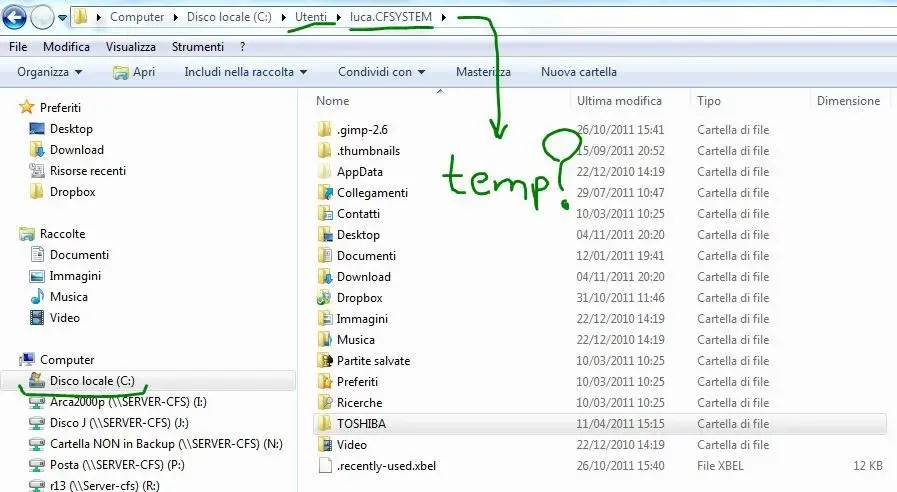
hi, I can get in to ask: where is the temp folder inside the user?
 

Attachments

  • TEMP.webp
    TEMP.webp
    59.3 KB · Views: 15
hi, I can get in to ask: where is the temp folder inside the user?
you can see the address by clicking with ts dx on “computer” (or computer resources)>properties>
advanced system settings.


c:\users\you\appdata\local\temp
then there would be this.. .
c:\windows\temp


:finger:

ps: you have to show the hidden folders... don't mess up.. .
 
ps: ... do not mess up.. .
c:\users\you\appdata\local\temp
then there would be this.. .
c:\windows\temp
Thank you, no, I try not to mess up:tongue:
and just for this reason apologize again if "find" the post asking for clarifications:

I've got it
c:\users\you\appdata\local\temp (2gb)c:\windows\tempo (106mb)- can I delete everything that they contain without problems or should I look for and eliminate only swx things?
- I have to worry about closing all programs or deletion first does not cause problems?
Do I have to worry about not erasing today's files or in use or not?
 

Attachments

  • temp2.webp
    temp2.webp
    92.4 KB · Views: 6

Forum statistics

Threads
44,997
Messages
339,767
Members
4
Latest member
ibt

Members online

No members online now.
Back
Top