• This forum is the machine-generated translation of www.cad3d.it/forum1 - the Italian design community. Several terms are not translated correctly.

slowness problems. . .

  • Thread starter Thread starter fabbrino
  • Start date Start date

fabbrino

Guest
Hello.

use autocad 2022 on a pc so built:
- motherboard: gigabyte aorus master z390;
- cpu: intel i7-9700k;
- ram: 32 gb - ddr4;
- video card: radeon rx 570.

I'll explain the problem.
when selecting the text to change it pass about 4-5 seconds before the editor starts.
Moreover, when selecting an object the property bar puts us a life before showing the properties.
I reinstalled the product and downloaded the video card drivers.
What do you think?

Thank you.

 
What did you not understand?
you have to read and do the tests indicated in the link. too difficult?
I'm obviously not the only one who can't read. . .
opens a page full of topics regarding civil, revit, recap... and last "autocad does not respond during opening or saving"that is not my problem.

Usually when you ask me something I answer by bringing back only what is required to me to facilitate the task to those who ask me without giving him analphabet... vocational training.
 
to me opens all another page.
These solutions, at least to me, did not bring benefit... it was better autocad than a few years ago though the pcs were slower.
Thank you.
 
Last edited by a moderator:
to me opens all another page.
These solutions, at least to me, did not bring benefit... it was better autocad than a few years ago though the pcs were slower.
Thank you.
because you clicked on the signature of @tristan and not on links to the autocad page, otherwise it does not explain how you ended up on the page you linked ttp://ctrl-alt-cad.blogspot.com/2016/08/autocad-non-risponde-durante-lapertura.html
 

Attachments

  • Immagine.webp
    Immagine.webp
    39.5 KB · Views: 9
Let's narrow the field.
Do these problems happen only on a dwg in particular? It can happen in fact that a design can contain critical issues within it so autocad does not work as it should. It wouldn't be the first time it happened. sometimes it is enough to "purge" the design with the command eliminates to delete layers, blocks etc., perhaps placing all entities on a single level (after launching the command deletes).
to tell us: if you create a new design and put some texts, the problem is reproposed?
Does other programs work slow?
 
Let's narrow the field.
Do these problems happen only on a dwg in particular? It can happen in fact that a design can contain critical issues within it so autocad does not work as it should. It wouldn't be the first time it happened. sometimes it is enough to "purge" the design with the command eliminates to delete layers, blocks etc., perhaps placing all entities on a single level (after launching the command deletes).
to tell us: if you create a new design and put some texts, the problem is reproposed?
Does other programs work slow?
I hoped it was a problem of a specific design, but no. it also happens with an empty design on which I drew a rectangle.
select the rectangle and before opening the property window passes 1 second and more and in the meantime the mouse stops.
even worse with the texts, there the delay is 3-4 seconds.
I also tried to turn off hardware acceleration but nothing changes.
only with autocad I have this problem, so far always went well.
 
the configuration of your pc seems to be fine. You have power and ram. I don't even think it depends on the video card.
and however the design in 2d does not overly engage the video card. with 2d any card goes well with autocad.
to me personally happens that the problem you describe occurs when autocad does not have enough memory available, when for example launch a photogrammetry program by making it process, and simultaneously autocad. at that point autocad becomes almost unmanageable due to delays.
the video card speech leaves the time you find, I think. For example I have a very dated geforce gt 620 2 gb, and autocad does not recommend geforce. but with the geforce I can still make it. a more modern board would definitely help me in the fluidity in the heaviest scenes, but if I don't exaggerate in the drawing I can still work.

just a test, you should see using memory when you start autocad. with activity management see how much memory is using autocad at that time. with an empty autocad design should not go beyond the 300/500 mb of used memory.
you can also split the screen into 2 windows, in an autocad alert and in the other half resource management, then draw something and select it, looking at what happens to the memory level used by autocad, just a test
 
Last edited:
the configuration of your pc seems to be fine. You have power and ram. I don't even think it depends on the video card.
and however the design in 2d does not overly engage the video card. with 2d any card goes well with autocad.
to me personally happens that the problem you describe occurs when autocad does not have enough memory available, when for example launch a photogrammetry program by making it process, and simultaneously autocad. at that point autocad becomes almost unmanageable due to delays.
the video card speech leaves the time you find, I think. For example I have a very dated geforce gt 620 2 gb, and autocad does not recommend geforce. but with the geforce I can still make it. a more modern board would definitely help me in the fluidity in the heaviest scenes, but if I don't exaggerate in the drawing I can still work.

just a test, you should see using memory when you start autocad. with activity management see how much memory is using autocad at that time. with an empty autocad design should not go beyond the 300/500 mb of used memory.
you can also split the screen into 2 windows, in an autocad alert and in the other half resource management, then draw something and select it, looking at what happens to the memory level used by autocad, just a test
Good morning.

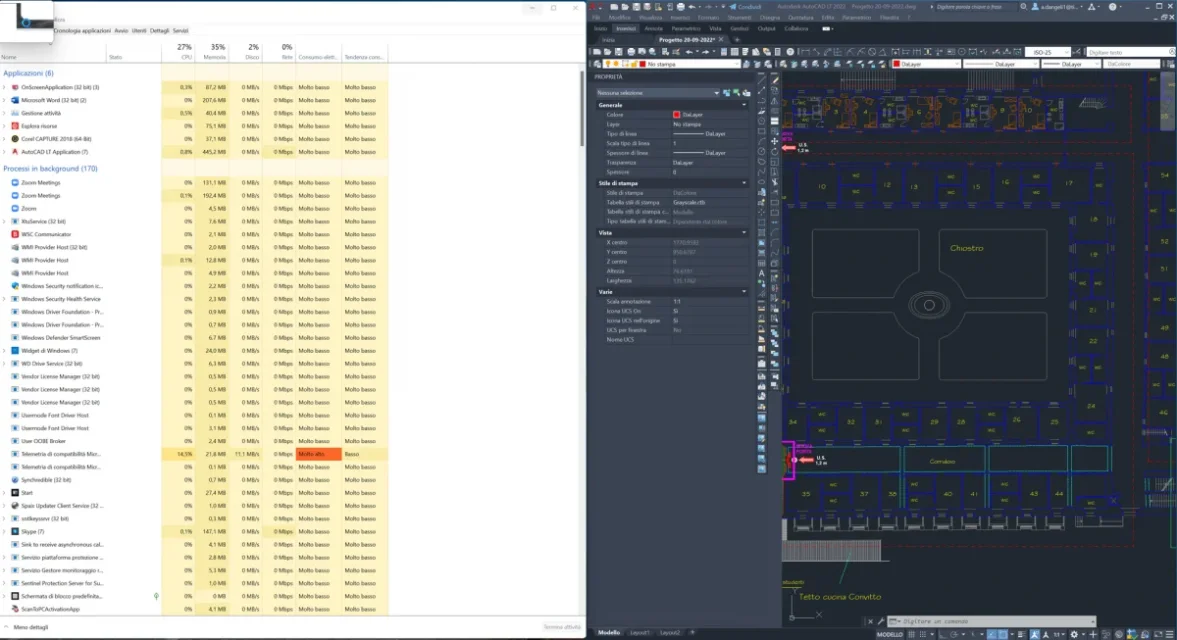
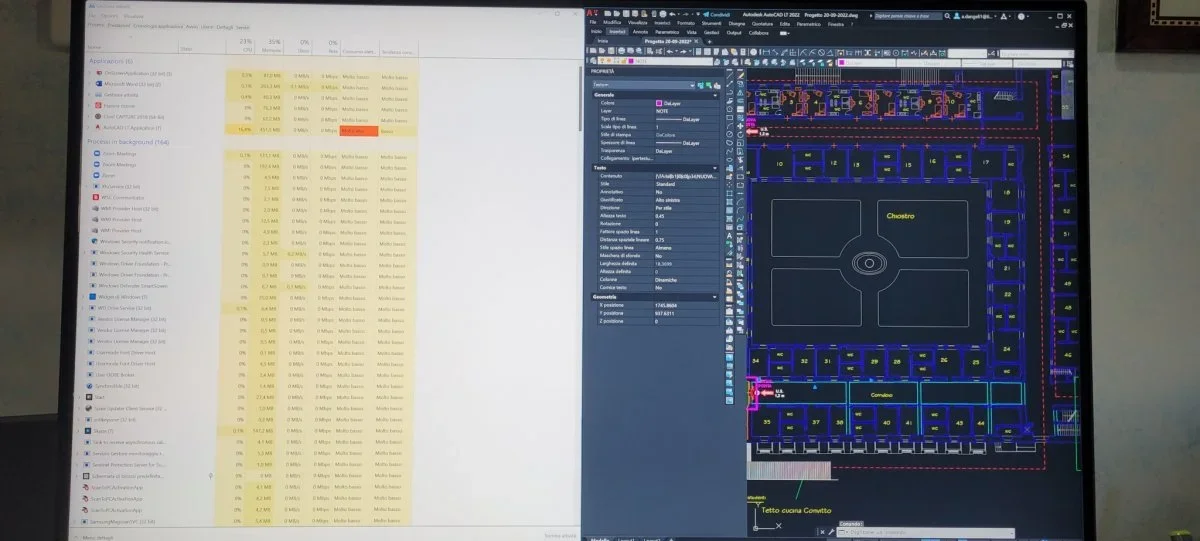
I made proof that you proposed (just started operating system, with a non-empty design though), of which I place the images.
the problem is in the text, when I double click I make a coffee in time...

image 00 - without selection.
image 01 - with double click on text.
 

Attachments

  • 00 - Senza selezione.webp
    00 - Senza selezione.webp
    80.7 KB · Views: 9
  • 01 - Doppio click su testo.webp
    01 - Doppio click su testo.webp
    68.9 KB · Views: 8
follow the indications that autodesk from regarding the problems of graphics performance slowed down.
place the link at the end.
in these cases it is good to try all the possibilities: as autodesk also talks about the possibility of corrupted files (and we have found that the problem is not about the only file you are working on but rebooting to every creation of a new design) you could do a further test, in case the problem resided in the model file (*.dwt) that autocad assumes when creating a new design. if that pattern file was corrupt all the drawing files created with that dwt would bring the problem down. Usually this template file is by default acad.dwt.
creates a new design using a different dwt from the one currently set.
in the initial screen creates a new design by clicking on the "models" item and choosing a different model and see if the problem is resolved.
i.e. create a new design but with a different dwt than the one currently set, try with acadiso.dwt or another.

 
Last edited:

Forum statistics

Threads
44,997
Messages
339,767
Members
4
Latest member
ibt

Members online

No members online now.
Back
Top