• This forum is the machine-generated translation of www.cad3d.it/forum1 - the Italian design community. Several terms are not translated correctly.

solids

  • Thread starter Thread starter FB9
  • Start date Start date

FB9

Guest
Good morning to all, if I have an igs file of a hollow body how can I make it solid? keeping in mind that it is a complex geometry and therefore tamed by a lot of surfaces. I would in addition get even a solid no longer cable..but full.
Thank you.
 
You should see the iges to give suitable suggestions, however:

1) use the union command by selecting the external surfaces you need (if geometries allow it you can use the propagation selection: in the field elements to join, dx key and then propagation distance or angle)

2) step by step a bit at a time and then join all the unions you created ensuring that there are no "holes" (act on tolerance)

3) in the larger holes you must "fit" the surfaces or create a new one, until it is all closed

4) then in solid uses the command closes a surface

Let me know.

years ago
 
Thank you! and the solution I had already thought, I hoped there was a faster way. Thank you very much
 
Thank you! and the solution I had already thought, I hoped there was a faster way. Thank you very much
look that if you do as I said (with propagation) it is very fast (unless the igs is not a pigeon), it is not that you can make a "traplone" and just
other question, can you move the axle terna after generating solids?
Yes, menu/insert/axis system and enter as many axles as you need, as you want

If you always work with cat, you can activate the axis to use by selecting it and then dx key set as current, if you want to export it for e.g. in igs, you have to move the geometry from axis to axis before exporting.

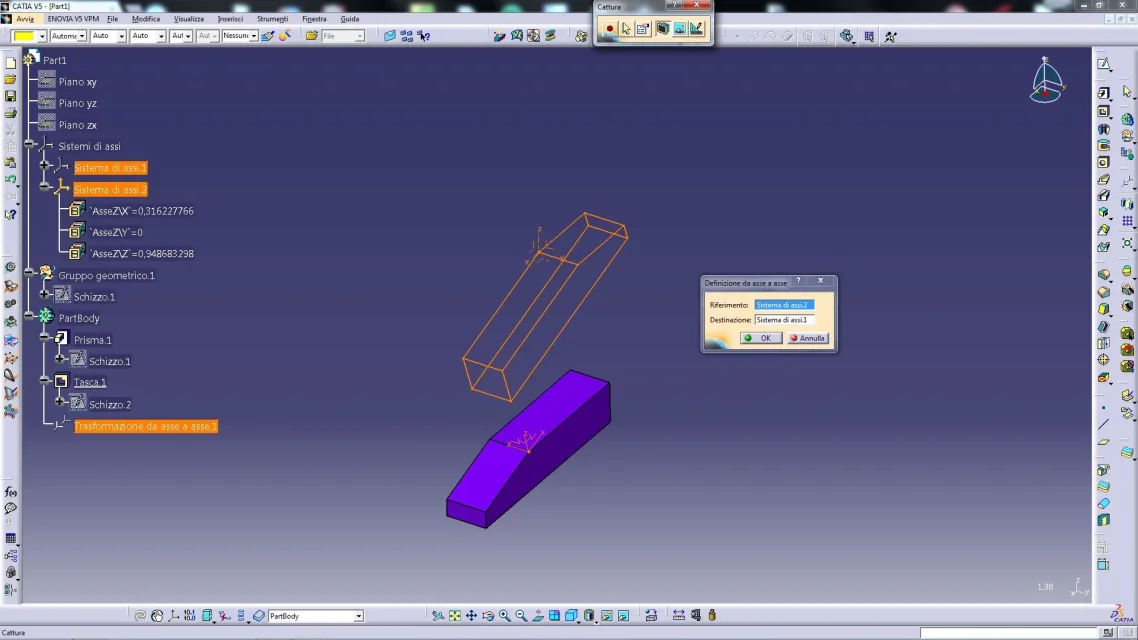
(to transform (setting geometry according to the new terna): menu/insertion/feature of transformation/axis to axis)

Let me know.

Hi.

years ago
 
if I wanted to export my component (e.g. in iges) with a terna other than that of origin as I do? I'm sorry, but I thought I solved the problem, but it's not like that, reading on the forum, I found some discussion on the subject, but not clear answers.
Thank you.
 
If I wanted to export my component with a terna other than that of origin as I do?
as I have already written, you have to move the geometry according to the new terna:

1) create the second terna
2) menu / insert/features of transformation/axis axis (you will see moving geometry from the second to the first)
3) carry in iges (better in step)

because the system exports geometry in neutral format but cannot do so for the construction entities like the axes as they would not be recognized, I believe that the only way is to bring geometry to the point of origin and to guide it using precisely from axis, in this way when the amounts is in place.

otherwise if it confuses you, you can create a fictitious axis using identifiable lines (e.g. axis x long 5, axis y long 10, axis z long 15), carry everything and then inside the software (e.g. cam), perform the translation

Let me know.

Bye-bye
 

Attachments

  • Capture_002.webp
    Capture_002.webp
    122.4 KB · Views: 1

Forum statistics

Threads
44,997
Messages
339,767
Members
4
Latest member
ibt

Members online

No members online now.
Back
Top