
• This forum is the machine-generated translation of www.cad3d.it/forum1 - the Italian design community. Several terms are not translated correctly.

solidworks line thicknesses

diabloz97

Guest
Good morning.

during the pdf printing of a table, I realized that the program (I use pdf creator) does not follow my custom styles of the properties of the line thicknesses.
the lines are identical and of the same thickness.

How can I solve this?
Thank you in advance.
Faithful putzu
 
if you print with a physical printer the same design as it comes?
I also use pdf creator and never had problems.
 
if you print with a physical printer the same design as it comes?
I also use pdf creator and never had problems.
yes the problem is the same... I see everything with a thickness.

Did you change any particular settings?
because I have created my custom layers, with the thickness and color of differentiated line;
so you can highlight or not the various components.

Let me know.
Thank you.
 
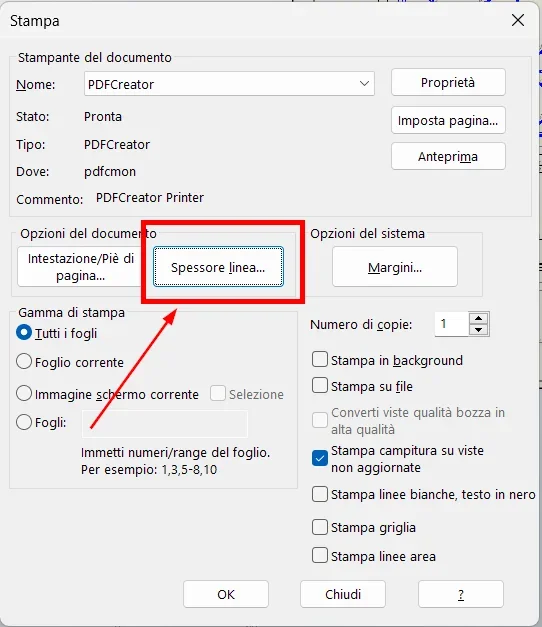
when you press the button to set the thicknesses. It will be there that you have to touch.
 
ti
when you press the button to set the thicknesses. It will be there that you have to touch.
You mean here? (see Annex "1")
because if you mean I have to change the settings on "line thicknesses" I have already set my customizations (see attachment "2").
 

Attachments

  • 1.webp
    1.webp
    35.6 KB · Views: 26
  • 2.webp
    2.webp
    17.1 KB · Views: 24
You're the one

You mean here? (see Annex "1")
because if you mean I have to change the settings on "line thicknesses" I have already set my customizations (see attachment "2").
exactly.

instead of printing pdf with pdf creator you tried to save as pdf the design?
with a physical printer get the same problems?
there is something strange because it should work already so with the set dimensions you have attached.
one thing you can look at is in the options of the drawing, clicking on the gear and checking what is how the various types of lines and thicknesses are set.
 
I tried to use the "Save with Name" option and also print directly with a physical printer, unfortunately in that case it only keeps the colors of the layer while the thicknesses all the same.

on the problem of settling lines you mean this? (see Annex "1").

If it's not a problem, could you send me the profile with your personalizations? so you can try to see if the problem is in some of my settings.

Thank you for your time.
 

Attachments

  • 1.webp
    1.webp
    38.2 KB · Views: 19
our company standard has no geometry on the layers.
Technically the standard setting of solidworks should already work.
try to take a look at the online guide of solidworks and compare with what you did.
 
I noticed something.
if I associate a line of a sketch to my custom layer, once I mold (both physical printing and pdf), it keeps me my line thickness customizations;
while if I associate a part to a custom layer, it does not keep me custom settings.

Is it normal?
 
I noticed something.
if I associate a line of a sketch to my custom layer, once I mold (both physical printing and pdf), it keeps me my line thickness customizations;
while if I associate a part to a custom layer, it does not keep me custom settings.

Is it normal?
in fact there is no association of the parts to the layers. are the lines or objects such as quotas, annotations, tables etc. that you can put on the layers. It is not autocad that you make the blocks and you can associate them to the layers.
 
You're the one

You mean here? (see Annex "1")
because if you mean I have to change the settings on "line thicknesses" I have already set my customizations (see attachment "2").
attention, that those values 0.05 and 0.12 are useless and influential. because solidworks considers as a minimum thickness 0.18 (under that does not go, always 0.18 will print).

Moreover, the order in which you assigned the thicknesses is not correct;
- the voice "slim" swx refers to the thin lines of the design (axis, quota lines, hidden edges, sketches etc.)
- the "normal" item is referred to the thicknesses of the visible boundary lines (and I don't think you want to draw in 0.12).
and these are the 2 "main/importing" line thicknesses of the table (as normal should be one double of the other).

Still,
you must also intervene in the "line character" tab, to match the line thicknesses displayed on screen and the printed ones (or pdf, which is equivalent to a print). Whereas swx uses 0.18 by default (the minimum thickness) for thin lines, and 0.25 for "normal" lines (the visible edges, for example). and this 0.25 in print is too thin, practically not to distinguish it from the thin lines (0.18), then usually increases it. and that is what corresponds to the "normal" voice.
and that same thickness you will have to assign it in the line character card under the heading "visible stocks > solid".

easier to do than explain, I wrote half a mess:)
 

Attachments

  • CARATTERE LINEA.webp
    CARATTERE LINEA.webp
    34 KB · Views: 18
I only saw now, thank you.
attention, that those values 0.05 and 0.12 are useless and influential. because solidworks considers as a minimum thickness 0.18 (under that does not go, always 0.18 will print).

Moreover, the order in which you assigned the thicknesses is not correct;
- the voice "slim" swx refers to the thin lines of the design (axis, quota lines, hidden edges, sketches etc.)
- the "normal" item is referred to the thicknesses of the visible boundary lines (and I don't think you want to draw in 0.12).
and these are the 2 "main/importing" line thicknesses of the table (as normal should be one double of the other).

Still,
you must also intervene in the "line character" tab, to match the line thicknesses displayed on screen and the printed ones (or pdf, which is equivalent to a print). Whereas swx uses 0.18 by default (the minimum thickness) for thin lines, and 0.25 for "normal" lines (the visible edges, for example). and this 0.25 in print is too thin, practically not to distinguish it from the thin lines (0.18), then usually increases it. and that is what corresponds to the "normal" voice.
and that same thickness you will have to assign it in the line character card under the heading "visible stocks > solid".

easier to do than explain, I wrote half a mess:)
 

Forum statistics

Threads
44,997
Messages
339,767
Members
4
Latest member
ibt

Members online

No members online now.
Back
Top