
• This forum is the machine-generated translation of www.cad3d.it/forum1 - the Italian design community. Several terms are not translated correctly.

solidworks or changed legislation - threads

  • Thread starter Thread starter meccanicamg
  • Start date Start date

meccanicamg

Guest
I'd like to post something unusual.

version: solidworks 2009 x64 sp 4.0 and on solidworks 2010 x64 sp 2.0

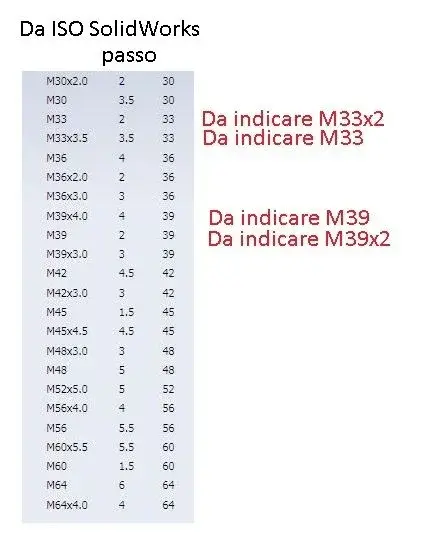
problem: the standard threads of the iso and din metriche have the words different from the norms (I would say that they are sbaglaite!). the norm says to indicate with m... and just the metric thread to big step (magigore pass) while with m...x... the nominal value x the fine step.

from m33 up you have strange directions. the m33 has step 3.5 by step, so it must be written only m33. if you have step 2 will be to write m33x2 not the opposite. so for some subsequent measures.

the only standard that seems exempt from these errors is the metric ansis.

strange that there are these very serious errors on this software. Yet according to one 4535 and 4536 and various catalogs in the internet and manuals of all kinds are not already these indications.

I wait for you. thanks for the collaboration.
 

Attachments

  • filetti.webp
    filetti.webp
    22.3 KB · Views: 93
In the meantime, I'm looking for the procedure to set up the database at my own risk. a year ago I read inside the db that there was the word I translated: you can add and edit content and values in the db but it could happen that by upgrading to the next sp you lose the changes.

comforting. ...
 
So... let's see.

in the default \solidworks data\lang\english folder there is the swbrowser.mdb file and inside there are the basic configurations. in the version_update_instruction tab there are idications... Let's try to see if we can't let anything go. even updatebrowserdata.exe part... but what database do I give him?? there is no longer the integrated standard configurator.... uff.
by hand the changes are not effective because I cannot find all references in the db
 
I never put my hands in his db. make at least one copy of the files you go to retouch. . .
 
I would send them to the assistance with the exhortation to postpone them corrected by morning at 8:00 p.m.

these are actually unseen quite unjustifiable. . .
 
I would send them to the assistance with the exhortation to postpone them corrected by morning at 8:00 p.m.

these are actually unseen quite unjustifiable. . .
but above all: how long has this history been going on? It is like the fact that on the versions of a few years ago you could copy the standard type iso din etc. rename it and change it. Now it's all locked up.

assistance... beautiful word... already in an ideal world works!
 
but above all: how long has this history been going on? It is like the fact that on the versions of a few years ago you could copy the standard type iso din etc. rename it and change it. Now it's all locked up.

assistance... beautiful word... already in an ideal world works!
But I didn't understand the need to use a mdb file to handle threads, if it does with a txt file of a few kb and it works perfectly.

the thread table is still iso_data_thrd, but with openoffice it only shows me but without being able to change it.
 
But I didn't understand the need to use a mdb file to handle threads, if it does with a txt file of a few kb and it works perfectly.

the thread table is still iso_data_thrd, but with openoffice it only shows me but without being able to change it.
I have seen the iso_data_thrd but also modifying it not enough, in fact then tells me that it is not defined the standard.

was so beautiful inventor with its excel sheet of 3 tabs or something, very simple...3 4 columns: identification, size, depth... Enough.
for now I have solved in the following way:
Since it iso and din are sbaglaite I opened the toolbox configurator and unchecked the holes from m33 onwards on iso and din standards I will use the metric ansi that are right. problem circumvented but not solved. :angry:
 
but above all: how long has this history been going on? It is like the fact that on the versions of a few years ago you could copy the standard type iso din etc. rename it and change it. Now it's all locked up.

assistance... beautiful word... already in an ideal world works!
But you have to call them and insist, otherwise they have no calls and for them it is because the software is fine, not because everyone arranges somehow.
 
It's true I checked too!!! What stuff, really good mistakes for a powerful program like sw... go to fall on these things!
 
sent request to my assistance. I think they'll open something... if I'm not the only one who reported it.
never made a case of this mistake because I stop at max al m20!

edit : the figure of the first table from where you took it?
 
sent request to my assistance. I think they'll open something... if I'm not the only one who reported it.
never made a case of this mistake because I stop at max al m20!

edit : the figure of the first table from where you took it?
edit2 : found.

on sw 2010 sp.3.1 the problem is also present on the m45.
 
What and where? :smile:


I just upgraded to sp 4.0 and it's always the same.

greetings
Marco:smile:
the table shown in the first post is a snapshot of the toolbox configuration table.
update -> assistance.
sw 2009 -> dies like this. That's it.
sw 2010 -> perhaps there might be hope.

workaround : -> standard formats cannot be changed. you can make a copy of the standard format and then edit the filet's words in the copy.
when using the guided drilling you need to choose the "copyed" standard.

maybe and I say maybe , you could remove the "read only" check from the toolbox folder and "maybe" you could always change in the toolbox configurator. Maybe. Maybe I'm saying why he came to mind now while I was writing.

cmq I really feel terrible with the toolboxes! :
 
questo e' totally assured! :confused:
you can make a copy of the standard and change that.
I agree that it is totally absurd not to take in the hand an old product because at the end sp! think about the sw2009 in sp5.0 when they have chapeled the possibility to open a browser window when you change the reference a drwg design.
on sw2010 it still worked and assistance told me -> "if 6 lucky they fix it, otherwise attacked!"

among other things it is not said that they set it on sw2010!
 
the table shown in the first post is a snapshot of the toolbox configuration table.
update -> assistance.
sw 2009 -> dies like this. That's it.
sw 2010 -> perhaps there might be hope.

workaround : -> standard formats cannot be changed. you can make a copy of the standard format and then edit the filet's words in the copy.
when using the guided drilling you need to choose the "copyed" standard.

maybe and I say maybe , you could remove the "read only" check from the toolbox folder and "maybe" you could always change in the toolbox configurator. Maybe. Maybe I'm saying why he came to mind now while I was writing.

cmq I really feel terrible with the toolboxes! :
thanks to all those who are collaborating!

hi lelepanz, I couldn't make a copy of a standard from the toolbox configuration panel. in the 2008 version you could, you clicked with the right and issued standard copy... How do you do it now?
the general database can be changed but I couldn't find all the changes to make... in individual standards the database is also editable but it seems not true effect.
 
thanks to all those who are collaborating!

hi lelepanz, I couldn't make a copy of a standard from the toolbox configuration panel. in the 2008 version you could, you clicked with the right and issued standard copy... How do you do it now?
I go to memory because I don't honor work.
enter the configuration page.
then go to the first page (1).
select the standard you want to leave.
click.
at the top left you will have 2 icons.
1 is the classic one to climb level, the other is to copy the standard.
 

Forum statistics

Threads
44,997
Messages
339,767
Members
4
Latest member
ibt

Members online

No members online now.
Back
Top