
• This forum is the machine-generated translation of www.cad3d.it/forum1 - the Italian design community. Several terms are not translated correctly.

sos:default models change path

  • Thread starter Thread starter aldus
  • Start date Start date

aldus

Guest
Help me, I'm desperate!
I can't change the path of the models that solidworks uses for drawing parts and assemblies. I have to give him another path than he already has.
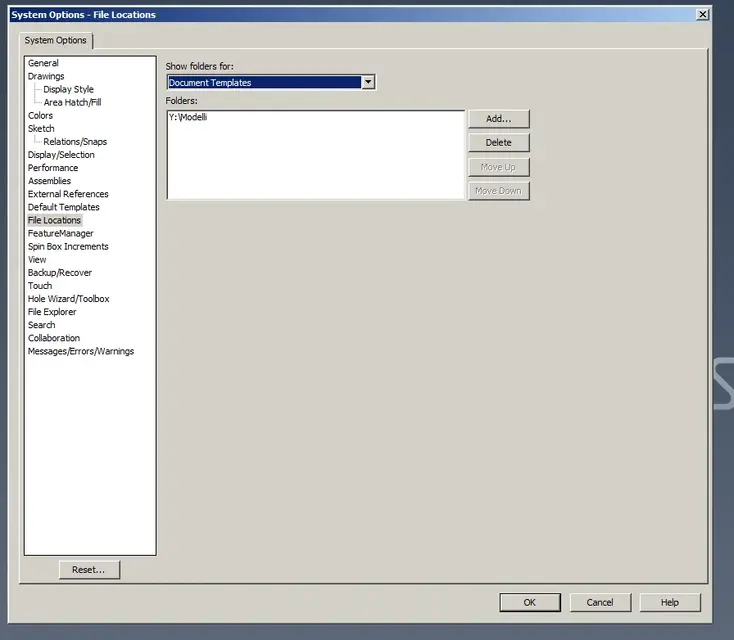
I found files in location from options tools, document templates and gave them the right path and it seems to me that the parts tied to the new path, but the drawings and assemblies did not.
I have to solve it as soon as possible, someone could politely help me, thank you!
 
Help me, I'm desperate!
echessammaiiii!!!: Confused:
I found files in location from options tools, document templates and gave them the right path and it seems to me that the parts tied to the new path, but the drawings and assemblies did not.
but in the new folder you put the drawing templates together? because if swx doesn't touch the templates in the indicated path, it automatically restores the default folder in permanent form.
 
I don't get what you say.
I checked all my colleagues point to that folder and I too until yesterday then fell the network and to restore the path and varied and I do not find the way to change it.
I don't remember how you do it, I think I'm losing myself in a glass of water!
 
I don't get what you say.
I checked all my colleagues point to that folder and I too until yesterday then fell the network and to restore the path and varied and I do not find the way to change it.
I don't remember how you do it, I think I'm losing myself in a glass of water!
do you reach the network resource? You're doing this from the window as the image attached, but I think you're already there.
If you can't get from the swx settings, I don't know what to say, but once you get it all back and dot again, backp the cad's registry settings, so to the limit if you defeat again you can restore the previous situation with a click.
 

Attachments

  • Immagine.webp
    Immagine.webp
    24.6 KB · Views: 39
Of course that's what I think I did.
but the path in which solid goes is another I think there is some additional setting.
however translated into Italian would be models of the document?
and from there takes both tables and assemblies and parts?
Thanks for the patience, today I burst!
Hi.
 
what does not come back is that now every type of file has a different path between part and design and together.
I don't understand why.
 

Attachments

  • 18122012_193854.webp
    18122012_193854.webp
    35 KB · Views: 39
Maybe there's some mess in the files.
experience with solidworks if something is outdated or not used but you do not want to throw it away because you never know the best and safest thing to do is to zip the files.
This way even a remote reference to those files disappears. You have no idea when I work with files with references to old projects... In one way or another he always connects to a folder that I've got in my ass in the world.
in fact there is a template in the sheet format folder. . .

but then those links there are not those to set up to make a new document, as it is written they serve to create derivative parts (not starting); to set the template file folder, you can indicate even more than one, you have to go to the entry file location and look for the subvoice Document templates
 
then the links are just those of the models of the document.
Now I try to draw and see what happens.
I agree with you if it was for me I would have done all the zippers to me the same thing happened.
thanks to all of the timeliness.
Thank you!
 

Forum statistics

Threads
44,997
Messages
339,767
Members
4
Latest member
ibt

Members online

No members online now.
Back
Top