
• This forum is the machine-generated translation of www.cad3d.it/forum1 - the Italian design community. Several terms are not translated correctly.

special weight in cartiglio 2d, not indicated if < 1.0 kg

  • Thread starter Thread starter Giacomo75
  • Start date Start date

Giacomo75

Guest
Hello everyone.. .
I have a problem, in cartiglio 2d, of the details that weigh less than 1.0 kg
In the sense. .
if a particular weighs 1.2 / 2.4 kg etc...
when I put the 2d view in the cartilage, it is immediately put in the cartilage its equal value ( 1.2 / 2.4 kg)

if the particular weighs less than one kg, e.g. 0.4 kg
... in the weight box, when I put the view, no value appears, in the weight box

Units: under instruments/options/properties of the document, are (believe) set correctly
(I attach the two screen shots)

thanks to all and a greeting
jacomo
 

Attachments

if instead of attaching the screenshots attaching the files would be better.
write the solid version in the profile, thank you
 
All clear... thank you...
I had already written the solid version before
that is 2017 sp 5

Thanks again
jacomo
 
Please write the version of solidworks within your user profile, where you wrote software:solidworks
 
... I don't know...
until yesterday it didn't happen to me, this weight problem, which is not reported in cartiglio 2d
from this afternoon I happen.. .
... now (I attach the file part ).... I happen the problem on any weight has the part
(both less than 1kg, and with weights more than 1 kg, as in the new attached file now..)
I also tried to vary the type of material... but the weight in table 2d, is not indicated. .

opening the file part... instead in the properties of 3d, the weight is present correctly

Settings, Units (under instruments/options/properties/properties of the document), according to me are in place

... thanks again to all... :
 

Attachments

... on previous file parts and assemblies (always c. solidworks 2017),
weight is correctly put in table 2d

. thanks to all
 
in the attachments lack drawing files. without those it is not possible to verify anything.
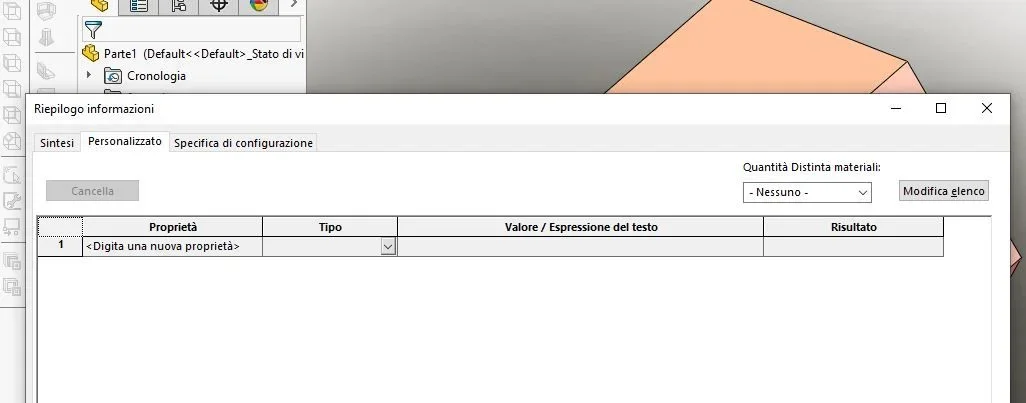
in both files lacks the property that indexes the mass
 
I attach everything in two zipped files, in a folder there is the zip file
where the weight does not appear in the table

and in the other zip file, where it is all right (the weight appears in table 2d)

all files were made with solidworks 2017
If I go to the properties of both parts, the weight appears. .

Thank you very much.. .
 

Attachments

If I go to the properties of both parts, the weight appears. .
Absolutely not.
in the file in which the weight appears in the properties is present, together with others, the weight item
in the nn file in the properties there is no voice.
 

Attachments

  • Cattura.webp
    Cattura.webp
    21.4 KB · Views: 1
... understood... thank you so much mass...
but how can I now put the problem in place, at the source (i.e. in the template file part.prtdot)?
 
Yes, it is. :
by applying, on the custom properties (right corner), go to the place

... thanks again and good day
 
that is the tab builder and has nothing to do with the prtdot file.
the first has extension prtprp and serves exclusively for the management of the properties.
the second is the template for modeling in part environment.

the images attached as such and not as pdf
 

Forum statistics

Threads
44,997
Messages
339,767
Members
4
Latest member
ibt

Members online

No members online now.
Back
Top