
• This forum is the machine-generated translation of www.cad3d.it/forum1 - the Italian design community. Several terms are not translated correctly.

step-dwg

  • Thread starter Thread starter roby88
  • Start date Start date

roby88

Guest
Hello everyone,
I would have to convert a step file to a dwg or dxf file so that you can edit it.
Can someone tell me how if it is possible with inventor or if you have to have another special program to convert files?
I have only inventor and autocad available.
Thank you very much and good day
 
I have never used inventor or autocad, but if you can't import it directly (I imagine in both there is a "file->importa" or something) you could try freecad
definitely read the steps and allow the rescue in inventor 2.1 (*.iv), and then change it to inventor

freecad also exports .dwg and .dxf but both only in 2d

of course it would be good that you know what you have to expect, so you realize if there are translation errors between the various formats
 
Hello everyone,
I would have to convert a step file to a dwg or dxf file so that you can edit it.
Can someone tell me how if it is possible with inventor or if you have to have another special program to convert files?
I have only inventor and autocad available.
Thank you very much and good day
try to open the step with inventor and save in satellite format, that maybe you open it in autocad like 3d (or it is possible that inventor saved in dwg 3d, would be to try).
 
inventor opens the step and saves directly in dwg 3d.
I honestly don't understand why not modify it directly in inventor, do 100 times before and better than with autocad.
 
Thank you very much to all. .
stefanobruno I tried to open it with inventor but it only allows me to view it and nothing more, although I think a work plan on which to start a sketch does not make me project the geometry of my particular in .step, for this I thought to export it in autocad and then to change it and add the details that serve around this piece already designed.
Good day
 
stefanobruno is on the pc that I have in the workshop tomorrow I see if I can put it on mobile and upload it here in the discussion. . .
 
hi roby88, sorry I don't know if I understood correctly, you want to convert it and then change it (work on it) on a 2d?
in .dxf and then send him to the car?
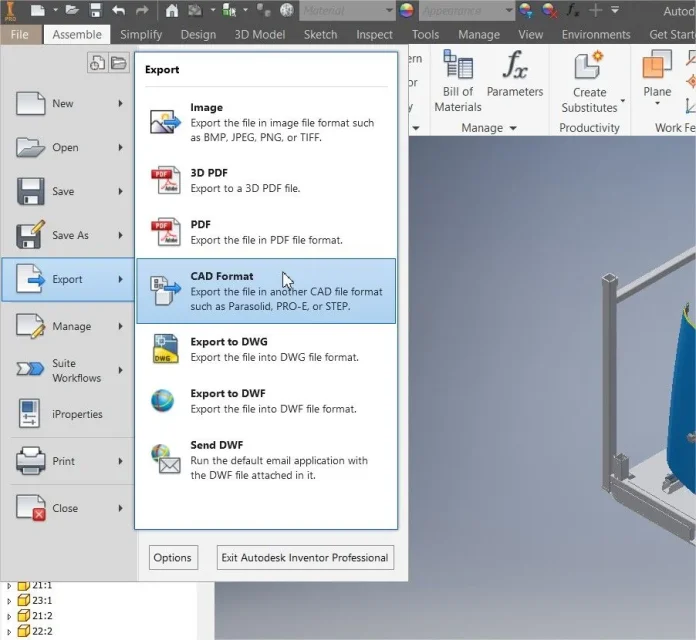
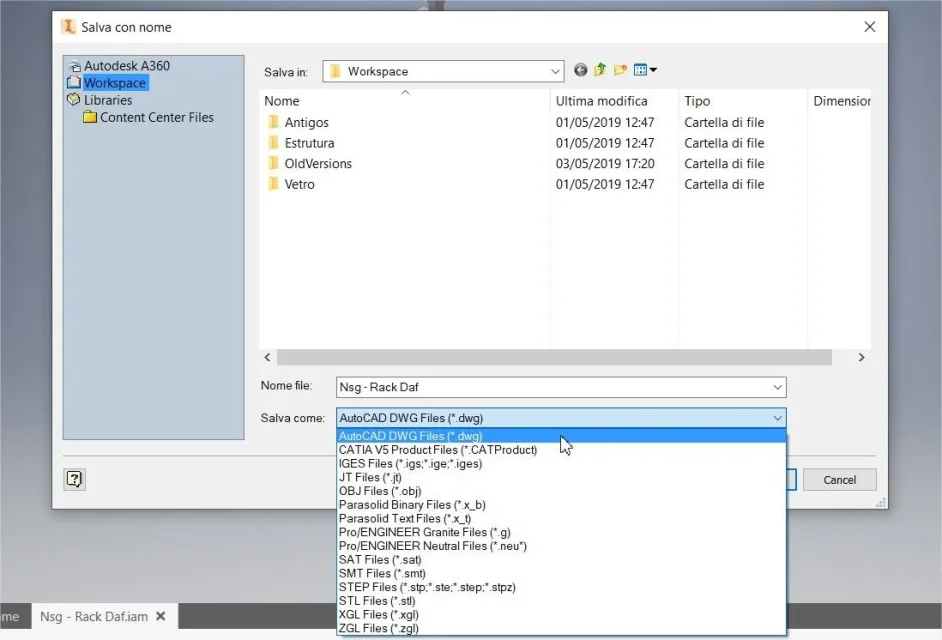
If yes, I attach an image of how to convert it to .dwg, for the dxf I recommend you convert it after autocad, then, convert to .dwg as shown in the pictures, then on autocad modify it and convert it to .dxf

Say hi.
 

Attachments

  • PrtScr capture.webp
    PrtScr capture.webp
    62.9 KB · Views: 16
  • Salva con nome.webp
    Salva con nome.webp
    48.8 KB · Views: 14
excuse the delay in responding but were days of fire in the workshop.
Does the file fail to attach it tell me it's too big or maybe I'm not capable?
Oriano thank you very much just what I meant tomorrow I try and then let me know if I managed.
Thank you very much
Good evening
 
excuse the delay in responding but were days of fire in the workshop.
Does the file fail to attach it tell me it's too big or maybe I'm not capable?
Oriano thank you very much just what I meant tomorrow I try and then let me know if I managed.
Thank you very much
Good evening
roby88, is not the best way to edit files, but it is functional if you do not use well inventor, remember 2 things:
(1) of course. 3d, whether .stp or .iam, will not be updated.
2) when you expose it, create a .idw (drawing) on inventor and already you put all the perspectives, then you directly expose the design in .dwg and you can work as best as you like, at this point you delete the perspectives you do not need and save in .dxf and transfer it to the car. ;-)
 
Oriano thank you very much,
I did as you advised me and managed to edit the file of the detail and then make it in the car.

good ride
 

Forum statistics

Threads
44,997
Messages
339,767
Members
4
Latest member
ibt

Members online

No members online now.
Back
Top