• This forum is the machine-generated translation of www.cad3d.it/forum1 - the Italian design community. Several terms are not translated correctly.

storage parts and axis protection

  • Thread starter Thread starter Serviman
  • Start date Start date

Serviman

Guest
hello to all and good morning,

important premise, I work only with creo2
I have created a directory of the warehouse components for a long time. so when I need them in the project, without occupying useless space in the work directory.
the problem that most bothers me however is that, although the components are not done anything except some dimensional modifications of the project, however in the directory of the warehouse are saved new versions, both for the assemblies and for the parts.
moral, how do I protect the warehouse components from rescues? Is there a blockage or protection I don't know for my ignorance? ! !

thanks in advance,
 
Bye.
when you make dimensional changes to the warehouse models, somewhere I create will have to save those changes. . .
you have two roads to follow:
1) create a copy of the warehouse model within the work directory, and make them all the dimensional changes you want. then you will have a warehouse model adapted to your project.
2) In some cases you could work with flexible components.

Hi.
 
hello and good morning,
Thank you very much for your answer, so I can answer your questions:
1) create a copy of the warehouse model within the work directory, and make them all the dimensional changes you want. then you will have a warehouse model adapted to your project.
this goes against the concept of warehouse component. putting the component in stock I want to lighten the work directory. above all, if you have to upgrade the component (knowing that it is influential to past projects), I find myself improving in the future without having to make double changes.
2) In some cases you could work with flexible components.
I have found that the flexible components fit badly into the project relationships and in the context of the family, but perhaps, after the first repallated and unresolvable yellow lights, I have no more detailed the question. by the way this does not fit the concept of warehouse.

but I came up with the idea of creating a backup of the component if you "break" during the next project, but I accept other solutions.

Hi.
 
Sorry, but I didn't understand something. .
when you say
"even if the components are not done anything except some dimensional modifications of the project"
What do you mean by "some dimensional changes"?
that loads from warehouse a standard component, insert it together, change its length, and save the assembling?
and would like the component in stock to keep the original length,
while when you load the axieme it takes the length you have changed?
 
However, as you already introduced, you can also work with family tables,
if the dimensional quotas you have to take are tableable.. (number of table rows)
if the quotas can take values tending to infinite, then flexibility.
eg, the position of the stem of a cylinder, in stock you have the cylinder with retracted stem, when you load it together define the variable quota that must have the stem in that axieme.
I use flexible parts for known section profiles, but variable length, and since the length can take any value, even centesimal, it would be unthinkable to make a family table. .
 
Sorry, but I didn't understand something. .
when you say
"even if the components are not done anything except some dimensional modifications of the project"
What do you mean by "some dimensional changes"?
that loads from warehouse a standard component, insert it together, change its length, and save the assembling?
and would like the component in stock to keep the original length,
while when you load the axieme it takes the length you have changed?
hi, the juice would be that, but I would simply like that when the project was not made further copies of the component in stock, because anyway, using the components in stock, whenever the project is saved (outside the warehouse) are made new copies of the component, with a new progressive and I do not want to.
I would like the new warehouse component to be saved, for example, if the work directory is just the warehouse or something.. .
 
Good morning @serviman , the behavior that signals is due to the fact that those components are simply used, I suggest that I work with creo 8 and intralink (but this does not make any difference), so I can tell you that I create sees modified some files simply for a regeneration or some rule in relationships. here from me the thing is manageable, since with the pdm I can avoid saving useless versions server side, but if you work in the folder you do not have complete control of what the sw evaluates as modified, then you have the problem you talk about.
the solution is however simple, just do not give permission to create writing in the location where you have the details of warehouse, and he will not be able to save changes, whether these are real or fictitious. do this you simply need to use a batch to delete all files saved as new in the work directory.
 
Hello and thank you,
The point is exactly that.

You know how to explain to me?

would be an alternative to purge? I don't know why. .
First of all you need to know if your warehouse folder is on the network or locally, the procedures are different (I warn you that they are not user friendly, but I think they can fix it).
- if files are on a shared network path just remove write permissions to your user (I can't show you how because on our network I'm not authorized to give or remove permissions)

premise: Do the evidence on a copy of your folder, you never know!

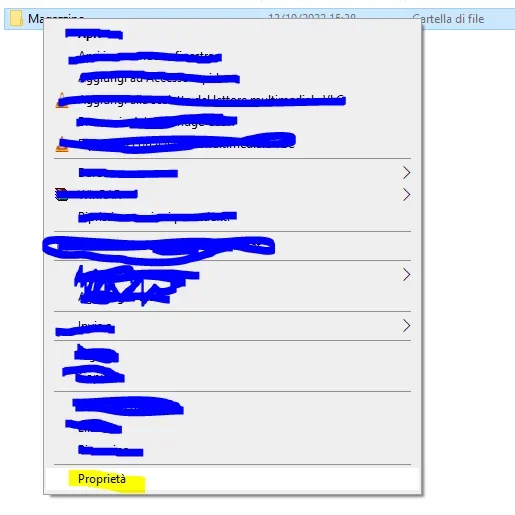
- if the folder is local you have to select it and press dx button of the mouse --> properties
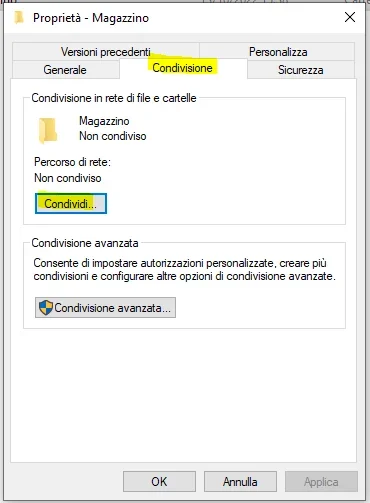
1665668384763.webp1665668498707.webp- at this point choose sharing
1665668562491.webp- to your user only give read permissions and click share
1665668700284.webp- click on completed operation
1665668784694.webp- now move to the security tab and click advanced --> then select administrator --> change
1665669128063.webp- just leave writing permits and press ok
1665669238817.webp- Okay.
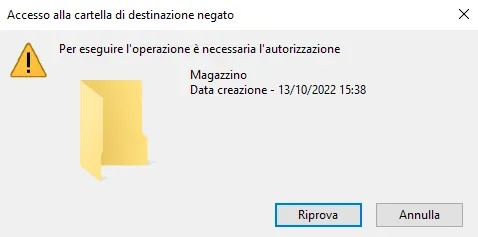
- Now you shouldn't be able to write in the folder
1665669432287.webp
 

Attachments

  • 1665669015963.webp
    1665669015963.webp
    68.6 KB · Views: 0
thank you so much for the time dedicated, because it is not little!
I'll look so calm!

Thank you, thank you, thank you!
 
Hello and thank you,
The point is exactly that.

You know how to explain to me?

would be an alternative to purge? That's why I don't know. .
for the batch is a very simple dos file that allows you to delete a list of specific files from the folder where you have your project.

e.g.
extract the content of the directors in a text file

list.

then open it in excel getting all the file names in the warehouse folder

generate a new text file (bloc notes) containing the string for each file name:

of the pipe*
of pluto*
etc.

change the file extension from txt to bat
When you finish your job, just throw the bat in the workbook with a double click.

n.b. eye to how you name the files that you need, because in this way will be deleted all the files that start for, so for example if you have pippo.prt.1 and pippo.prt.2 and pippo new.prt.1 the batch will erase everything
 
hi, they're old memories. Now that I've been using the pdm for 15 years, it's like you, but before I check the drawings, recovering the originals, which have changed even because I opened the file to turn on a layer.

when I didn't have it, but try my 60-year-old memory is not a security, I think I would erase the files in the work directory of the warehouse obviously deleting also the memory of proe .
being automatically linked to the reopening of the asm proe file, the original ones went back to the warehouse following the path of the search path file.
Try it.
Hi.
 
hi, they're old memories. Now that I've been using the pdm for 15 years, it's like you, but before I check the drawings, recovering the originals, which have changed even because I opened the file to turn on a layer.

when I didn't have it, but try my 60-year-old memory is not a security, I think I would erase the files in the work directory of the warehouse obviously deleting also the memory of proe .
being automatically linked to the reopening of the asm proe file, the original ones went back to the warehouse following the path of the search path file.
Try it.
Hi.
In fact, it can be another simple strategy.
 
hi, they're old memories. Now that I've been using the pdm for 15 years, it's like you, but before I check the drawings, recovering the originals, which have changed even because I opened the file to turn on a layer.

when I didn't have it, but try my 60-year-old memory is not a security, I think I would erase the files in the work directory of the warehouse obviously deleting also the memory of proe .
being automatically linked to the reopening of the asm proe file, the original ones went back to the warehouse following the path of the search path file.
Try it.
Hi.
ciao Waltzmaloobocon , absolutely correct as observation! in this case @serviman you could help with the batch to clean the work directory and avoid reading the warehouse folder (this is just a security for the files contained in it).
 

Forum statistics

Threads
44,997
Messages
339,767
Members
4
Latest member
ibt

Members online

No members online now.
Back
Top