• This forum is the machine-generated translation of www.cad3d.it/forum1 - the Italian design community. Several terms are not translated correctly.

Stratagura

  • Thread starter Thread starter gianlucap
  • Start date Start date

gianlucap

Guest
Hello everyone, I should represent on a pin the zigrinature (in the model), do you know where I can find the appropriate command?
I use the 2008 version.
thanks to all
 
you have to create a color that has the zigrination as a composition, it is only a "color" for which in the table you do not see, at least that does not untouch the piece in "shaded"
 
thanks peppe, of course that but those of the autodesk could already preview it as processing! ! ! ! !
but creating a color to simulate the zigrination is a long procedure?
 
making a zigrination with a real workmanship would weigh heavily on the piece and quite uselessly, so much interested only the optical effect... Also the threads of the holes and screws, for example, are only representations made with an image, no real spiral processing is made to obtain them.
 
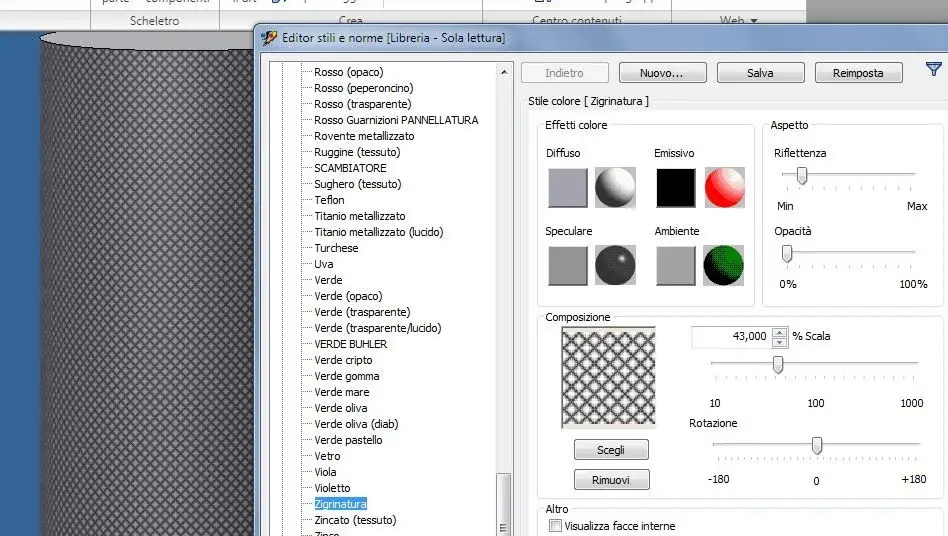
go to editor styles - select a color (e.g. metallic steel) and save by name, call it zigrinatura - then go to choose composition and play with reflectance, opacity, scale and rotation. At the end, save. This color of course you will only give it to the face you want to zigrinate, not to all the solid.
Zigrinatura.webp
 
but it's already on the inventor's list of colors:
metal-stained steel
I don't have it, I don't know if because my bookstore styles I carry it from very earlier relics or anything. However process valid to create colors for networks, for which transparent or other
 
but it's already on the inventor's list of colors:
metal-stained steel
Yes there is but I have to keep the color metal
go to editor styles - select a color (e.g. metallic steel) and save by name, call it zigrinatura - then go to choose composition and play with reflectance, opacity, scale and rotation. At the end, save. This color of course you will only give it to the face you want to zigrinate, not to all the solid.
View attachment 14309
beautiful them, so I can create zigrination also on green color for example
making a zigrination with a real workmanship would weigh heavily on the piece and quite uselessly, so much interested only the optical effect... Also the threads of the holes and screws, for example, are only representations made with an image, no real spiral processing is made to obtain them.
It is true, however it would be a break in less, as in my case that I now have to change color to the details close because the zigrination is only for the color metal steel, I had the details near the piece zigrinato color steel and this I identified putting it a different color, instead now I have to go to change the others!
 
Hello everyone, I wanted to know how to create a zigrination on a particular 3d, use autocad 2007, from the view in 2d as it should be designed to be generated in the solid view. They told me that the generation in 3d is a long passage as generation. . Thank you.
 
Hello everyone, I wanted to know how to create a zigrination on a particular 3d, use autocad 2007, from the view in 2d as it should be designed to be generated in the solid view. They told me that the generation in 3d is a long passage as generation. . Thank you.
I think I didn't understand the question. with autocad 2007 do a 2d representation just. It's over there.
in inventor is all another planet and you do it differently.
 
Hello everyone, I wanted to know how to create a zigrination on a particular 3d, use autocad 2007, from the view in 2d as it should be designed to be generated in the solid view. They told me that the generation in 3d is a long passage as generation. . Thank you.
did you notice that this is the inventor forum? ?
mother home apart 2 softwares have nothing to do with.
for autocad there is the special section, put there your questions that have nothing to do here.

then as a new user you should read the regulation and learn calmly to know the forum before beginning with messages ot.

greetings
Mar
 
Hello, I created in 2d a zigrination on a particular, now wanted to regenerate it in three-dimensional where the characteristic of this processing is highlighted.practically how to generate a thread with all the views.I apologize if I am unclear in the explanation, I am sure you can understand my request.
 
I reopen this thread because I can't create/see/manage a zigrination on inventor 2019 (only look grinning, not a real processing).
I remember doing it in 2013 (with inventor 2010), and I also had some notes about it as a future reminder:
,--------------
to make a zigrination/coating/bugnation you must assign a texture to the desired surface (click dx/property - management/editor styles/color)
pattern_7.bmp straight enjoyment (scale 1)
knurl.bmp spindle/diamante enjoyment
diamond plate4.bmp/plate_1.bmp/plate_2.bmp/
'--------------

I am now impatient; I can't apply the above, then I read the old discussions but if I try to follow the tips given here in the past something doesn't come back.

try 1: I open my ipt with the created part, I go in management/editor styles but do not appear colors, I only have lighting and text (with their subsections), unlike what I see here (#5): https://www.cad3d.it/forum1/threads/zigrinatura.18622/post-152864Test 2: I go into tools/look, and in the inventor material library there is actually the item "zigrinate 45"; the reference sphere is a normal glossy figure, in fact if I apply it as it is to a surface, the appearance changes but you do not see the zigrination. I return to instruments/species and change the parameters of the zigrination (value and scale), on the ball the zigrination appears, I apply the modified appearance to a surface but the zigrination still does not appear.
I have made several attempts, then I have yielded.

Am I wrong?

Thank you.
 
Test 2: I go into tools/look, and in the inventor material library there is actually the item "zigrinate 45"; the reference sphere is a normal glossy figure, in fact if I apply it as it is to a surface, the appearance changes but you do not see the zigrination. I return to instruments/species and change the parameters of the zigrination (value and scale), on the ball the zigrination appears, I apply the modified appearance to a surface but the zigrination still does not appear.
I threw out the autodesk forum, it seems to be (as usual) a common problem.

reading https://forums.autodesk.com/t5/inventor-forum/knurling/m-p/6966672 I remembered the process, but also applying a custom texture (knurl.bmp and/or other similar) then I don't show it correctly, even changing display.

it will end up that I will create it as processing; But I can't lose too much time.
 
it will end up that I will create it as processing
Wow, I figured out why you said that creating zigrination as a hanging workmanship: original starting file 165 kb; I add zigrination processing --> almost 6 mb!

(I then lightened to 3 mb, playing with the parameters of the helicoid: revolution 0.5 instead of 1)
 

Forum statistics

Threads
44,997
Messages
339,767
Members
4
Latest member
ibt

Members online

No members online now.
Back
Top
