
Luca18
Guest
Hello everyone!
I'm new, and I need some advice.
I'm making a 3d hub design with inventor, and so far all right.
But now I would like to check if the piece is properly sized for the efforts to which it will be subjected.
I press that despite having a good experience with 2d software, it is recently that I use inventor.
I launched an analysis of the stresses, applied the forces in the contact points, defined the material, fixed the constraints where the hub will be fixed with conical screws, made mesh and simulated.
what I do not understand is why I apply 1n of force or 100000n in the final result the deformation of the piece is always the same (see figure) and the areas that in theory should have the greater deformation in the various tests have the same color of areas that in theory are less stressed.
I think the software applies a simulation to the point of material yielding regardless of the input force.
I was interested in understanding in particular whether the six areas close to the contact points (I looked for one in red) resist the stresses to which the piece will be subjected without suffering a plastic deformation or worse a break.
How can I do that?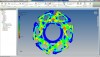 I think it's a trivial thing, but if some pious soul can clarify my ideas? I'd be grateful.
thanks to everyone in advance.
I'm new, and I need some advice.
I'm making a 3d hub design with inventor, and so far all right.
But now I would like to check if the piece is properly sized for the efforts to which it will be subjected.
I press that despite having a good experience with 2d software, it is recently that I use inventor.
I launched an analysis of the stresses, applied the forces in the contact points, defined the material, fixed the constraints where the hub will be fixed with conical screws, made mesh and simulated.
what I do not understand is why I apply 1n of force or 100000n in the final result the deformation of the piece is always the same (see figure) and the areas that in theory should have the greater deformation in the various tests have the same color of areas that in theory are less stressed.
I think the software applies a simulation to the point of material yielding regardless of the input force.
I was interested in understanding in particular whether the six areas close to the contact points (I looked for one in red) resist the stresses to which the piece will be subjected without suffering a plastic deformation or worse a break.
How can I do that?
I think it's a trivial thing, but if some pious soul can clarify my ideas? I'd be grateful.thanks to everyone in advance.