• This forum is the machine-generated translation of www.cad3d.it/forum1 - the Italian design community. Several terms are not translated correctly.

style view sheet metal

  • Thread starter Thread starter xxfast
  • Start date Start date

xxfast

Guest
Good morning.
I performed a step recognition for a sheet metal part.
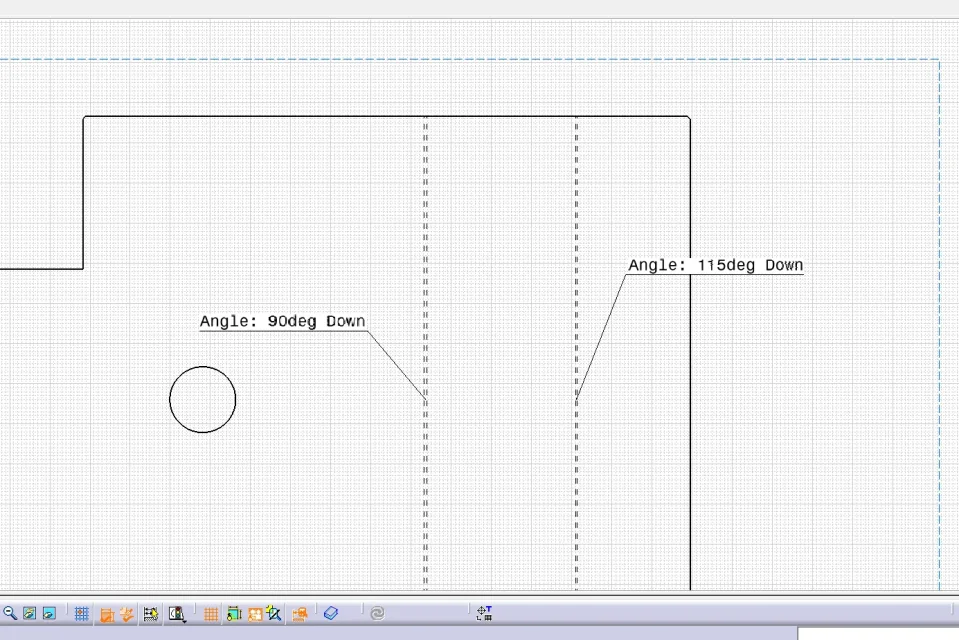
when I make the table on the development I do not see the fold lines.
I usually apply a style of the development-generative view, previously uploaded to the caia directory.
Now I'm stuck setting "generation view style" on development view options.
Can someone tell me something about it?
Thank you.
XXX.webp
 
Hi.
if on the same design make a view of a cube e.g. do you have the menu available?
Could it be that the option is not available for views of a sheet?
 
Hi.
if on the same design make a view of a cube e.g. do you have the menu available?
Could it be that the option is not available for views of a sheet?
Nothing to do.
It's the same thing.
Previously it worked, as I used the view style to create the fold lines with the relevant directions.
 
Hi.
What revision do you use? (I have 19)
as my dialog is different from yours and I don't find the style of regenerative vision to test...

for verification, try reopening an old part and design that worked
I think that a converted step losing features does not allow certain operations, but it seems too trivial.

Hi.
 
Hi.
What revision do you use? (I have 19)
as my dialog is different from yours and I don't find the style of regenerative vision to test...

for verification, try reopening an old part and design that worked
I think that a converted step losing features does not allow certain operations, but it seems too trivial.

Hi.
use 20.
common mist gives fare, stessa thing.
 
Okay, then it's clear that you've changed a parameter setting! (or catsetting, or that settling is inherited from a copied drafting)

Meanwhile I found in the r19 the style option of the regenerative view found in:

right/right/object/generative view selection

that was stuck to me too!

go to:

menu/instruments/options/mechanical desig/drafting/administration/generative view style

remove the check mark from: prevent the use of generative view style.

Let me know.

Hi.

years ago
 
Okay.
Thank you for your help.
I was also stuck with the parameter: right/right/object/generative view selection
However, by unlocking and selecting the style I uploaded earlier, I do not display the fold lines and even with the standard cat style.
I believe it depends on the fact that the file in question is an import from one step and then converted the sheet.
trying with a part generated by me everything works:
sviluppo.webpif you have a file that sets the fold values in Italian and maybe with a single fold line and the text line even better. :redface:
 

Forum statistics

Threads
44,997
Messages
339,767
Members
4
Latest member
ibt

Members online

No members online now.
Back
Top