
Danny12
Guest
Hello everyone, this is my name Daniel and I am 33 years old. It's been this summer that I've been following 3d drawing courses for jewelry and it's the second time I've been facing a problem. I'm trying to make a museum ring following a tutorial of the course I'm following.
the surface of the ring is realized with the mesh command of curves and from here everything perfect, the problem that has already been presented to me other times comes when I try to divide the green surface with the orange line that is located on it (made by making an offset of the edges). as in the image placed it is seen that after the use of the command rhino decides to split the surface in two parts while I would need it was a unique surface, in the tutorial this problem does not appear, once used the command divided between the surface and the orange line you get a single surface from which then the edges will be obtained uv. I while having followed each single passage I find myself with two distinct surfaces and even if I try to unirle only
At this point I wonder if there are no parameters to change within the options or escamotage to bypass this thing (the clear green lines are only the skeleton with which I made the surface and are not part in any way of it, do not create division edges)
I hope someone can help me
thanks in advance
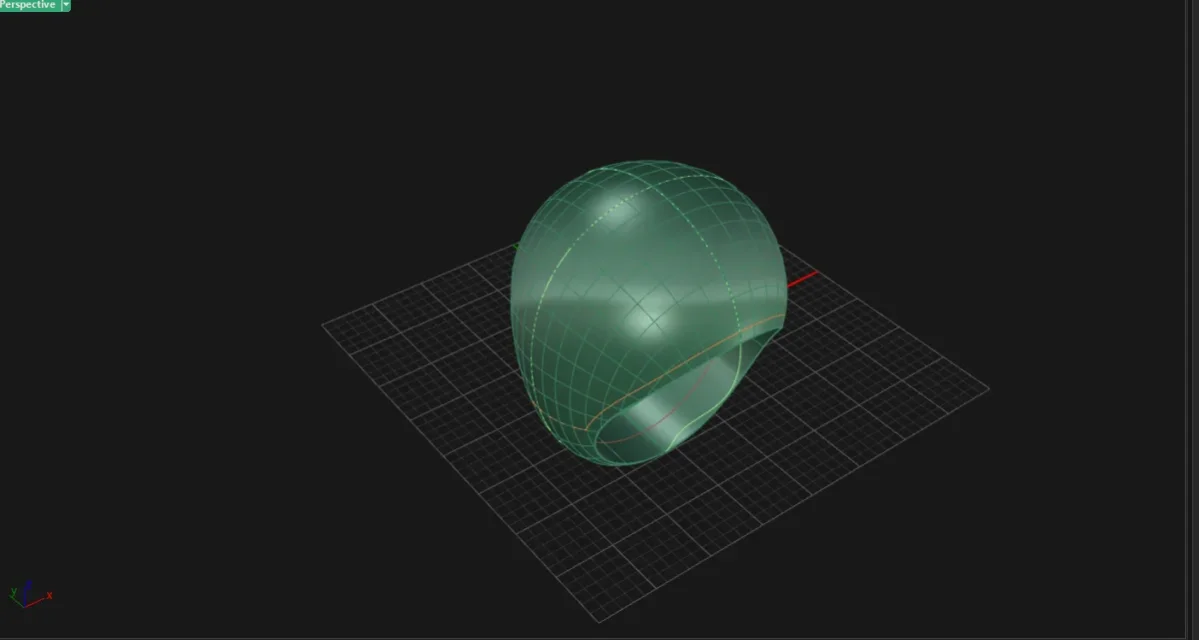


the surface of the ring is realized with the mesh command of curves and from here everything perfect, the problem that has already been presented to me other times comes when I try to divide the green surface with the orange line that is located on it (made by making an offset of the edges). as in the image placed it is seen that after the use of the command rhino decides to split the surface in two parts while I would need it was a unique surface, in the tutorial this problem does not appear, once used the command divided between the surface and the orange line you get a single surface from which then the edges will be obtained uv. I while having followed each single passage I find myself with two distinct surfaces and even if I try to unirle only
At this point I wonder if there are no parameters to change within the options or escamotage to bypass this thing (the clear green lines are only the skeleton with which I made the surface and are not part in any way of it, do not create division edges)
I hope someone can help me
thanks in advance