
• This forum is the machine-generated translation of www.cad3d.it/forum1 - the Italian design community. Several terms are not translated correctly.

Sw2017: hide pattern elements

  • Thread starter Thread starter strudeldemele
  • Start date Start date

strudeldemele

Guest
Hello everyone,
in a drawing file I added "model elements" to add cosmetic threads; the problem is that it has shown them all, some I have managed to remove them, but others I can't understand where they come from and I can't select them from the tree (or at least so it seems); in some cases it even seems that certain lines should not be there.
- can you with a command, delete the items previously imported?
- can I select all cosmetic threads with a "frame" and a filter?

Thank you.
 
Are you talking only about cosmetic threads or other elements?
How did you get them off?
Are the views in high quality mode instead of draft?

it is understood as little overall.
perhaps there is a difference between import in hidden lines and without these modes, but I have never verified
Perhaps you can make a undo to restore the situation before inserting the imported elements, but it must be done immediately after.
the filters available are those in the appropriate bar, there are no others.
cosmetic threads can be hidden from the feature manager
 
Hi.
I did this:
1- full design, I had to add on some views the cosmetic threads, with the command insert from the model;
2- My mistake: I left flagged the option "import in all views" and I found all the existing threads, even those hidden by other bodies, I can't select them and from the tree of the feature manager if I go on the screw and select the thread (or on the hole) does not give me the option "hide" or with the mouse button dx or otherwise;
3- at this point from the options of the document I tried to disable them but or disable them all or nothing.... if I disable them all and try to import them only in the chosen view, it still puts them on all the table;
4- If I try to insert elements of the model by choosing the components .... do not select them.. .

I don't know if it's a bug or if it's me making a mess
hello and grazuie a thousand
 
massivonweizen said:
Are the views in high quality mode instead of draft?
verified? ?
massivonweizen said:
]The cosmetic threads can be hidden from the feature manager
Have you tried? ?

However I’m trying with 2014 and selecting each single thread you can hide directly from the view.
in the filter bar there is the cosmetic thread that however does not work with the area selection, but ease the selection
 
Hi.
I'm sorry if I didn't answer but I just had a holiday...
I tried, the only one is looking for threads between another hundred... in the graphic view often does not even select them.thanks
 
Hi.
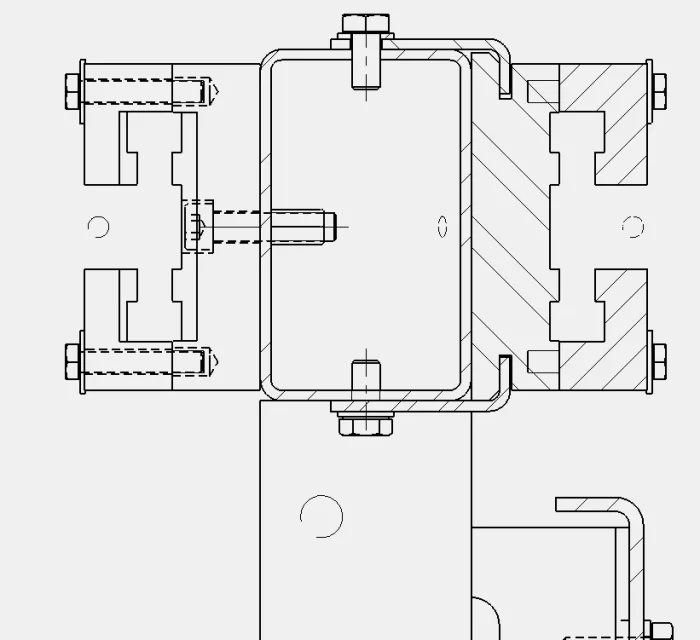
I attach an image of a view where I'd like to remove the incriminated fil cosms... views are all in high quality, both in general and single settings.
as you see there are also threads of unseen parts, which I cannot select
even using the filter or command selects others, it does not allow me to select the threads and hide them.
--Is there no way to "cut" elements from the model? practically the opposite command.. .
I'd like to get the fillets out.... go to visit them in the feature manager would be a mess, in the assieme there are about 200 screws
thanks for collaboration and patiencefil cosmetiche.webp
 
I don't know how to fix it because I can't reproduce the problem.
Can you create a small anonymous group that brings back the problem and attach it?
 

Forum statistics

Threads
44,997
Messages
339,767
Members
4
Latest member
ibt

Members online

No members online now.
Back
Top