
You are using an out of date browser. It may not display this or other websites correctly.
You should upgrade or use an alternative browser.
You should upgrade or use an alternative browser.
Ezio Olivato
Guest
with autocad you were poly3d!
riccardot5765
Guest
You can do it in two ways. the first is to place appropriate points and the second to use a dedicated module.
first method:
1 place corners or curve points
2 I create the linear segments in pairs between the corners or between the terminals of the curves, obtaining in both cases a continuous line
3 I use the sweep by defining as a trajectory the first tracked curve and making at the moment the definition of the section. In this case, I'll place you an orthogonal plan where you put the origin of the line.
The section can be what you want. the only thing a bit boring in this process is to calculate the exact point for the curves. but you have the creation of many different curves.
the second method instead is to use the efx module that is dedicated just for the kind of work you want to do. in this way you will create so many parts as the pieces that make up the structure.
I would say that if you have to do something a little more important than the design you posted, then the efx module becomes fundamental, even because it manages the joints and what else. If you have to limit yourself to things with a couple of curves, then put a couple of points and you solved.
Hi.
Hi.
first method:
1 place corners or curve points
2 I create the linear segments in pairs between the corners or between the terminals of the curves, obtaining in both cases a continuous line
3 I use the sweep by defining as a trajectory the first tracked curve and making at the moment the definition of the section. In this case, I'll place you an orthogonal plan where you put the origin of the line.
The section can be what you want. the only thing a bit boring in this process is to calculate the exact point for the curves. but you have the creation of many different curves.
the second method instead is to use the efx module that is dedicated just for the kind of work you want to do. in this way you will create so many parts as the pieces that make up the structure.
I would say that if you have to do something a little more important than the design you posted, then the efx module becomes fundamental, even because it manages the joints and what else. If you have to limit yourself to things with a couple of curves, then put a couple of points and you solved.
Hi.
Hi.
Attachments

maxopus
Guest
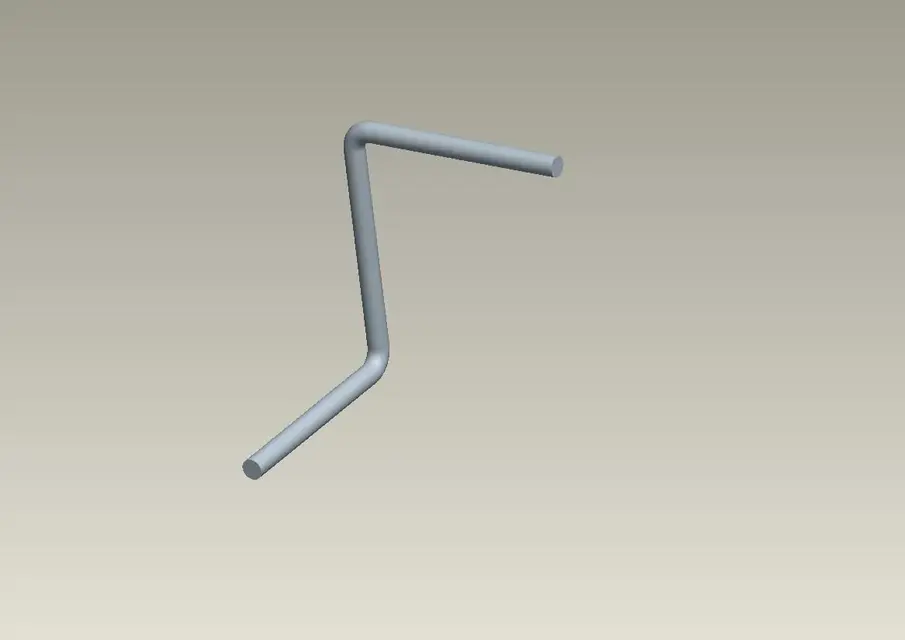
depends on what you need to draw, if it is a pipe, as in the image you post, you just need the steps and use the pipe command.
If you need to use a section other than a circumference and do not have specialized modules, just draw a reference curve through the points and then use it for a variable section sweep.
or always use the pipe command with "no geometry" option (to track the curve) and then realize the variable section sweep.
If you need to use a section other than a circumference and do not have specialized modules, just draw a reference curve through the points and then use it for a variable section sweep.
or always use the pipe command with "no geometry" option (to track the curve) and then realize the variable section sweep.
africagia
Guest
Thank you. What I care about is the first method. It's just a curiosity that came to me, in the end, in some way, I managed to realize but I used extrusions and revolutions to realize the design posted before. I don't understand one thing in the first method. I realized the 3d curve as you indicated me. now I go in sweep in the definition of the trajectory select the curve realized previously, but then I can not go further, asks me chain: one by one, chain tan, chain curves, chain surface, chain I mean.You can do it in two ways. the first is to place appropriate points and the second to use a dedicated module.
first method:
1 place corners or curve points
2 I create the linear segments in pairs between the corners or between the terminals of the curves, obtaining in both cases a continuous line
3 I use the sweep by defining as a trajectory the first tracked curve and making at the moment the definition of the section. In this case, I'll place you an orthogonal plan where you put the origin of the line.
The section can be what you want. the only thing a bit boring in this process is to calculate the exact point for the curves. but you have the creation of many different curves.
the second method instead is to use the efx module that is dedicated just for the kind of work you want to do. in this way you will create so many parts as the pieces that make up the structure.
I would say that if you have to do something a little more important than the design you posted, then the efx module becomes fundamental, even because it manages the joints and what else. If you have to limit yourself to things with a couple of curves, then put a couple of points and you solved.
Hi.
Hi.
africagia
Guest
Thank you. That's what I was wrong: the variable section sweep. Now I'm trying the pipe command.depends on what you need to draw, if it is a pipe, as in the image you post, you just need the steps and use the pipe command.
If you need to use a section other than a circumference and do not have specialized modules, just draw a reference curve through the points and then use it for a variable section sweep.
riccardot5765
Guest
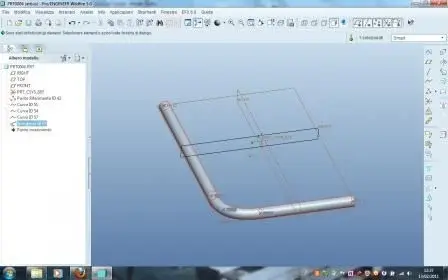
It's not that he asks, but you have to choose the type of selection to do. In the example I posted I used one by one. holding ctrl I selected the various curves, click ok and then it makes you draw the section, which can have any shape you want.Thank you. What I care about is the first method. It's just a curiosity that came to me, in the end, in some way, I managed to realize but I used extrusions and revolutions to realize the design posted before. I don't understand one thing in the first method. I realized the 3d curve as you indicated me. now I go in sweep in the definition of the trajectory select the curve realized previously, but then I can not go further, asks me chain: one by one, chain tan, chain curves, chain surface, chain I mean.
africagia
Guest
but I realized a single curve, so using one to one I selected the only curve, but then it doesn't make me end.It's not that he asks, but you have to choose the type of selection to do. In the example I posted I used one by one. holding ctrl I selected the various curves, click ok and then it makes you draw the section, which can have any shape you want.
Anyway, I did it with variable section sweeps and pipes.
blubossa
Guest
Excuse me, but the piping command where I find it?
Thank you.
bb
Thank you.
bb
maxopus
Guest
(ii)Excuse me, but the piping command where I find it?
Thank you.
bb
blubossa
Guest
hi maxopus,(ii)
I tried the command, it looks like it goes well but I don't see a tube:biggrin:
How come?
bb
blubossa
Guest
Sorry, I solved...:biggrin:
Hi.
Hi.
cletus
Guest
method 3:
drawings on two orthogonal planes (front and side) the two sketches represent the projection of the 3d curve on the planes themselves.
intersect the two curves and get the 3d curve
drawings on two orthogonal planes (front and side) the two sketches represent the projection of the 3d curve on the planes themselves.
intersect the two curves and get the 3d curve
Alan81
Guest
I usually do 3d sketches, creating plans in the different angles I need. I didn't know the piping function. I'll try!