• This forum is the machine-generated translation of www.cad3d.it/forum1 - the Italian design community. Several terms are not translated correctly.

sweep command not usable with fittings

  • Thread starter Thread starter Zanna91
  • Start date Start date

Zanna91

Guest
Good morning to all,
I have the following problem:[video]http://v6.tinypic.com/player.swf?file=28guzq0&s=6[/video]I can't understand why when I go to insert the fittings doesn't allow me to use the sweep command?

Thank you.
 
otherwise in the inner corner that geometric figure should ever go out?
with connection radius equal to the radius of the "tubo" (as gp says) in the inner point you will have a bending radius equal to zero.
With a smaller radius, there's no possible geometry.
 
rehearsal, always remaining on the subject. How can I reconnect polylinea after changing the direction of theucs and therefore I disagree with my "tubation"?

Thank you.
 
for what you want to do you can not use polylines, those 2d have the vertices that lie on the same floor, those 3d can have them everywhere, but they are not suitable.

you have to use the splines, i.e. single splines of 2 vertices (so straight) combined to form the desired path and then collect.

eventually join everything in a unique spline, sweeppabile as you want.
 
...this is a great lisp....with the commands in Italian....
Hello, nice to see you "on these screens" and... thanks for the translation. :wink:

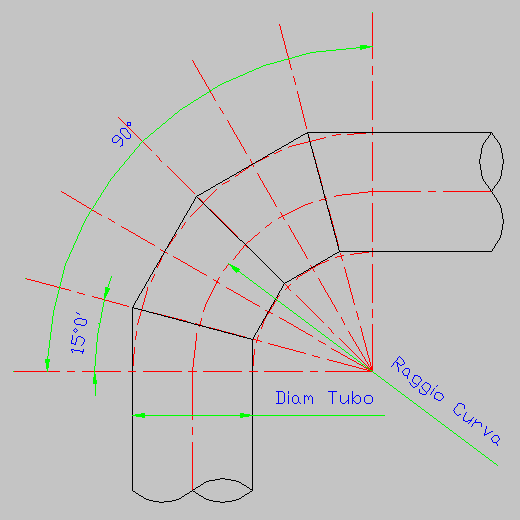
cute lisp, for use however depends on the degree of representation that has to get zanna91, as the curves are transformed into a series of straight strokes and not true arches.

another approach, with autocad > 2011, could be to draw lines, collect them and then join them in a unique spline.

424.gif
 
Gentlemen, allow me. . .

the connection on a polylinea, along the z (which is current or global ucs) is not allowed. but it is allowed on the lines, as long as these belong to the same ucs.
There's a difference between a line (horizontal) that belongs to a vertical ucs, and a vertical line that belongs to the global ucs.
If the lines belong to the same ucs, you can reconnect. and if you can collect, after you can sweep, even if for single pieces, but that we care, after we join them in a single solid.
I attach a short video of clarification.View attachment 32721
 
... degree of representation that must obtain zanna91, as the curves are transformed into a series of straight strokes and not true arches.
it is suitable for the representation of curves with spikes, used for large diameters or in pipes for air / smoke.Curva_a_spicchi.gifa greeting to all, and especially to gp.
 
Hello, everyone. I have a similar problem, in the sense that it always concerns the sweep command.
I try to ask here, so I avoid opening a new discussion, since by pushing the forum I did not find what I was looking for.

I attach some pictures to help me in the explanation:

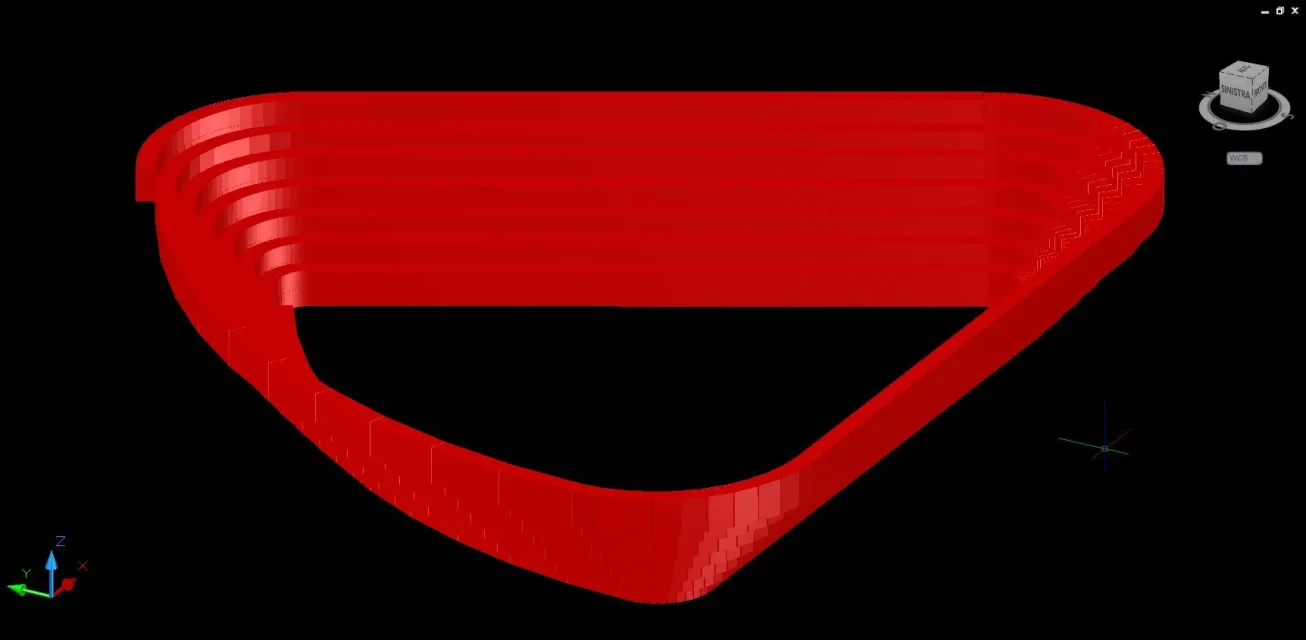
in this image the magenta rectangle is the polygon to be extruded, the red 3d polylinea is obviously the path Screen1.webpthis is the result of extrusion:Screen2.webpI would like that along the path, the sides of my magenta polygon remained vertical/horizontal, but the result as you can see is completely different from what I would like to achieve.

I tried any type of option available in the sweep sub-commands, but with any modification the result remains identical, so I am completely flattened.

advice?
 
is a problem already dealt with in other discussion http://www.cad3d.it/forum1/showthread.php?34846-estrusione-lungo-l-asse-zmake your rectangle a block, measure the beads with the block option, requiring you not to align the block to the path.
Explode your new blocks inserted, and instead of sweep, from a loft between sections (in the exact development sequence).

useless to say that the more sections you will have, the better will come out the solid.
 
You may try to change the rectangle position from the sweep polyline.
keep it as well orthogonal, but put the origin of the poly in the center of the rectangle and try to see how it comes.
 
Thanks for the advice. I placed the middle sections and did the loft command. only that when I go to indicate the trajectory tells me "the selected entities are not valid"

What does that mean?
https://dl.dropbox.com/u/40973929/3dpoli.dwgThis is the polylinea 3d file, maybe you can figure out which chestnuts I'm doing.
 
I solved. If it could come back useful to others, I would like to say that importing polylinea on 3d studio max, with 2 clicks and set 3 parameters throughout, the result is perfect. Time: 1 minute. This does not take away that I thank you for the help and advice.
Screen3.webpps: the procedure on 3ds is:

select the imported polyline
add "sweep" modifier to polylinea
set side and height of desired extrusion profile, set fitting angle = 0
export to dwg format
import on autocad
End.
 
... importing polylinea to 3d max studio, with 2 clicks and setting 3 parameters in all, the result is perfect. time: 1 minute. .
It is strange that autodesk does not implement the command with a sensible option, or maintain the inclination of the original object.
However... having a lisp to create the 3dpoly offset (your trajectory) in autocad could be enough even less than a minute. :smile:
 

Forum statistics

Threads
44,997
Messages
339,767
Members
4
Latest member
ibt

Members online

No members online now.
Back
Top