• This forum is the machine-generated translation of www.cad3d.it/forum1 - the Italian design community. Several terms are not translated correctly.

swept command anchor points

  • Thread starter Thread starter warcraft
  • Start date Start date

warcraft

Guest
Good morning to all,
being new to the forum I take the opportunity to greet everyone.
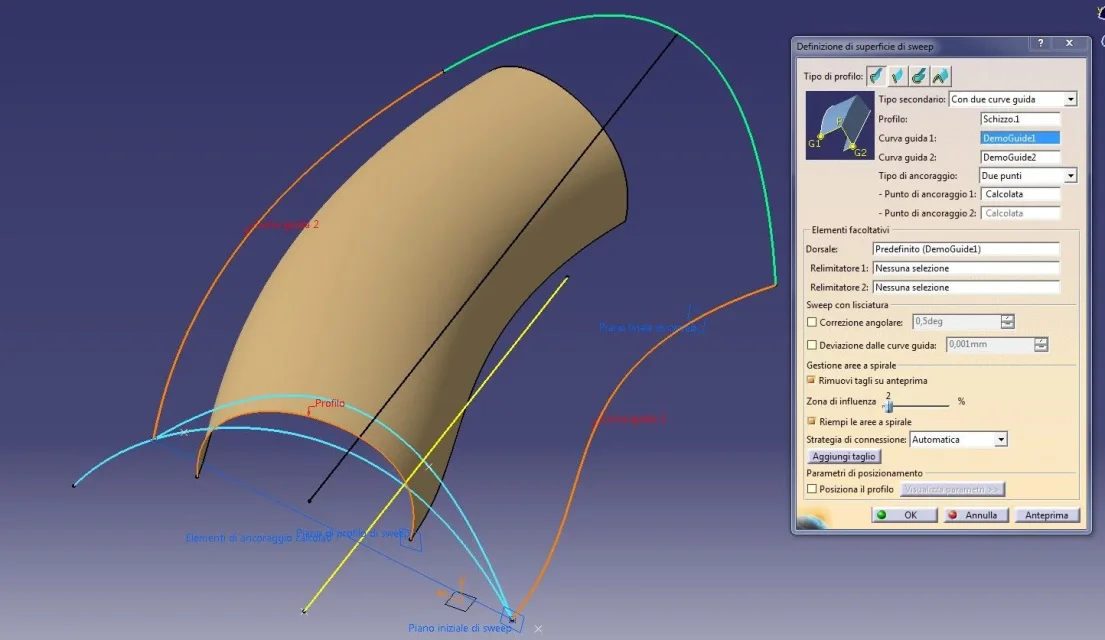
I wanted to ask someone for clarification on the anchor points of the swept command of catia, so what are they for? ! ?
once given the profile and the two guide curves on which to run it to what do I need the anchor points?
 
Hello warcraft,

I quote the guide of catia:

"the anchor points are the intersection points between guides and profile plan or profile itself, through which the guide curves will pass"

Now I try to explain it with examples:

1.jpg
Usually we are used to create the sweep by selecting the profile and the guide curves that intersect each other

2.jpg
but it is also possible to create a sweep by selecting a profile that does not intersect with the guide curves, in that case the profile vertices will be maintained the guide curves will be passed for these vertices.

3.jpg
if I anchor one of the profile tops, this moves exactly to the guide curve, deforming the profile section on the selected side.

4.jpg
if I anchor them both, the guide curves are respected but the profile is recalculated and adapted.

obviously does not end there, but there begins, as there are many modifiers to use.

for all sweep command you should do exercise with the file contained in the guide and with the guide itself

Let me know.

Hi.

years ago
 

Attachments

  • 1.webp
    1.webp
    86.7 KB · Views: 7
  • 2.webp
    2.webp
    91.6 KB · Views: 7
  • 3.webp
    3.webp
    91.1 KB · Views: 8
  • 4.webp
    4.webp
    92 KB · Views: 7
as gianni says, there are many options in the command
of sweept, on gsd- 21 ways if not erro. .
it is to exercise and see with different parameters the
command response. .
personally in the sweept with two guide curves, I opto
always for anchoring profile points with curves
guide and imposed the dorsal, using for its creation
the profile and the two guide curves... This way
I can "expalm" the profile, so "satisfactory" in the almost entirety of the guides. .
(the case is the one shown in the attached image)
in the file you will find other options, with different results
to theSWEEPT.webp
 

Attachments

thanks to thepole,

I also send a file where many sweep parameters are addressed, divided by geometric groups.
(they are not exhaustive, and they must always be seen according to the online guide, but I hope they can serve)

Hi.

years ago
 

Attachments

good evening alpole,
I thank you for the delucidations but unfortunately I can't open the file, maybe because I have version 19 possible?
 
Happy birthday,
first-than-first thanks for the answer.
so if I understand correctly in case the driving curves start from the top of my profile I don't need anchor points,
If not if the guides do not intersect the vertices by anchoring the profile vertices I can maintain the section without deforming the right profile?
 
so if I understand correctly in case the driving curves start from the top of my profile I don't need anchor points
if they coincide it is optional to indicate them, as the system defaults the profile tops, this applies in the case of open profiles, if they are closed profiles it may be necessary to indicate them (depending on the profile)
If not if the guides do not intersect the vertices by anchoring the profile vertices I can maintain the section without deforming the right profile?
no, it is the opposite, if you do not intersect the vertices by anchoring the profile will move/deform on the selected guide curve.

Believe me, the descriptions are misleading, better if you do the exercise and check how the command reacts (the file I attached is r19)

Hi.
 

Forum statistics

Threads
44,997
Messages
339,767
Members
4
Latest member
ibt

Members online

No members online now.
Back
Top