
• This forum is the machine-generated translation of www.cad3d.it/forum1 - the Italian design community. Several terms are not translated correctly.

tabelle solid works

  • Thread starter Thread starter SuperbirbA
  • Start date Start date

SuperbirbA

Guest
good day to all, I am a new member and I hope to find a solution to my problem with this site.

My problem is this:

when I create a design, if it is just sheeting when I put in the table and create uan distinct cut that I customized in pre-cendence all smooth row.
the problem comes to me when inside my design I also have parts of the profiled type (structural average) flanges and so on.
When I go to the table, I get a mess that's enough.
someone tells me what kind of table I have to insert (cut or materials) and how do I set by default all the parameters that will come out in the table.
I hope someone helps me.
Thank you.
Frankish.
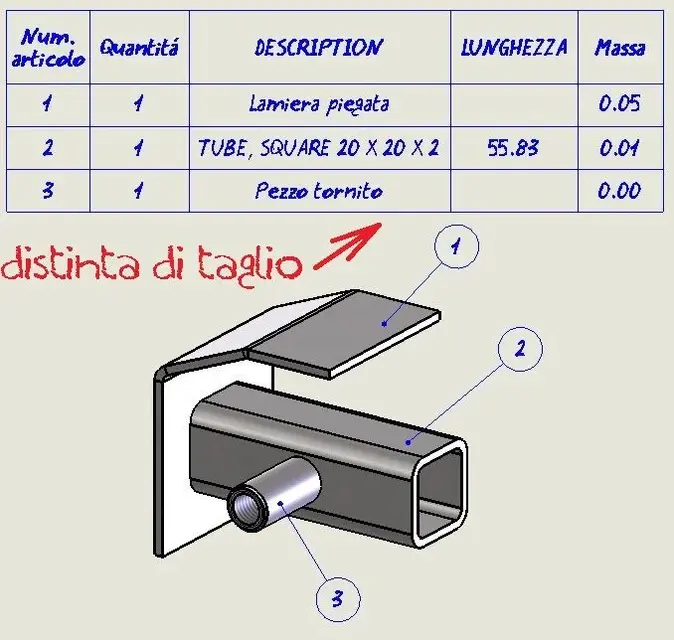
 
in the multibody part you always have to press the welding button. in the table you will need to make the welding table/cut so you will get a customizable table with profile description, length, angle1 and angle 2. in the multibody part you automatically create the folders of the solid bodies grouped for equal solids.
for the table, the first time amounts so by default, add the columns and save as a model. next time the selections between the models and you already have the right columns.
 
I messed up.
tomorrow morning I try to rewrite the problem.
Thanks for the answer.
creating under welds the table becomes more manageable, but it no longer recognizes me anything, sheet thickness, mass, material.
See you tomorrow.
 
I messed up.
tomorrow morning I try to rewrite the problem.
Thanks for the answer.
creating under welds the table becomes more manageable, but it no longer recognizes me anything, sheet thickness, mass, material.
See you tomorrow.
there are to edit the properties of the families of bodies. Then it depends a lot on how you made the model and the properties you use. be careful not to go beyond the sensible customization, otherwise you no longer know than fish to sting.
 
Then I'll explain the problem now that I'm home and I have some time:

I create a new part, in this part we put the case that I create 6 different sketches that I will then become pieces of sheet metal (and so far everything smooth when I go to create the separate cutting table).
In this part I make another sketch on which I create a structural element (example profiled unp).
always in this part I make another sketch and I extrude it (example external diameter 50 - inner diameter 40, for me this is a piece that will be done in mechanics).
ok now if I go to put in the table everything I have to make a separate table materials or cut?
I as a general table for all the works I make use of:
1 quantity (this program gives me it automatically and all right).
2 material (for example the part mentioned above I want to do with different materials)
3 description (some of those quoted above me give them automatically for example sheet but others not as for example the round I created in extrusion).
4 length / size
5 weight
6 code (if I include a piece in my part that I also use in other parts that I have available in stock for example).
7 thickness

then the point is:
I can create something default where I go to automatically insert as for the sheets mentioned above or manually as that extruded round to make sure that in all future times after completing these default fields I have the clear and precise table.
I hope I have explained clearly and I hope in a help because today I really went crazy.
I repeat as long as it comes to sheeting the thing goes away smoothly with a little shortness (which puts me properties like corner cutting surface and things like that I don't care and that if possible I would delete them as default), but how much I start with more complex things is a mess.
Thanks again.
 
then, if you work in the environment part and create a multibody you will have that the sheets and all parts will be encoded with their properties, including the material. what is standard tube you have to take it from the structural member library so you have the description "tubo ø60....". for extruded pieces you have to put the description and properties by hand.
If you want to codify all components, I suggest you work in the environment together, where by default you create parts with special codes depending on the thickness. for DIY pipes parts with structural members with their properties. for standard pieces in stock as perforated and shaped plates idem. Put everything together and each piece will have a unique code with its properties. If you want to reuse components normally load them from the archive and mount them together.

work in multibody part we say that you have the advantage of customizing all components without giving it a code.

Usually the file name is the code of the piece/product, so it is advisable to have many different parts encoded, possibly create the family configuration of the same product and indicate the code field in the excel table depending on the configuration. so you will get for example the name "plate with two holes for table feet" in the configuration state "two holes for tube 60" or "two holes for tube 80" and have fields "code: 50060" and "code: 50080".

therefore for coding could make faith a specific field "code" that for the plates has the equation of the type "code: filename" and for the families configured "code: code_configuration".

look on the help for the syntax of equations/fields properties. I'd say you have to structure everything. when you found an appreciable standard you implement it on a large scale.

all this passes as distinct components of first level or to return if you want to see it structured. you will have assemblies, subaxis and parts at different levels.

I would say that there's some evidence to do before finding the "unright" road but the "best road".

I happened last week a job of a client where in part multibody there were all the details of carpentry: tubular, welded and folded sheets, mechanical components from trade and turned parts. I would say it was a disaster to make the table and the ball. for the coding each piece has turned out to itself, so then you need to have a complete knowledge of the project to put on the table only once the component and indicate by hand the quantities, but you do not do so. Unfortunately, that was what they gave me.
 
Thank you very much.. .
I'll try today.
Good day.. .
If I need to go back.
I'm frank.
 
Sorry if I didn't show up, but when you're in the sewer and you need to move on, you're not reading rules and things like that, just think about solving the problem.
my name is francesco I have 31 years since 6 years work on autocad and from 3 months to this part I started working on solid works, I attended a course of 6 lessons at the mother house in lainate receiving also a small diploma of frequency, but I realized that the program you only learn using it, the theory you will be there but up to a certain point.
are of Milan province and work in a heavy carpentry company and at the same time precision mechanics.
but the presentation is right here or I have to write it somewhere else.. ? . .
I am now leaving with the "problem" that I have found today that, by the way, it resumes that of the other day.
if they are within a part with profiled sheet extrusions and other things, as I do to customize what kind of information / properties give when I go to make separate material cutting. ?
he by default puts me a lot of things, cutting angle, surface and away.
I use 5 properties: description - length - weight - material - size.
there is a way to make sure that when I make dx key on list part items to manage the default properties only appear to me those 5 that interest me. ?
attentive answer and thank you. . .
Sorry if I don't use proper language but I'm in the beginning, they are non-free professional dependencies and if I write at 22.12 in the evening it means that I'm planning I'm jamming myself a lot but at the same time I'm driving mad.
Thank you very much.. .
 
Sorry if I didn't show up, but when you're in the sewer and you need to move on, you're not reading rules and things like that, just think about solving the problem.
my name is francesco I have 31 years since 6 years work on autocad and for 3 months to this part I started working on solid works, I attended a course of 6 lessons at the mother house in lainate I also received a small frequency diploma, but I realized that the program is only learned using it, the theory is there but to a certain point.
are of Milan province and work in a heavy carpentry company and at the same time precision mechanics.
but the presentation is right here or I have to write it somewhere else.. ? . .
I am now leaving with the "problem" that I have found today that, by the way, it resumes that of the other day.
if they are within a part with profiled sheet extrusions and other things, as I do to customize what kind of information / properties give when I go to make separate material cutting. ?
he by default puts me a lot of things, cutting angle, surface and away.
I use 5 properties: description - length - weight - material - size.
there is a way to make sure that when I make dx key on list part items to manage the default properties only appear to me those 5 that interest me. ?
attentive answer and thank you. . .
Sorry if I don't use proper language but I'm in the beginning, they are non-free professional dependencies and if I write at 22.12 in the evening it means that I'm planning I'm jamming myself a lot but at the same time I'm driving mad.
Thank you very much.. .
then you knew anlessandro and the mythical mauritius...:smile:


Welcome!
Anyway, calm down, I spent the nights... If I didn't see one or two... I didn't give up...

I don't want to say a minkiata, but there seems to be a propnames.txt file where you can edit at will, but we wait for lumi from technicians more equipped with me.
I have manually added them to the property box in a side file
saved as a template.
 
It's a fucking brain. .
but not...
The course only made me an alessandro. .
I hope someone will help me because really if you use 5 properties find a spatula that you don't need with all the various sheet profiles etc that I have inside a crazy part. .
 
but the presentation is right here or I have to write it somewhere else.. ?
there is the special section for making presentations and it is called "presentations" (so I think I remember).
he by default puts me a lot of things, cutting angle, surface and away.
I use 5 properties: description - length - weight - material - size.
there is a way to make sure that when I make dx key on list part items to manage the default properties only appear to me those 5 that interest me. ?
As I told you in the previous post, the first time you do the table you format it with the properties you need.
by example you want to add a column with properties, click on the table select a column, click with the right and choose add column to the left or right. then select all the new column and on the left will appear the properties to choose from. Personalized... material.

Obviously in the multibody part must already have been inserted, otherwise no new property is agigunge.

when you're finished unmaning on the table click with the right and save it as a model (templates), so reuse it the first time and you don't have to customize the table by adding columns and the like.

I attach the properties in the 3d multibody where I added the variables.
 

Attachments

  • modello 2d.webp
    modello 2d.webp
    44.5 KB · Views: 75
  • proprietà lamiere.webp
    proprietà lamiere.webp
    129.4 KB · Views: 71
  • proprietà strutturali.webp
    proprietà strutturali.webp
    105.4 KB · Views: 64
  • proprietà tornito o fresato.webp
    proprietà tornito o fresato.webp
    82.6 KB · Views: 56
Damn me you're a great you with I'm planning to see...
but I did and saved the tables, but I'd like to change the properties of the multibody, without having all the spatches he gives me. .
I'd just like to put the five that interest me. .
by default you can do it. ?
 
....contour area, surface and things like that don't affect me, I can delete them by default to those properties. ?
 
here the tables I normally use.
Try them and let me know.
basically create one as you want and save it as a template.

edit: I see that mechanicmg preceded me... sorry.. I never do f5...
 

Attachments

Damn me you're a great you with I'm planning to see...
but I did and saved the tables, but I'd like to change the properties of the multibody, without having all the spatches he gives me. .
I'd just like to put the five that interest me. .
by default you can do it. ?
I've been working on it for several years, and I don't even move it until I fall out of sleep. I happen for work and not only the ordinary one to deal with strange models, particular needs of customers etc., so I have to invent them all not to waste time and get the results.

you practically would like to leverage all the variables that puts him by default. I've never really had a problem with eliminating them. I add mine and I am appropriate. surely there will be the definition of the properties automatically to the creation for example of a sheet in a part, but I do not think they are editable at the user level. likely they are within one of the ignited solidworks databases or in some un editable and understandable files.

I believe that as you have to add the properties in manual, you will have to delete them in manual. just have a model with the cells already compiled and copy and paste into each property of the new file.

I know that said so is a manual system. This certainly works. In the meantime, I look at whether there is an automatic definition of what I explained to you.
 
I've been working on it for several years, and I don't even move it until I fall out of sleep. I happen for work and not only the ordinary one to deal with strange models, particular needs of customers etc., so I have to invent them all not to waste time and get the results.

you practically would like to leverage all the variables that puts him by default. I've never really had a problem with eliminating them. I add mine and I am appropriate. surely there will be the definition of the properties automatically to the creation for example of a sheet in a part, but I do not think they are editable at the user level. likely they are within one of the ignited solidworks databases or in some un editable and understandable files.

I believe that as you have to add the properties in manual, you will have to delete them in manual. just have a model with the cells already compiled and copy and paste into each property of the new file.

I know that said so is a manual system. This certainly works. In the meantime, I look at whether there is an automatic definition of what I explained to you.
and how do I make this model and copy it every time I do a part..? ...even if it is manual and simple for me it would be ideal. . .
:))
 
and how do I make this model and copy it every time I do a part..? ...even if it is manual and simple for me it would be ideal. . .
:))
as I did, take a new part, draw us 1 sheet, 1 turned, 1 fresed, 1 tubular by trade and add the properties you need. Save it.

when you need to draw the multibody part of the xyz store designs normally and when you need to fill out the properties also open your model and make copy and paste of the additional properties cells. anyway the new 3d multibody design should be edited all to body handle.
 
as I did, take a new part, draw us 1 sheet, 1 turned, 1 fresed, 1 tubular by trade and add the properties you need. Save it.

when you need to draw the multibody part of the xyz store designs normally and when you need to fill out the properties also open your model and make copy and paste of the additional properties cells. anyway the new 3d multibody design should be edited all to body handle for body.
That's funny. This makes me think when my employer speaks
with customers visiting our company: (to be pronounced in Ticino of malcanton
which is different from the dialect of the mendrisiotto)chì lèdua fan i disègn con tul cat tri d e i tira foera tuc i particulari prunt par ul tai leiser.. bla bla bla..
one day I will explain the true meaning of 3d: 3 days.. at a time...
 
That's funny. This makes me think when my employer speaks
with customers visiting our company: (to be pronounced in Ticino of malcanton
which is different from the dialect of the mendrisiotto)chì lèdua fan i disègn con tul cat tri d e i tira foera tuc i particulari prunt par ul tai leiser.. bla bla bla..
one day I will explain the true meaning of 3d: 3 days.. at a time...
hahahahah, forse è il caso in spiegarglielo :biggrin:
 

Forum statistics

Threads
44,997
Messages
339,767
Members
4
Latest member
ibt

Members online

No members online now.
Back
Top